文件编号:NR-TP-0715-008 版本:1.0
- 66 -
Chapter13 Review
The monitor provides up to 120 hours trend data review of all monitoring parameters, 1000
groups of NIBP measurement data and 200 alarm events. The user can select trend chart or
trend table to view trend change; or view the latest wave.
13.1 Reviewing Trend Chart
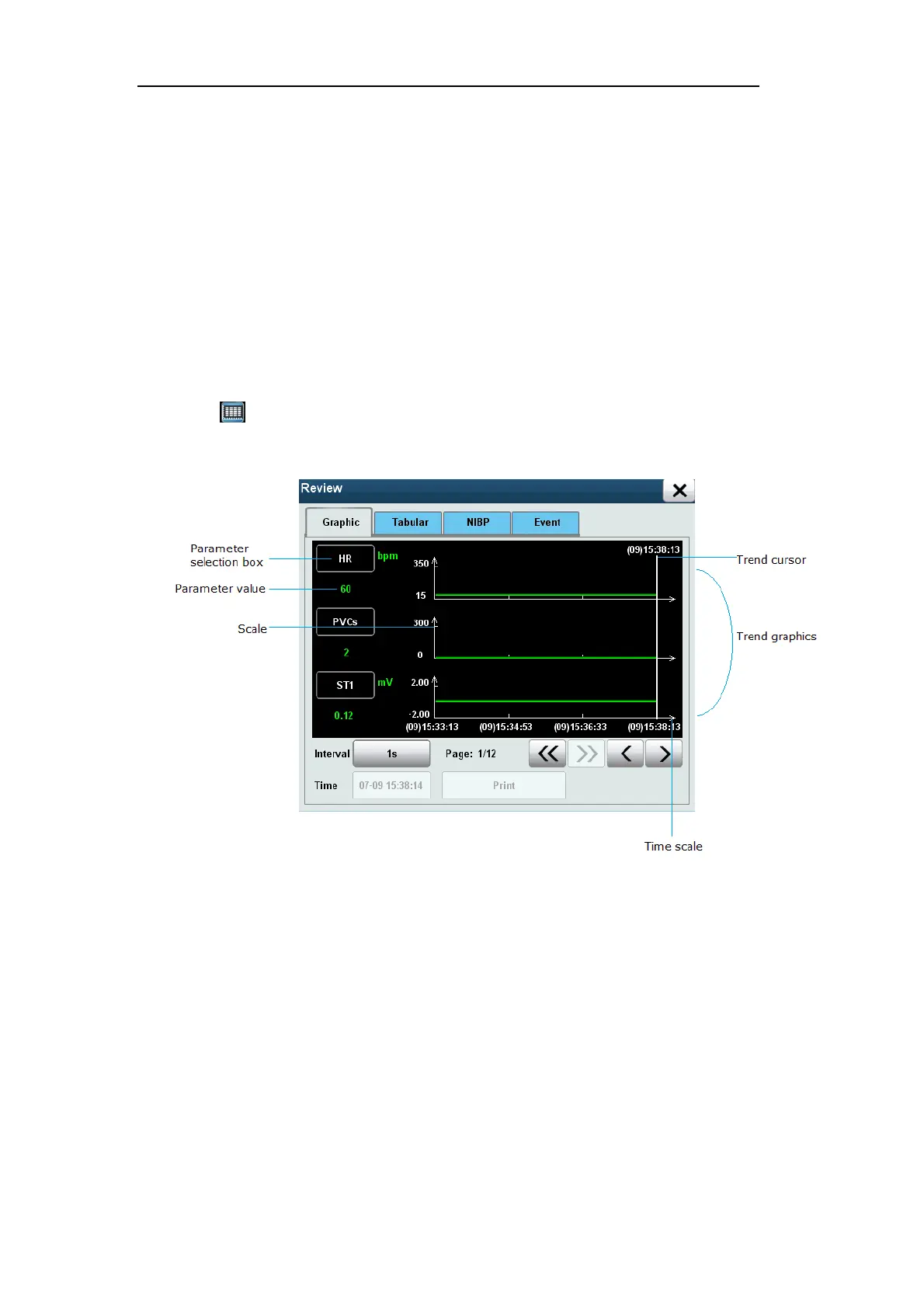
Select [Review] smart hotkey to enter [Review] menu, and select [Graphic] to enter the
following window.
Fig. 13-1 Trend Chart
In the trend chart, use the following method to select the parameter to be reviewed:
Select the parameter box, rotate the shuttle to select the parameters to be reviewed,
click on the shuttle, and set the parameter box as the parameter to be reviewed.
Select [Interval], and select the option as needed:
[1s]: observe the trend of the last hour at 1sec interval.
[5s]: observe the trend of the last eight hours at 5sec interval.
[1min]: observe the trend of the last 120 hour at 1min interval.
[5min]: observe the trend of the last 120 hour at 5min interval.
[10min]: observe the trend of the last 120 hour at 10min interval.


 To Next Page