17Northstar Explorer 650 Installation and Operation Manual
2-7-2 Favorite displays
The Explorer has a list of commonly used displays,
called favorite displays. There can be up to six
favorite displays and three can be set by the user
(see section 17-13).
To change the display to the next favorite, press
. For example, with four favorites:
Chart, fi rst favorite
Press
Sonar, second favorite
Press
Chart + sonar, third favorite
Press
Fourth favorite display
Press
2-7-1 Dual displays
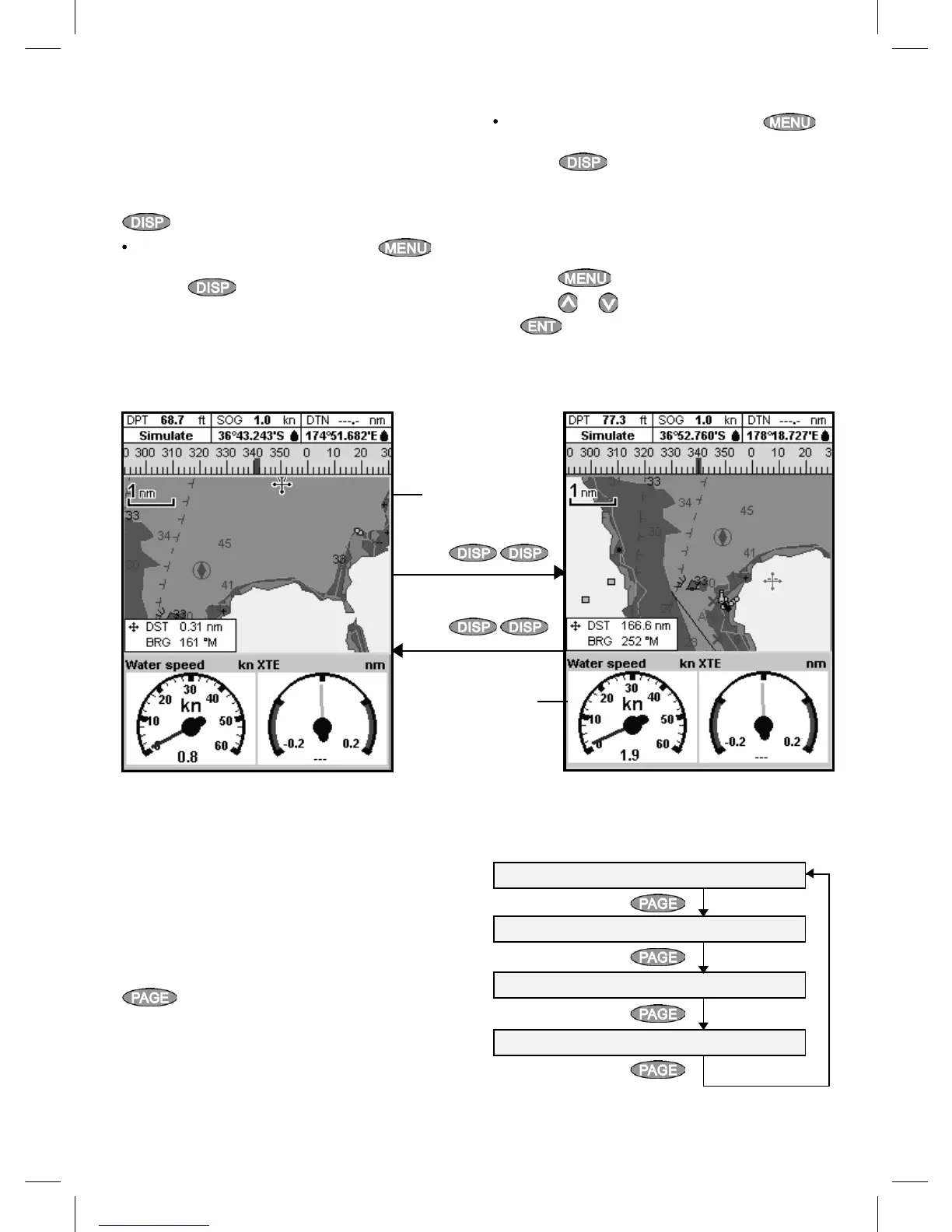
The Explorer can show two displays at once, for
example Chart + Gauges. One of the displays,
called the active display, has a yellow border and
is controlled by the user (Highway can not be the
active display). To change the active display, press
twice. For example:
If Chart is the active display: press to
display the options for Chart;
press
twice to make Gauges the active
display.
If Gauges is the active display: press
to display the options for Gauges;
press twice to make Chart the
active display.
Note: Split ratio of chart or sonar and gauges
can not be changed.
To adjust the relative sizes of the two displays:
1 Press
and select Split ratio.
2 Press
or to adjust the sizes, then press
.
Chart display is
active
Gauges display
is not active
Yellow border
Press
Press
Yellow border
Chart display is
not active
Gauges display is
active



 To Next Page