47Northstar Explorer 650 Installation and Operation Manual
12-2 Fuel display
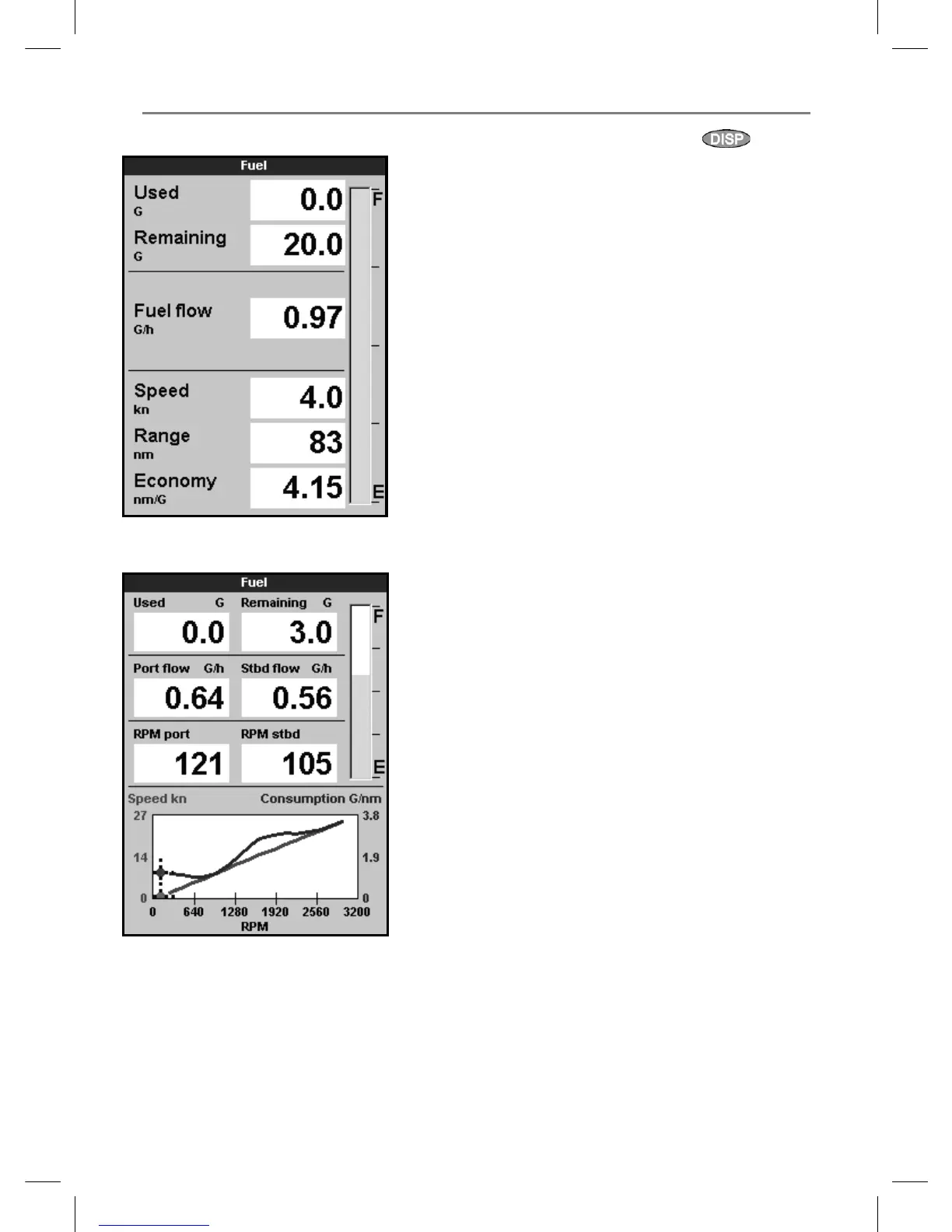
Fuel display without engine RPM
Fuel display with engine RPM
To go to the Fuel display, press
, select
Other, then select Fuel. The display is different
if engine RPM is available (requires SmartCraft to
be installed):
The Fuel display shows
Used
The total fuel used since this was last reset with
the Clear Used command.
Remaining
The amount of fuel remaining in the tank.
Flow
The fuel consumption per hour. For twin engine
installations, the fuel flow for each engine is
shown separately. This is useful for checking that
both engines are under the same load.
Speed
If the Explorer has both GPS and paddlewheel
speed available then you can select which to
use. The choice affects the calculated Range and
Economy (see section 17-5 Speed source).
If the Explorer uses a paddlewheel sensor
to measure speed, then the speed must be
accurately calibrated (to calibrate the Explorer
paddlewheel, see section 17-11).
Consumption
The fuel used per unit of distance travelled. The
smaller this number, the better the fuel economy.
Adjust the throttle and trim to achieve the lowest
consumption.
Economy
Economy is the distance travelled per unit of fuel
used. The Explorer calculates this from the boat
speed and fuel used. The bigger this number, the
better the fuel economy
Range
The estimated boat range at the current
fuel flow.



 To Next Page