20
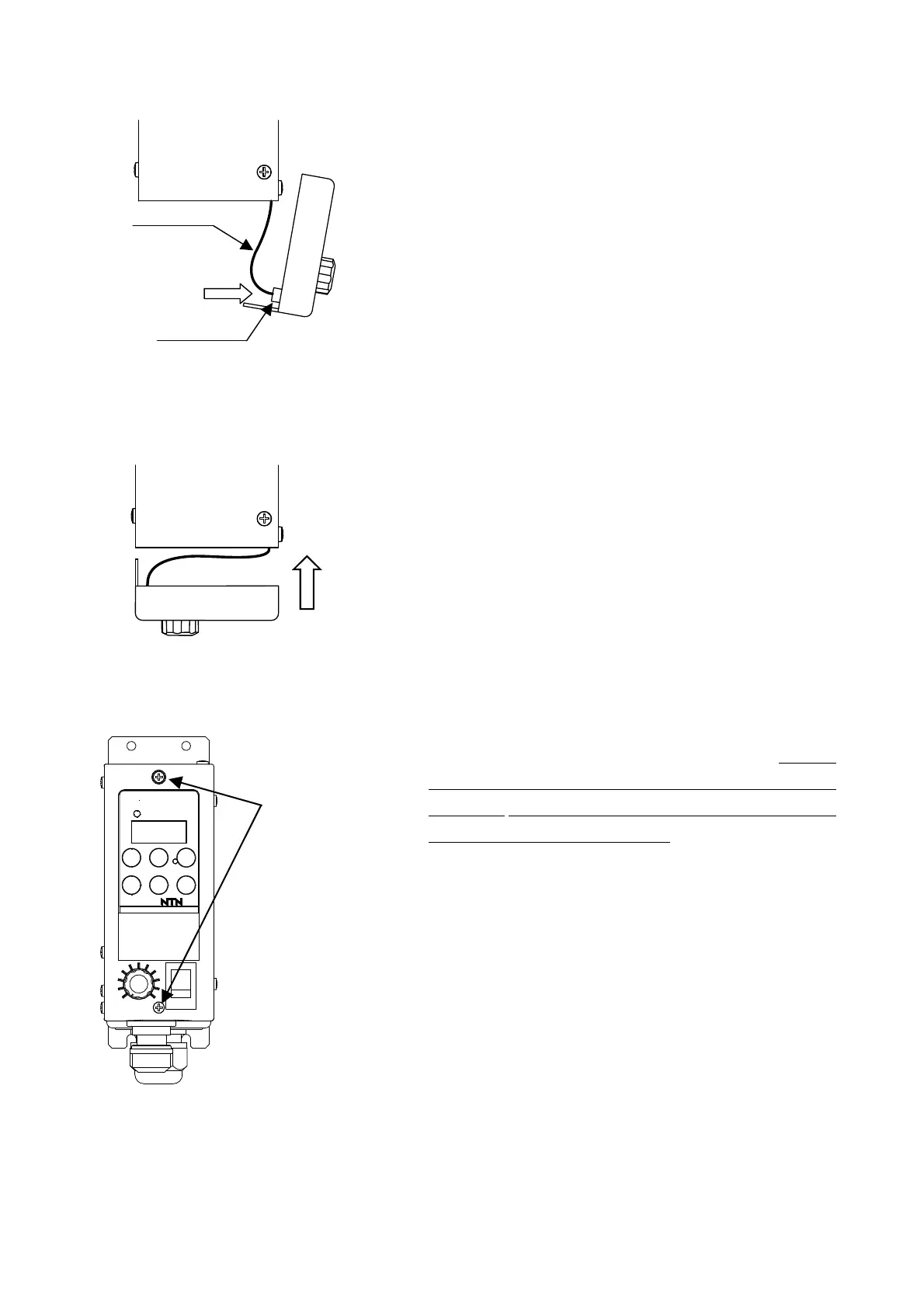
(9) Close the panel
Please check whether there is a mistake in the connection of
wiring.
Content to be checked
A) Isn’t there any mistake in the connection destination?
B) Isn’t there any mistake in the polarity?
C) Isn't there possibility of short-circuit and earth fault?
D) Is the earth surely connected? Was the protection
continuity test executed?
E) Isn’t there looseness in connector of operation panel?
Please take care not to pull out the cable of the box
connection side at the time of checking.
① Plug the connector to operation panel.
② Push in panel straight, taking care not to clip cable. When
installing, a little gap is made between panel and box, but if
they are tighten with screw, they are attached firmly.
③ Please tighten the attached screw to fix the panel. Because
the panel is made of the resin, it may crack if tightened
excessively. Please refrain from using an electric driver or
use it with torque of 0.7Nm or less. Handle carefully so that
there happens neither an impact, a fall nor a clash, etc.
Then the wiring work is completed.
③Please tighten
the screws
and fix the
panel.
But be careful
about over-
tightening.
K-ECF25
JAPAN
Be sure to check if
there is looseness.
Connector
①Plug connector
Cable
②Push in panel



 To Next Page