29
H.264 4/8/16-channel Networkable DVRs
SECTION 3: DVR SETUP
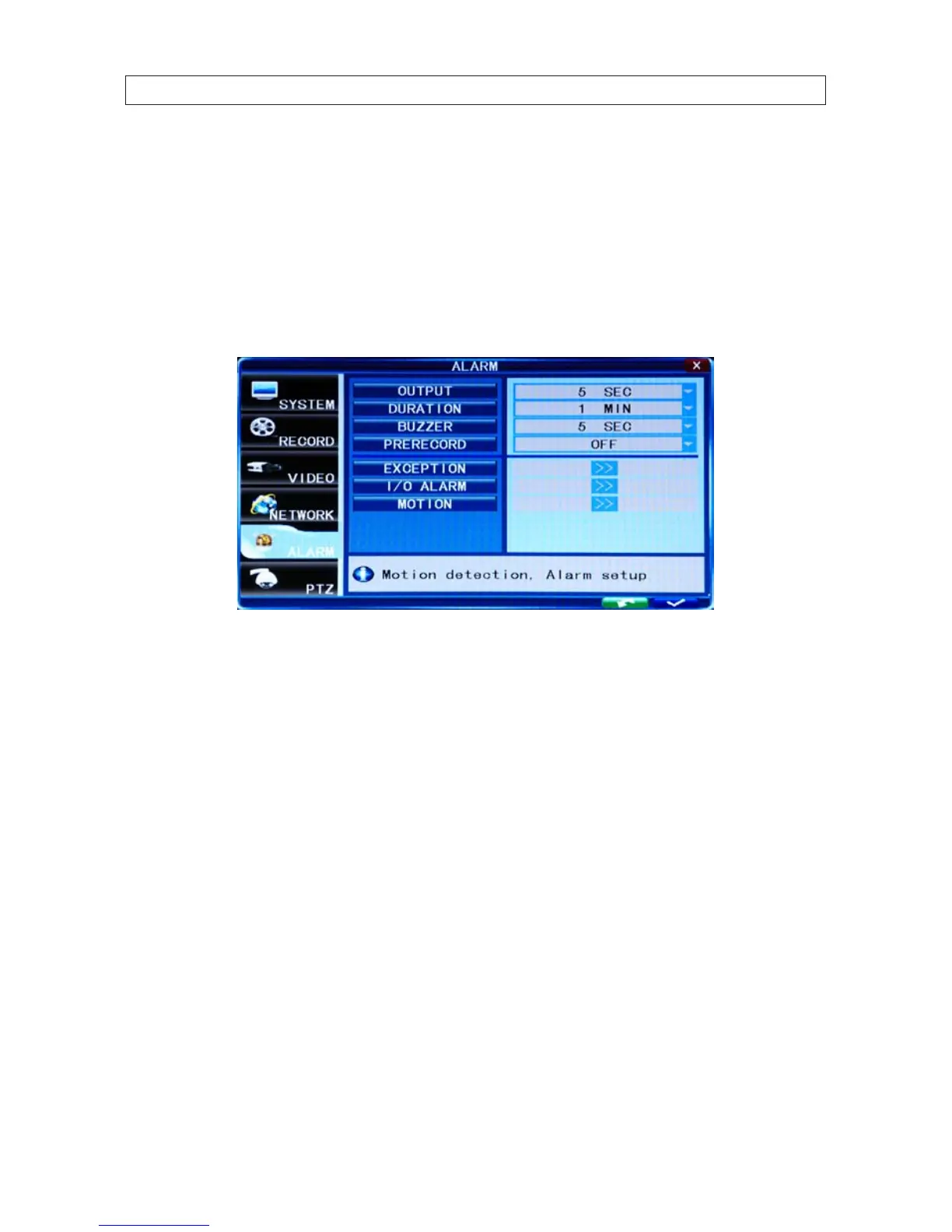
3.6 Alarm conguration settings
Use the ALARM menu to congure your DVR for behavior when the hard disk drive becomes full, and for motion detection
sensitivity of each channel.
1. Click the Settings icon on the Tool Bar to open the SYSTEM tab window.
2. Click the ALARM tab to open the ALARM settings menu.
3. Click the q icon at the right end of the DURATION line. From the dropdown list, select either 30 SEC .. 5 MIN. This option sets
the recording time length after an alarm recording is activated.
4. Click the q icon at the right end of the BUZZER line. From the dropdown list, select either OFF, or 5 SEC .. 60 SEC. This option
sets the buzzer sounding time when the alarm is triggered.
5. Click the q icon at the right end of the PRERECORD line. From the dropdown list, select either OFF or 5 SEC. This option
disables or enables recording 5 seconds of video before the alarm occurred.
6. Click the >> icon on the EXCEPTION line to open the EXCEPTION ALARM menu.



 To Next Page