8
SECTION 2: INSTALLING YOUR SYSTEM
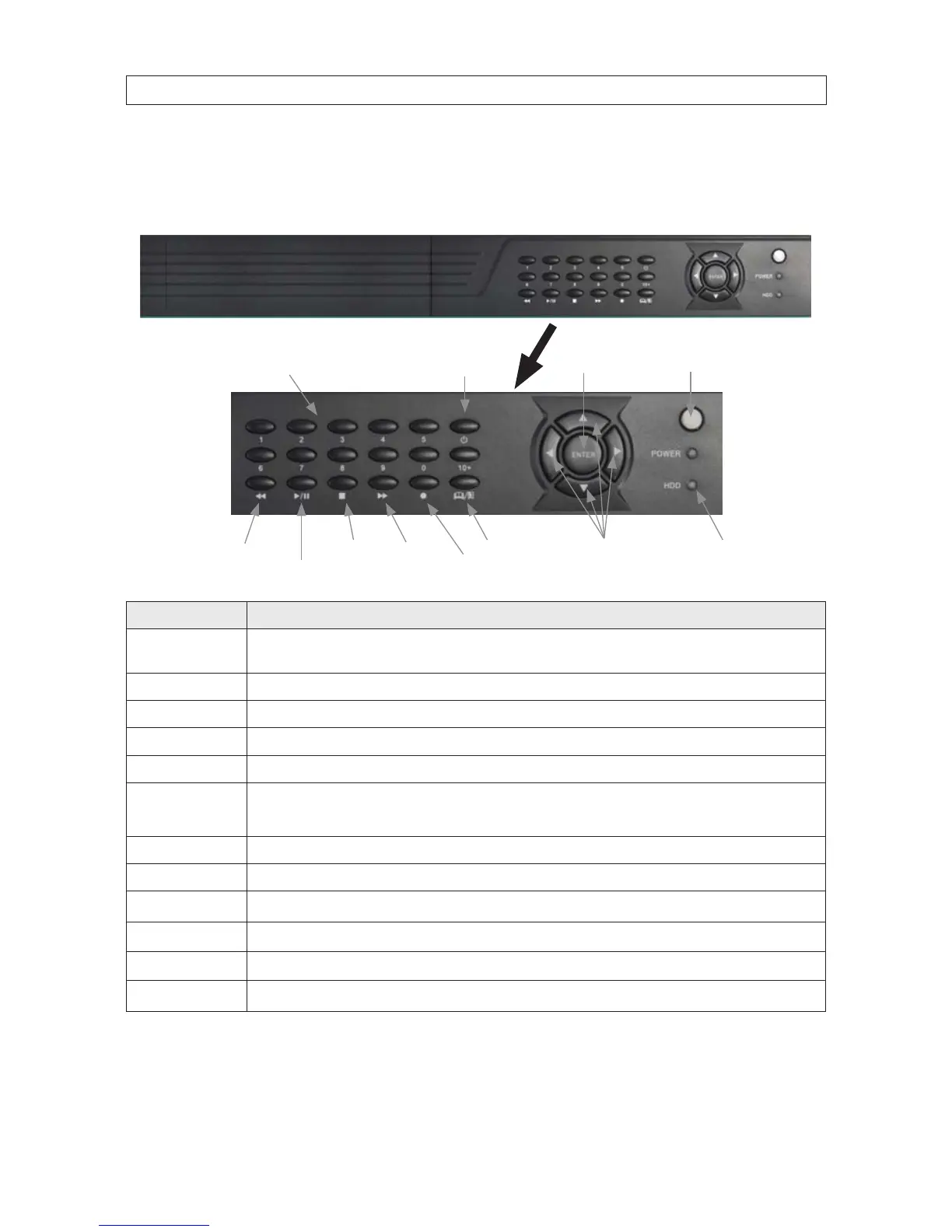
2.2.3 Controls and connectors (DVR9008N, DVR9016N)
DVR9008N, DVR9016N Front Panel
tqpu Menu
Navigation Buttons
Enter
MenuStop
Play/Pause
Power O
Fast
Forward
Record
Rewind
0 .. 9, 10+ Buttons
(Channel Select)
Infrared
Sensor
Status
LEDs
Button Usage
1 .. 9, 0, 10+ Press to select channel for display. To select channels 10 - 16, press 10+, then the right digit of the number. For example, to display
channel 12, press 10+, then 2.
Power O To power o the DVR.
Enter Press to conrm a menu choice.
Infrared Sensor Sensor for the remote control. (Remote control is not provided.)
Status LEDs Status LEDs for power and HDD activity.
t q p u
Use these buttons to navigate through the menu system. Generally, use the t u buttons to move to selection boxes,
and use the
q p to select submenu parameters.
MENU Opens the main menu window
REC Use to start and stop manual recording.
uu
Fast forward. Press repeatedly to increase fast forward speed.
n
Stop recording / playback.
u/II
When a recorded le is selected, press this button to play. then press it again to pause playback.
tt
Rewind. Press repeatedly to increase rewind speed.



 To Next Page