33
H.264 4/8/16-channel Networkable DVRs
SECTION 4: NETWORKING YOUR DVR
SECTION 4
Networking Your DVR
Your DVR supports highly exible networking congurations including an Ethernet connection, such as to a home network with a
broadband router and modem, and a PPPOE connection. In this section, only general guidelines for the setup of a DVR on a simple
Ethernet broadband home network are included. If you encounter problems you cannot resolve, contact your distributor.
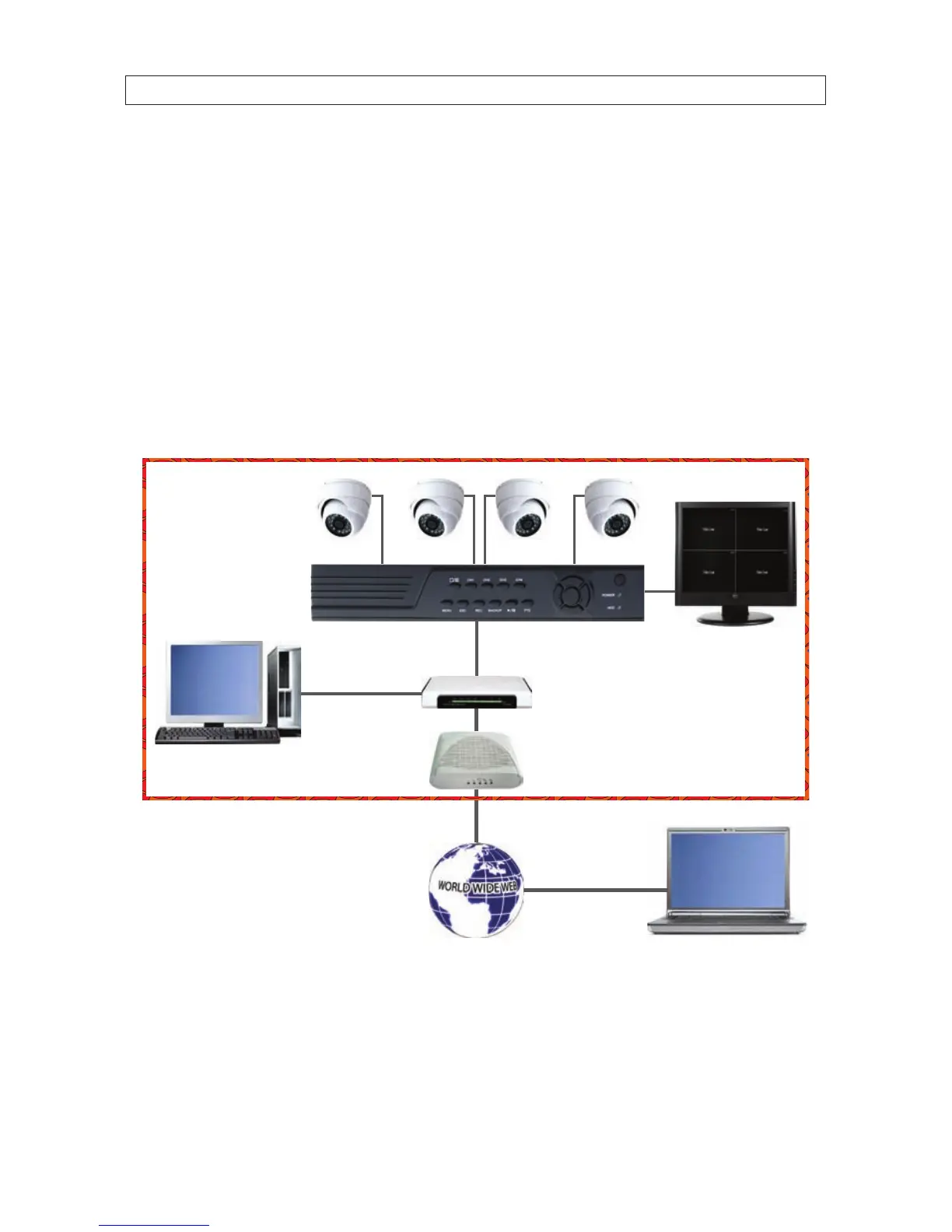
Home networks
A typical home network includes router, one or more computers, and a broadband modem for access to an internet service provider
(ISP) and the internet. The DVR attaches to the network like a computer, except that it has preset IP address settings that must be
congured for your network.
DVR
Router
Broadband
Modem
Home Network
Computer
Web Connected
Computer
DVR Monitor
Home Network
Setting up the DVR on the home network requires conguring it with IP address settings that are compatible with your network,
and connecting an Ethernet cable between the DVR and the router. Once setup, your security system can be monitored and
controlled from any computer on the network with the Microsoft
®
Internet Explorer
®
(IE) browser.
After the DVR is setup on your home network, usually the router can be congured so that the DVR is accessible from a computer
on the Internet or from a smartphone. Although most routers perform similar functions, the specic procedures to congure them



 To Next Page