10
SECTION 2: INSTALLING YOUR SYSTEM
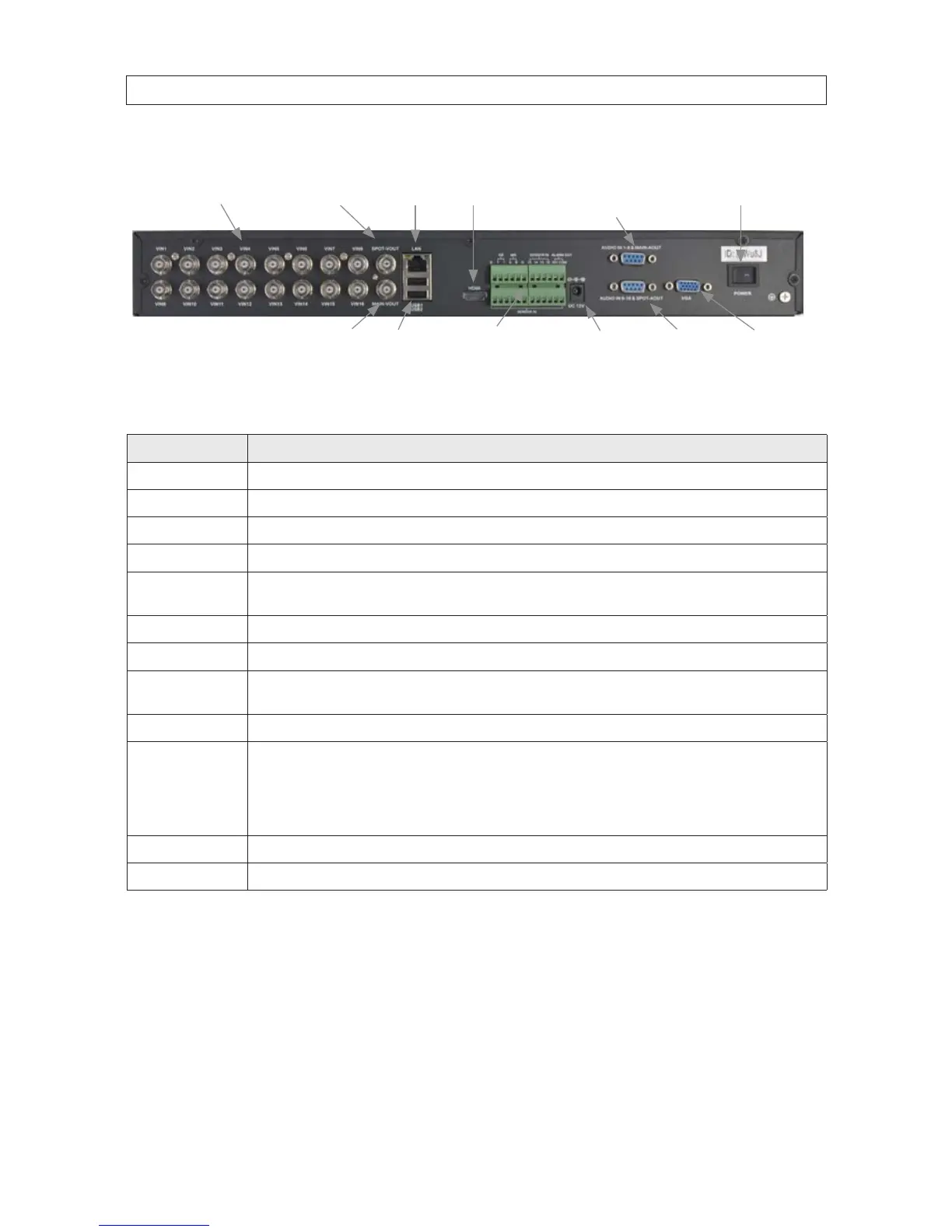
DVR9016N Back Panel (16 channel)
VIN1 - VIN16
Audio In 9 - 16
Spot Audio Out
Audio In 1 - 8
Main Audio Out
LAN HDMI
Main Out
(BNC)
Spot Out (BNC)
Main Out
(VGA)
Power
Alarm In/Out, Sensor
RS-485 Terminals
USB Power
DC 12V
Connector Usage
VIN1 .. VIN16 Video channel input connectors.
SPOT-VOUT Spot video out connector.
LAN RJ-45 connector for Ethernet LAN.
HDMI Main output through HDMI interface. This output is for viewing only.
AUDIO IN 1-8 &
MAIN-AOUT
Connector for input adapter for channels 1 .. 8 audio (associated with video channel inputs 1 .. 8). and main audio out to speakers.
POWER Power switch to turn the unit on and o.
MAIN OUT VGA Standard VGA output to a display device, such as a computer monitor.
AUDIO IN 9-16 &
SPOT-AOUT
Connector for input adapter for channels 9 .. 16 audio (for video channel inputs 9 .. 16). and Spot camera out for spot video to a
monitor.
DC 12V Connect to 12 Vdc power adapter.
Alarm In/Out,
SENSOR,
RS485 Terminals
Alarms In 1 .. 16 terminations: For connecting to external sensor device, each alarm has one input pin. Connect positive (+)
output pins of the alarm device to the inputs (Alarm In) on the DVR. Connect ground (-) output pins of the alarm device to the DVR
Ground slots (G). Multiple devices can be connected to one ground slot.
Alarms out terminations: NO, COM pins for alarm out normally open (N.O.)
RS-485 terminations: A, B pins for connecting to RS-485 network (PTZ camera control)
MAIN OUT BNC Standard BNC output to a display device, such as a computer monitor.
USB1, USB2 Use these USB ports to connect a mouse, or a backup device such as a ash drive or DVD recorder.
2.3 If installing an internal HDD
If you are installing an HDD in your DVR, or upgrading an internal HDD, perform the installation before connecting your system.
Refer to “APPENDIX C
HDD Installation” on page 87 for recommended HDD models and specic procedures.



 To Next Page