34
SECTION 4: NETWORKING YOUR DVR
vary widely. However, the documentation provided with your router, with the general guidelines included here, should enable you
to setup your DVR for web access.
4.1 Congure the DVR for access on your home network
To setup your DVR on the network without conicting with other devices, congure the network settings of your DVR before
physically connecting it to the network. Network conicts occur when two devices on the network have the same IP address. The
screens shown here were taken from a Windows XP system:
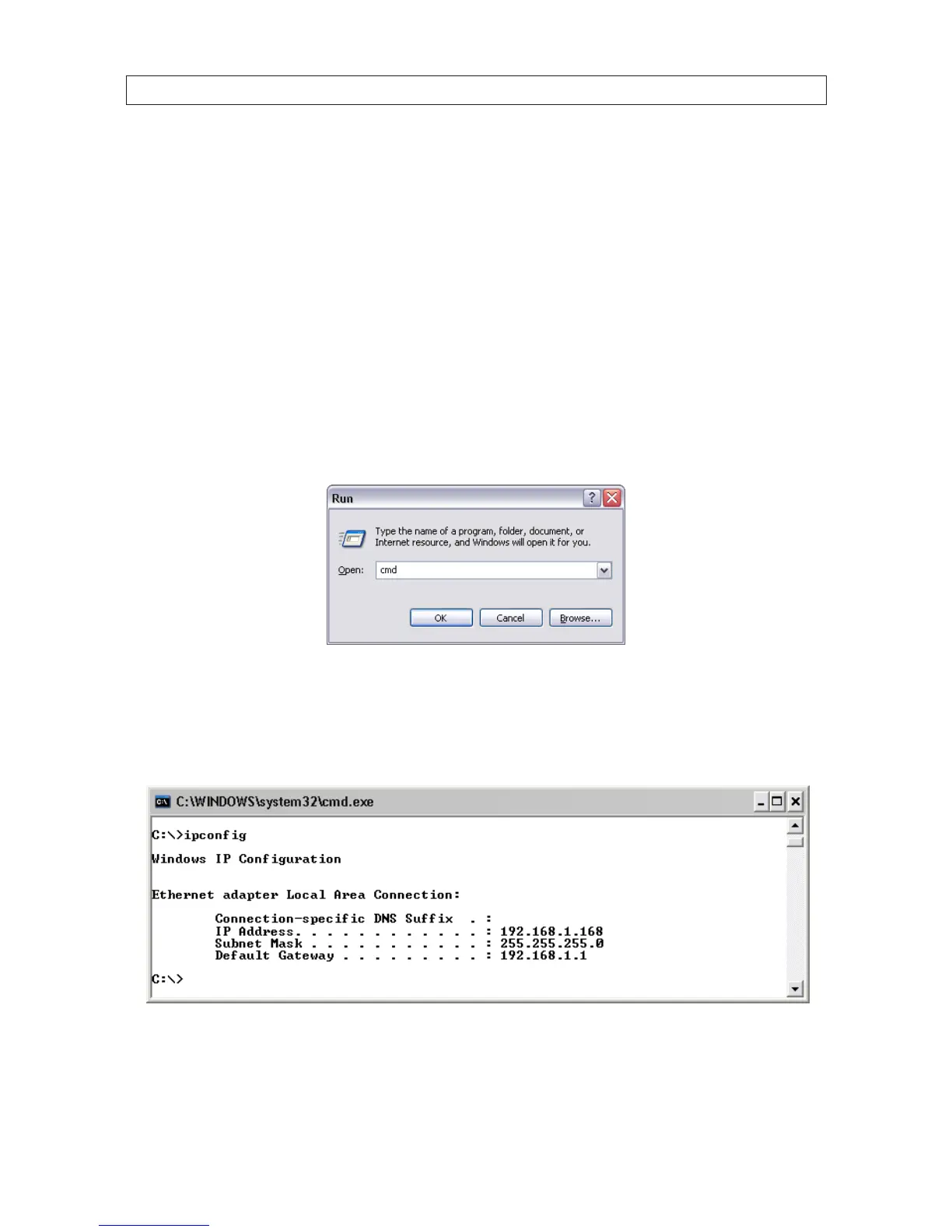
1. Determine the IP address, subnet mask, and default gateway of your home computer (PC) and record it in Table 1. To get this
information, do the following at the Windows desktop:
a. Open the Windows Start menu and click Run to open the Run dialog box.
b. Type cmd in the entry eld and then click OK to open the DOS command window.
c. At the command prompt, enter ipcong. The PC will display Ethernet data associated with your Ethernet adapter local
area network (LAN) connection.
Example: Typical use of ipcong in Windows XP
d. Enter the IP Address, Subnet Mask, and Default Gateway for your PC’s Ethernet adapter into Table 1.



 To Next Page