58
SECTION 7: DVR SYSTEM MENUS
7.2 System menu
The System menu (see above) contains parameters for setting the basic conguration of your system. it includes the following
options:
7.2.1 Language
Use this option to change the language of the DVR menu text and the On-Screen Display.
7.2.2 Video System
Set the system output to the camera input (PAL or NTSC). Note: The device will restart when you modify the camera mode.
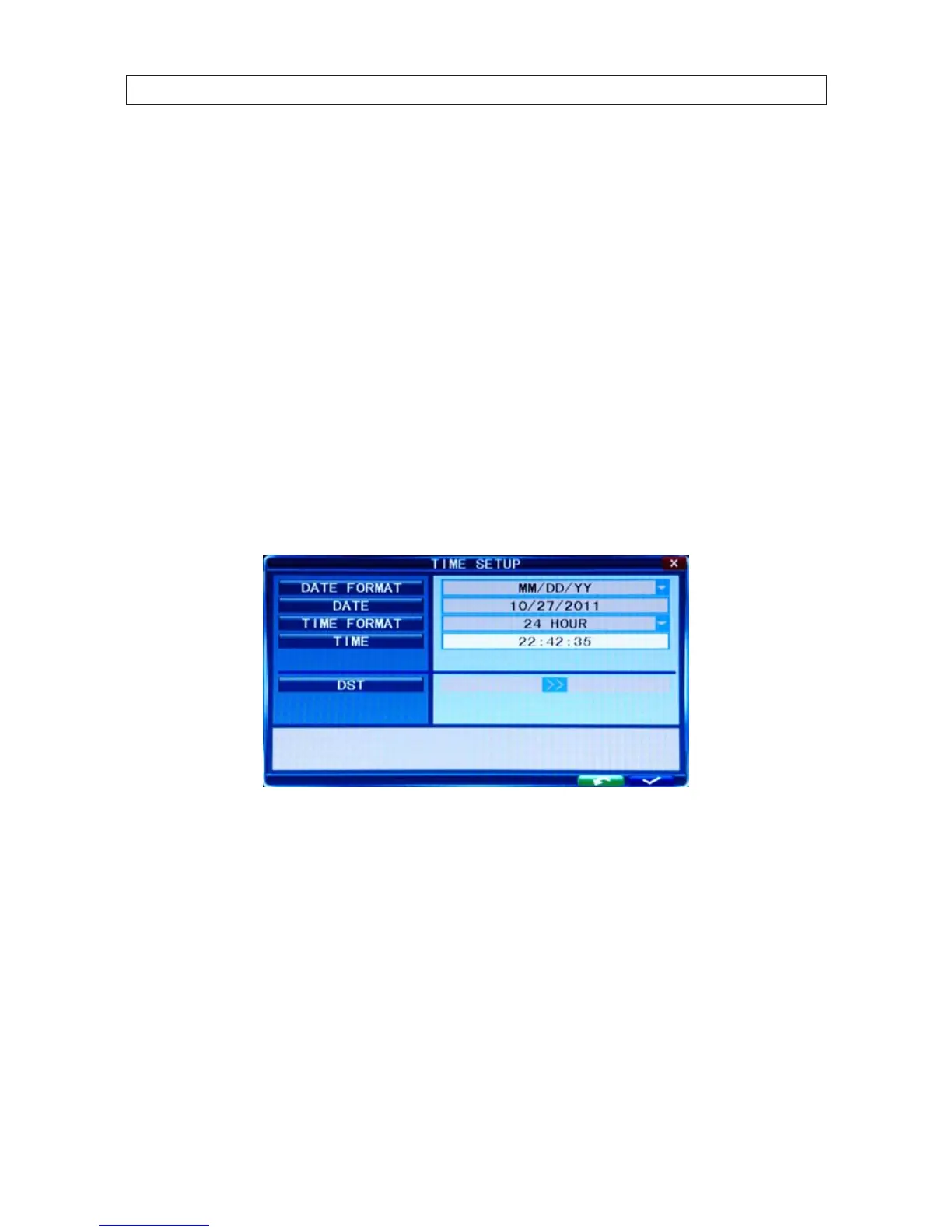
7.2.3 Time Setup
Click Time [System settings -> System -> Time] to open the Time setup menu.
DATE: Set up system date using the number keypad.
DATE FORMAT: Click the down arrow to switch the date format. Options: YY-MM-DD, MM/DD/YY.
TIME FORMAT: Click the down arrow to switch the time format. Options: 12 HOURS to 24 HOURS.
TIME: Set up the system time using the number keypad on the remote control.
DST: Daylight saving time. ON means DST clock change is enabled. You can setup the start time and end time of DST. For
example, in the right gure above, the start time is at 02:00:00 Sunday of the rst week on January. Similarly, setup the end
time.



 To Next Page