56
SECTION 7: DVR SYSTEM MENUS
7.1.1 Tool Bar
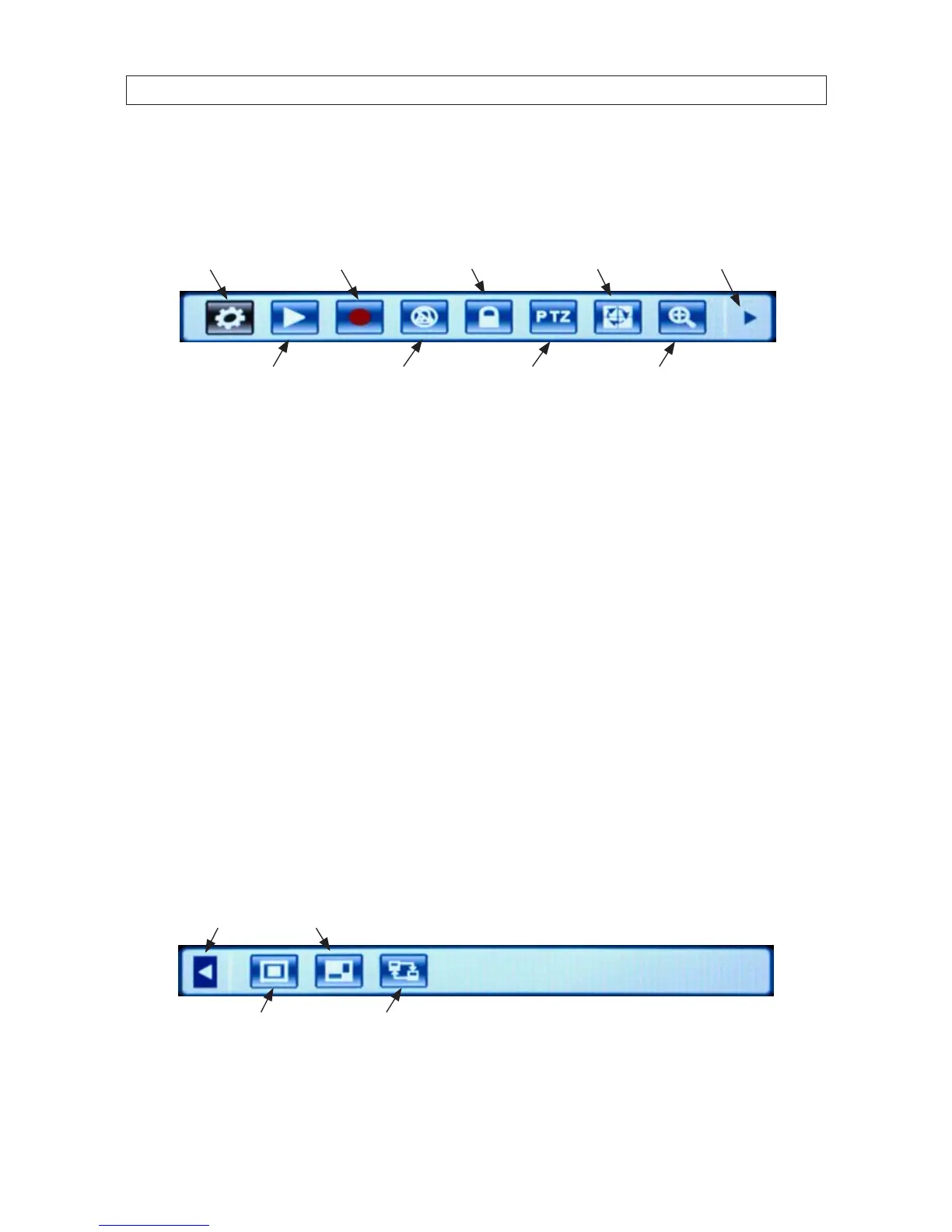
The Tool Bar provides icons for accessing menu features.
System Settings
EZoomPTZPlay
Manual Record /
Stop Manual Record
Auto
Sequence AdvanceKeylock
Mute On/O
Tool Bar
Tool bar icon functions:
System Settings: Opens the system conguration menu system.
Play: Search, playback and backup recorded les.
Manual Record / Stop Manual Record: Click to start or stop manual recording.
Mute On/OFF: Controls audio mute.
Keylock: If the password is enabled, click “KEYLOCK” to logout of the system.
Auto Sequence: Click to enable auto-sequencing, the channels with images will be in sequence: channel 1, channel 2,
channel 3, channel 4, channel 1. Channels without images won’t appear in the sequence. To interrupt auto sequencing, press
any button or click the mouse while in auto sequence mode.
EZoom: Click to enter zoom mode, then click left key and drag to select the area that you want to magnify. Right click to exit.
Advance: Click to open the Advance tool bar.
PIP 1x2
Hide Advance
PIP 1x1 VGA / BNC / HDMI* Switch
*HDMI Option Available On DVR9016N Only
Hide Advance: Close the Advance tool bar.



 To Next Page