77
H.264 4/8/16-channel Networkable DVRs
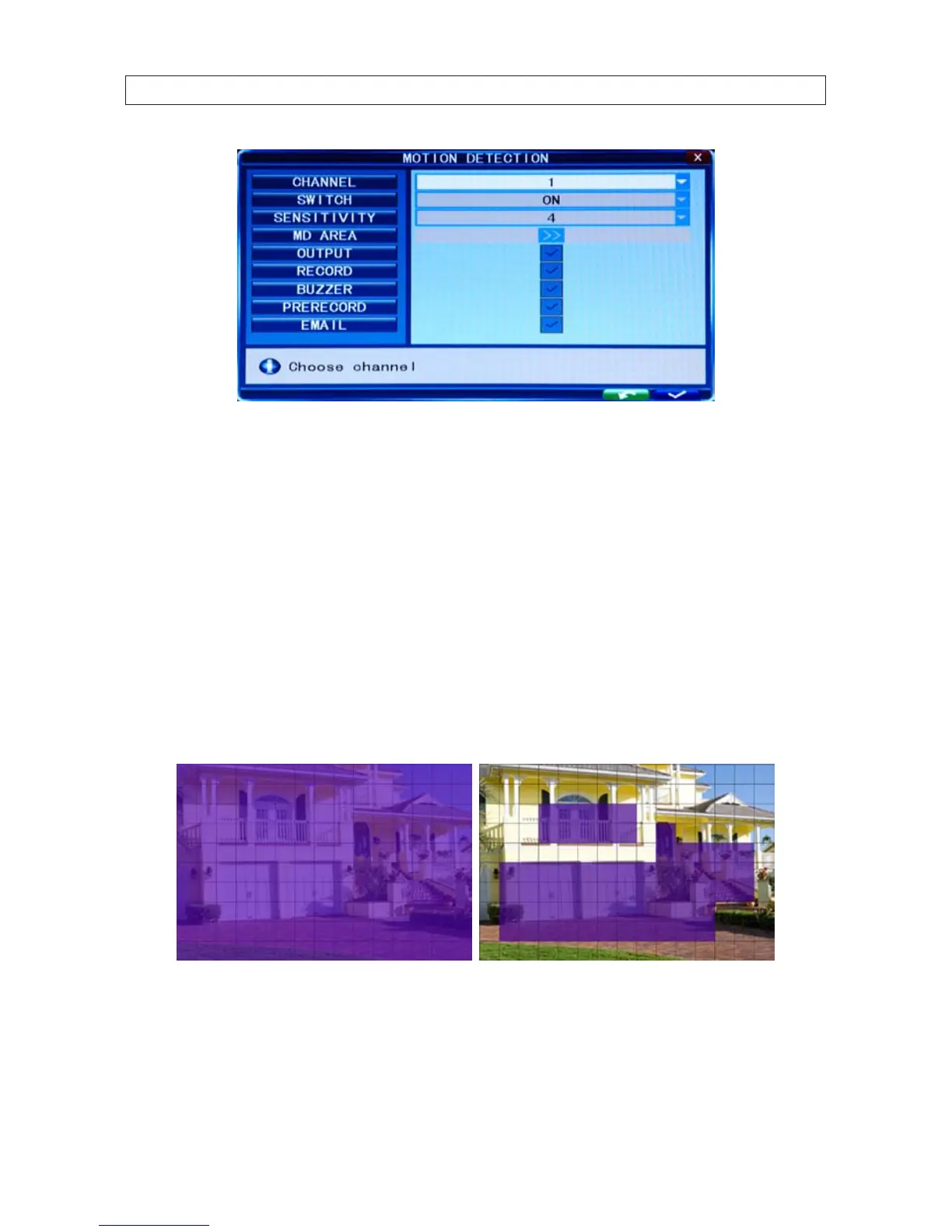
CHANNEL: Select the channel you need to setup. Open the drop-down menu to select the channel number
SWITCH: Set the switch to ON to enable motion detection for the channel selected.
SENSITIVITY: Set the sensitivity for the channel selected. A sensitivity of “1” indicates highest sensitivity. Open the drop-down list
to select a level appropriate for the channel.
MD AREA: To improve DVR performance, use the MD Area feature to select only the areas of a channel video image to sense for
motion. For example, the image of a road near a walkway can be congured to sense for motion only in the walkway only.
To establish motion detection areas in the video image, click the >> icon on the MD AREA line. An image of the channel video will
appear, covered by a semi-transparent layer on a 10 x 15 block grid. Motion sensing for blocks in the grid can be toggled on and o
by clicking on the block area. Areas on the screen selected for motion sensing are indicated by removal of the semi-transparent layer
inside the block area.
Video channel without (left) and with (right) areas of motion sensing
To return to the MOTION DETECTION menu from the MD AREA setup screen, right-click anywhere.
RECORD: If set to ON and the channel is triggered by motion, the channel will record.
SECTION 7: DVR SYSTEM MENUS



 To Next Page