d-Color MF222 plus/MF282 plus/MF362 plus/MF452 plus/MF552 plus 2-9
2.2 About this machine
2
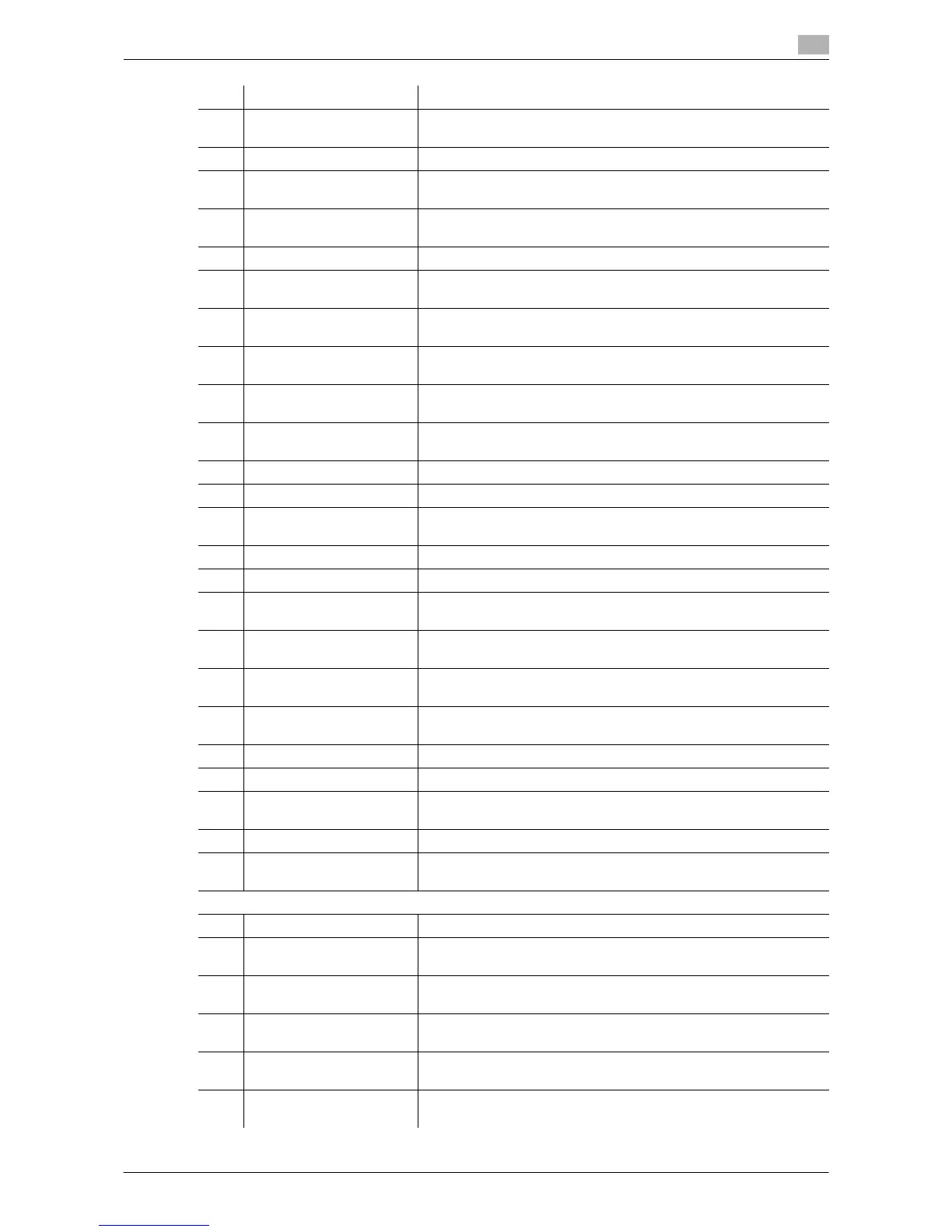
No. Name Description
1 Main unit Scans the original in the scanner section, and prints a scanned im-
age in the printer section.
2 Original Cover OC-511 Used to fix the loaded originals.
3 Reverse Automatic Doc-
ument Feeder DF-624
Automatically feeds and scans originals by page.
4 Dual Scan Document
Feeder DF-701
Scans the front and back sides of the sheet at the same time. This
enables higher-speed scanning.
5 Fax Kit FK-511 Required to use the fax function.
6 Authentication Unit
AU-102 (Biometric Type)
The Working Table WT-506 is required as a stand.
7 Authentication Unit
AU-201 (IC Card Type)
The Working Table WT-506 is required as a stand.
8 Working Table WT-506 Provides an area to temporarily place an original or other materials.
This is also used when the Authentication Unit is installed.
9 Keypad KP-101 It is equipped on the side of the Control Panel. Allows you to enter
numbers by using the hardware keypad.
10 Security Kit SC-508 Supports functions such as Copy Guard to prevent unauthorized
copying.
11 Keyboard Holder KH-102 Install this holder to use an external keyboard.
12 Mount Kit MK-730 Used to print on banner paper.
13 Image Controller IC-414 External image controller. Installing this unit provides the higher-
quality printing result (only for d-Color MF282 plus/MF362 plus).
14 Desk DK-705 Used to place this machine on the floor.
15 Desk DK-510 Used to place this machine on the floor.
16 Paper Feed Cabinet
PC-410
Can load up to 2500 sheets of 8-1/2 e 11 (A4) size paper.
17 Paper Feed Cabinet
PC-210
Can load up to 500 sheets respectively into the top and bottom
trays.
18 Paper Feed Cabinet
PC-110
Can load up to 500 sheets into the top tray. (The bottom tray is a
storage box.)
19 Finisher FS-534 Sorts, groups, or staples output sheets as required. The Desk DK-
510 or Paper Feed Cabinet is required to install this unit.
20 Saddle Stitcher SD-511 Used to add the bind/fold function to the Finisher FS-534.
21 Punch Kit PK-520
Used to add the punch function to the Finisher FS-534.
22 Finisher FS-533 Sorts, groups, or staples output sheets as required. This unit can be
installed in this machine.
23 Punch Kit PK-519 Used to add the punch function to the Finisher FS-533.
24 Job Separator JS-506 Used to separate output sheets into two trays in the body of the ma-
chine.
The following options are built into this machine and are not shown in the figure above.
25 Stamp Unit SP-501 Stamps a scanned original when sending a fax.
26 Spare TX Marker Stamp
2
A replacement stamp for the Stamp Unit SP-501.
27 Local Interface Kit
EK-607
Install this unit when using the linkage function with a Bluetooth-
compatible device.
28 Video Interface Kit
VI-506
This unit is required to install Image Controller IC-414 onto d-
Color MF362 plus or d-Color MF282 plus.
29 i-Option LK-101 v3 Supports the web browser function that is one of the advanced
functions.
30 i-Option LK-102 v3 Supports the PDF processing function that is one of the advanced
functions.














 To Next Page