38
Card Tendering
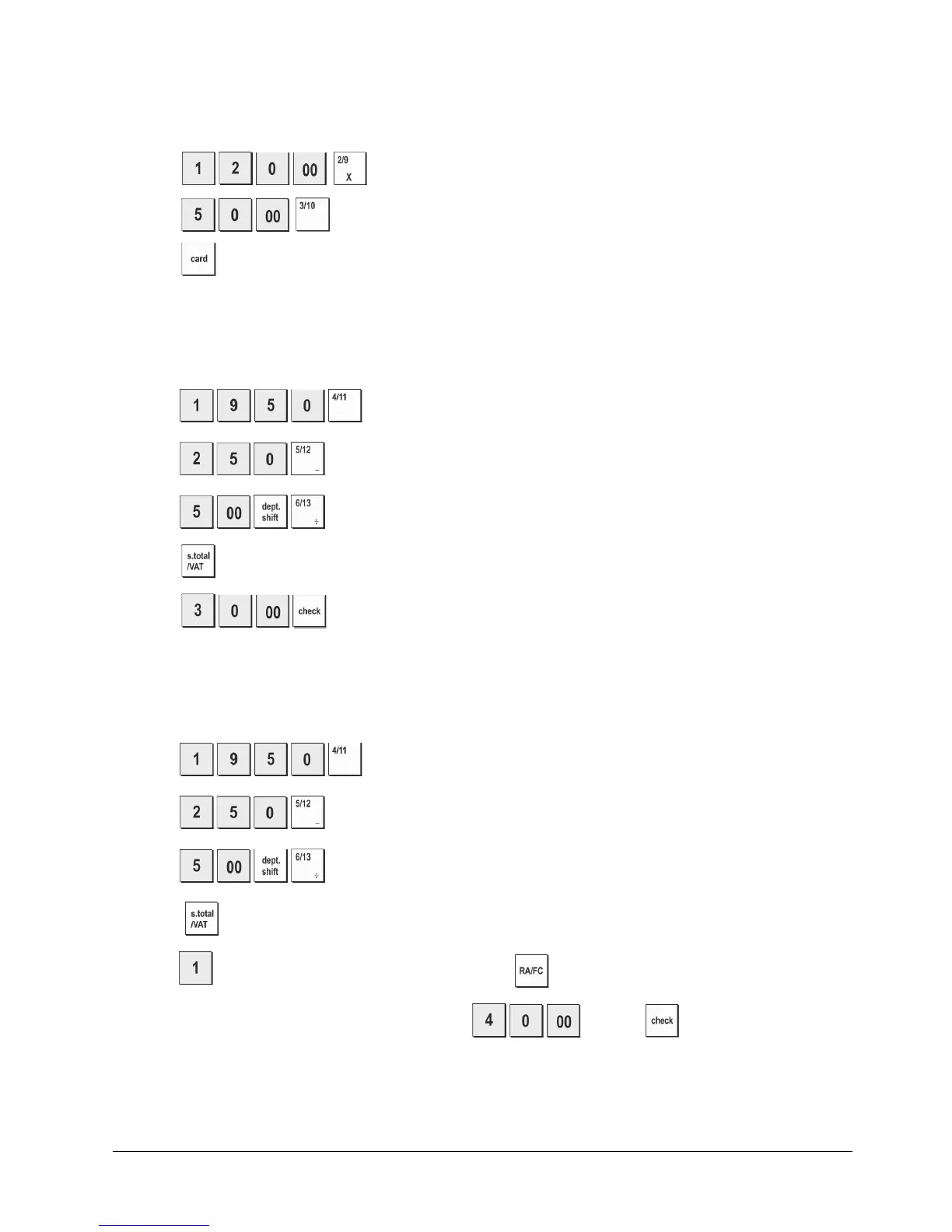
Example: Register a €120.00 item to Department 2 and a €50.00 item to Department 3. Complete the transaction with
payment using a credit or debit card.
1. Press
.
2. Press
.
3. Press .
Check Tender with Change
Example: Register a €19.50 item to Department 4, a €2.50 item to Department 5 and a €5.00 item to Department 13.
Compute the change for a €30.00 check tender.
1. Press
.
2. Press
.
3. Press
4. Press
.
5. Press
.
The change due to the customer is displayed.
Check Tender in Foreign Currency with Change in Local Currency
Example: Register a €19.50 item to Department 4, a €2.50 item to Department 5 and a €5.00 item to Department 12.
Compute the change for a €40.00 check tender.
1. Press
.
2. Press
.
3. Press
.
4. Press
. to display and print the current balance due in Local currency.
5. Press
for foreign currency number 1 programmed and press to display the current balance due in foreign currency.
6. Type the amount tendered by check in foreign currency
and press
.
The change due in local
currency is displayed.















 To Next Page