40
Discounting the Total Sale by Using a Random Discount Rate
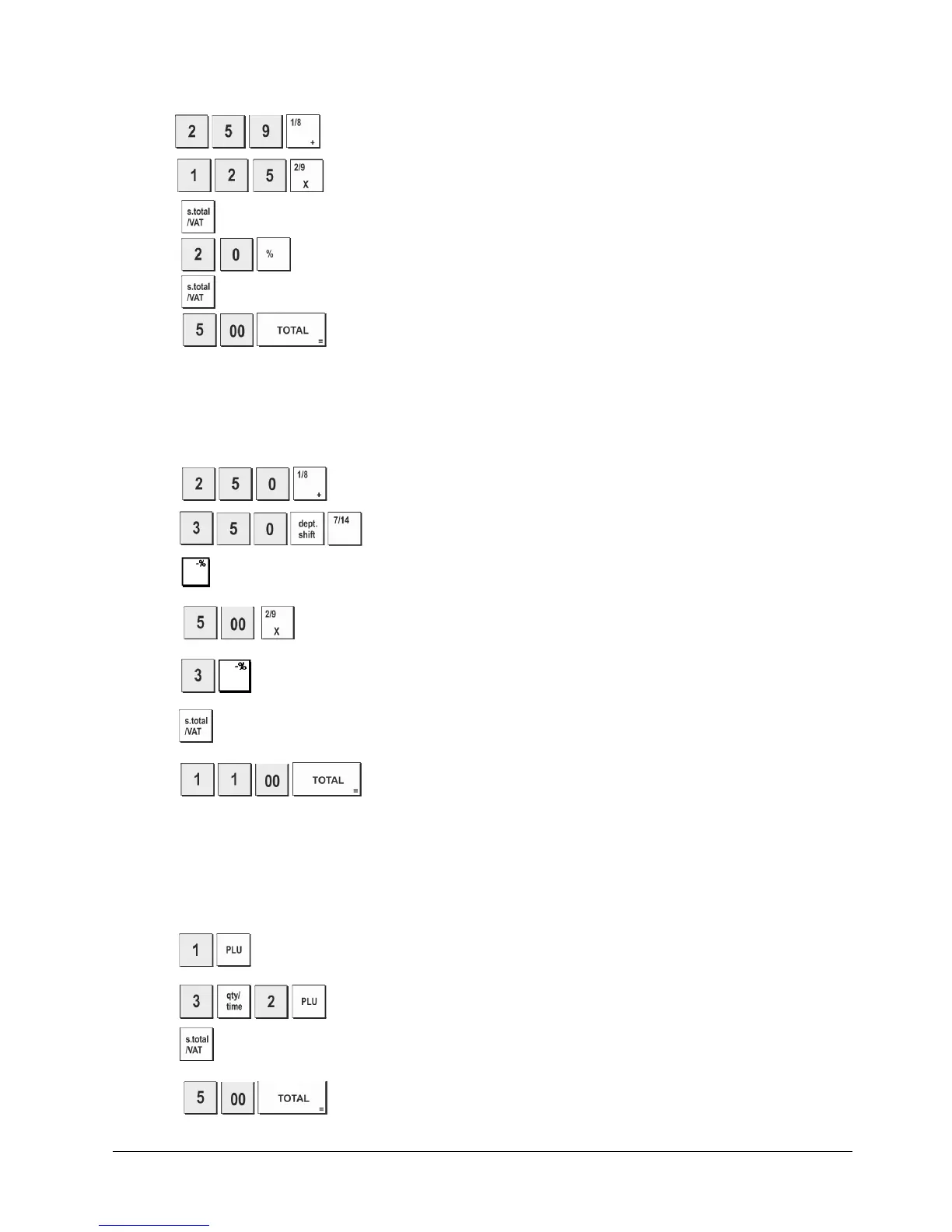
Example: Register a 20% discount to a sales transaction. Compute the change tender.
1. Press
.
2. Press
.
3. Press
.
4. Press
. The amount discounted is displayed.
5. Press
.
6. Press
. The change due to the customer is displayed.
Discounting Individual Items using Programmed and Random Discount Rates
Example: Register a €2.50 item to Department 1, apply the programmed discount to a €3.50 item to Department 14 and
apply a discount rate of 3% to a €5.00 item to
Department 2. Compute change tender.
1. Press
.
2. Press
3. Press to apply the programmed discount. The amount discounted is displayed.
4. Press
.
5. Press
. The amount discounted is displayed.
6. Press
.
7. Press
The change due to the customer is displayed.
Registering a Sales Transaction Using Preset PLU Codes
To use this feature, PLU codes must have been previously set.
Example: Use preset PLU codes to register an entire transaction: register PLU 1 and multiply 3 PLU 2. Compute change for
a cash tender.
1. Press .
2. Press
. The amount of the multiplication is displayed.
3. Press .
4. Press
. The change due to the customer is displayed.















 To Next Page