44
Registering an Identification Number to a Transaction
Up to 7 digits can be used for the identification number. This entry can be made prior to any operation. The identification
number is not added to the management report or totals.
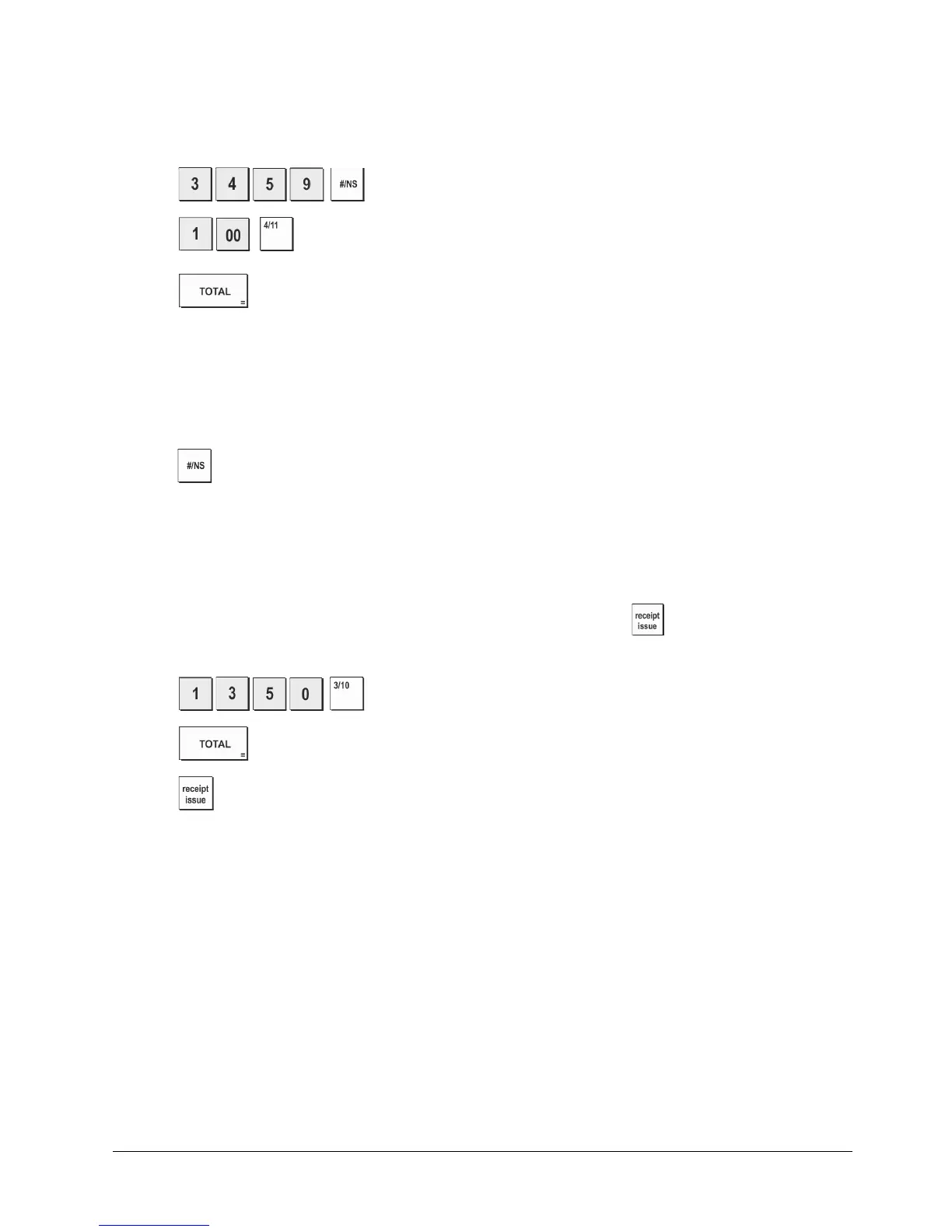
Example: Assign the identification number 3459 to a €1.00 sale to Department 4. Enter an exact cash tender sale.
1. Press
.
.
2. Press
.
.
3. Press .
Registering a No Sale
This operation opens the cash drawer and prints a no sale receipt. The activity is registered to the activity counter in the
financial report. If you do not want to print a no sale receipt, change Machine Condition 42 to 1. See "System Options" for
details.
1. Press
.
Issuing a Copy of the Last Sales Receipt
You can print a copy of the last receipt issued. For this feature to be operational, Machine Condition 16 must be set
to its
default value 0 (multiple receipts allowed). See "System
Options" for details.
NOTE: This feature will override the non-print mode, if previously activated, by pressing outside of a transaction.
Example: Register a €13.50 sale to Department 3 and enter an exact cash tender sale. Print a copy of the sales receipt.
1. Press .
.
2. Press
.
3. Press
.















 To Next Page