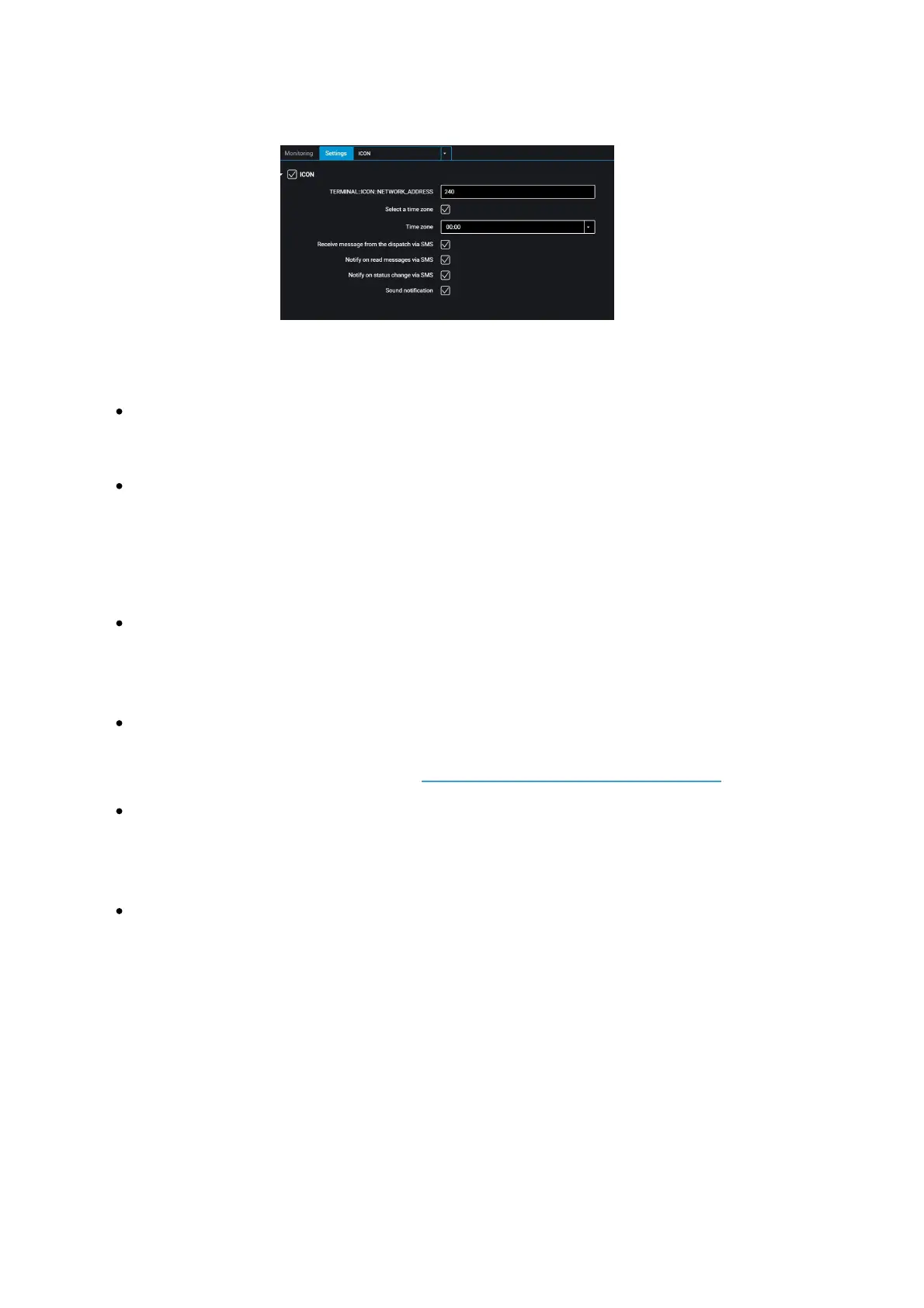
“ICON” – check the box to display data from the terminal on the Omnicomm ICON
Display
“Network address” – select the display network address. Possible values: from 7 to
254
“Select time zone” – check the box to select the time zone with reference to UTC.
The value of the time zone is used in case where automatic accounting of time
zones is not required
“Time zone” – select the time zone
“Receive messages from dispatcher via SMS” – check the box to display SMS
received at the SIM card number of the terminal. Format of the message sent:
D2ddispatcher text. Maximum message length: 128 characters.
“Notify about reading the message via SMS” – check the box to send the SMS
reading confirmation. Notifications are sent to the dispatcher’s number specified
when configuring the terminal (view Connection to Communication Servers)
“Notify about changing the status via SMS” – check the box to send SMS to the
dispatcher’s number about changing the driver's status. Notification contains the
new status of the driver.
“Sound notification” – check the box to enable sound notification when registering
the event specified when configuring the terminal and the display
In the “Settings” tab select the “Additional equipment” section from the list.
“Engine hours by RPM”, fill in the RPM to engine hours conversion table:



 To Next Page