after which the terminal will record activation of the sensor. Default value – 9 V.
“Pull-up resistor” – select “Enabled” when working with “open collector”-type sensors
or contact sensors.
“Input signal inversion” – set “Enabled” for the sensor with open contacts or contacts
closing on commission of any action.
“Current voltage” – value of the voltage at the universal input of the terminal.
“Current value” – auxiliary equipment switched on or off.
“SMS sending upon triggering” – select “Enabled” to send SMS when the direct-
current universal input is triggered.
“Equipment name” – enter the monitored parameter name.
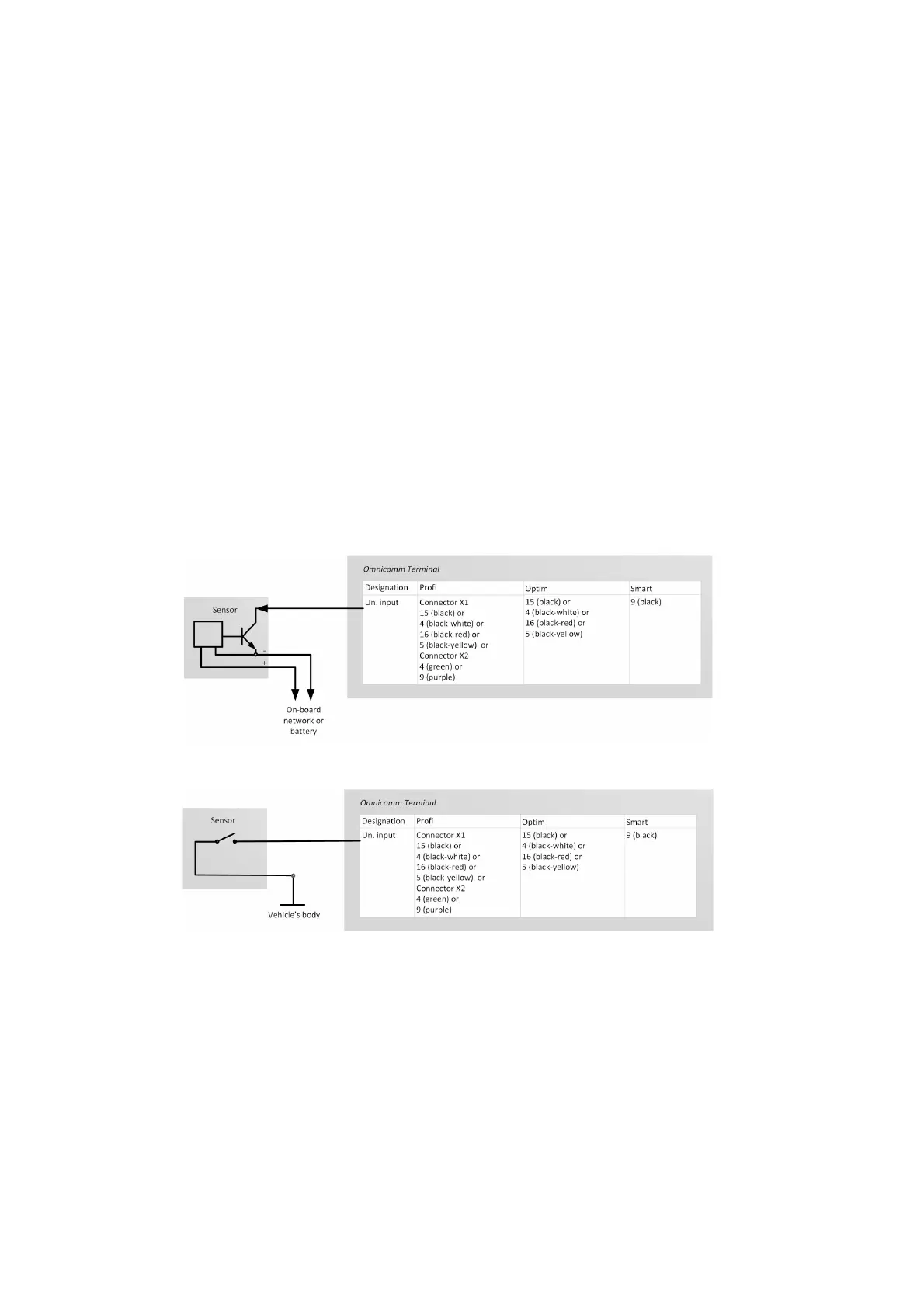
Possible sensor types: contact or contactless digital sensors.
Connect contactless sensors (capacitance, inductance, optical magnetic) and N-P-N
sensors with “open collector”-type input according to the diagram:
Connect the contactless sensor according to the scheme:
As the contact sensor you can use standard elements of equipment control (activation
buttons / limit switches / sensors triggered by excess pressure or temperature, etc.) or
an additionally mounted sensor. We recommend that you first look for possibility of
connection to a standard device and install an additional sensor only if there is none.



 To Next Page