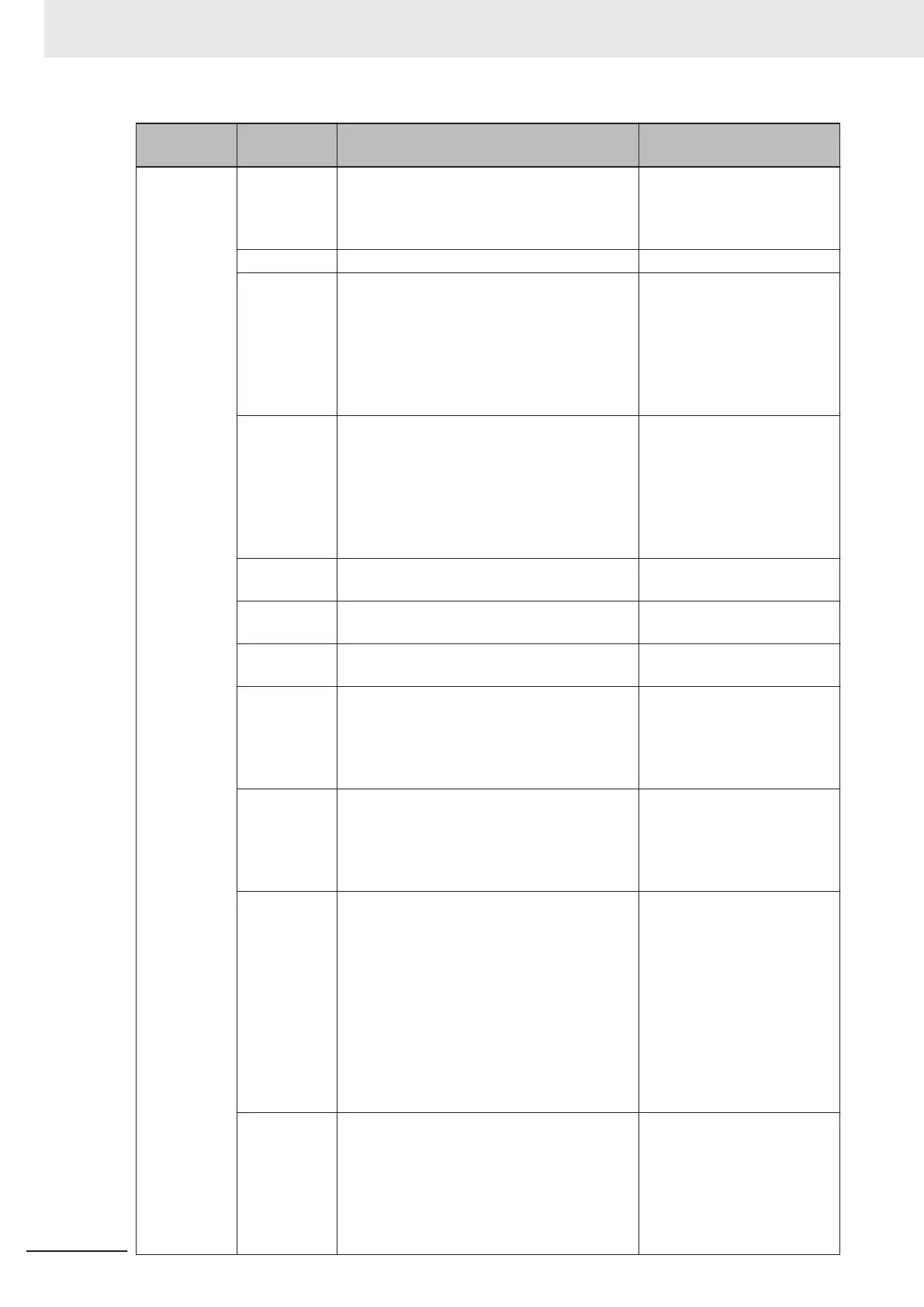
Category Command Description
Response Data Example
(For Read string ABCDE.)
Optimization <OPT> Starts Optimization. Optimization using the
next Symbol read. When reading the same
code symbols, using Optimization can make
the Reading speed faster.
None
<UNOPT> Releases Optimization. None
<OPT?> Confirm the Optimization status. Depending
on the Optimization status, the Response data
will be one of the following.
• <OPT,0>: Default, No Optimization
• <OPT
,1>: Optimization in Progress
• <OPT,2>: Optimization of Symbol is com-
plete
<OPT,0>
<?> Gets the hexidecimal number showing the
code reader status. Information for error con-
ditions on the code reader and Read Cycle
status can be obtained. For more detailed in-
formation, please refer to
Autofocus Multicode
Reader V430-F Series User Manual (Z407) -
Appendices A-16 Utilities.
<?/02>
(You can see there is current-
ly no error condition on the
code reader
.)
<K?> Queries the settings status of all K Com-
mands.
Settings status of all K Com-
mands.
<K??> Gets the description of all K Command param-
eters.
Description of all K Command
parameters.
<K?#> Gets the parameter ranges of all K Com-
mands.
Parameter ranges of all K
Commands.
<Knnn?>
(nnn: Three-
digit number
of each K
command)
Queries the setting status of the specified K
Command.
<K541,2000,30>
(Example response to
<K541??> Exposure: 2000us,
Gain: 30)
<Knnn??>
(nnn: Three-
digit number
of each K
command)
Queries the parameter description of the
specified K Command.
<K541??,Exposure,Gain>
(Example Response data for
<K541??> Y
ou can see that
Parameter 1 is Exposure and
Parameter 2 is Gain.)
<Knnn?#>
(nnn: Three-
digit number
of each K
command)
Gets the parameter range of the specified K
Command.
<K541?#,Value
25-100000:Def=2500,Value
0-100:Def=33>
(Example Response data for
<K541?#> You can see that
the setting range of Parame-
ter 1 is 25 to 100000 with a
default value of 2500, while
the setting range of Parame-
ter 2 is 0 to 100 with a default
value of 33.)
<Knnn?*>
(nnn: Three-
digit number
of each K
command)
Gets the same Response data as when the
<Knnn?> command, <Knnn??> command, or
<Knnn?#> command is executed.
<K541,2000,30>
<K541??,Exposure,Gain>
<K541?#,Value
25-100000:Def=2500,Value
0-100:Def=33>
(Example Response data for
<K541?*>.)
3 Controlling Operation and Data Output with Ethernet
3 - 42
V430-F Series Autofocus Multicode Reader User Manual for Communication Settings



 To Next Page
 Loading...


