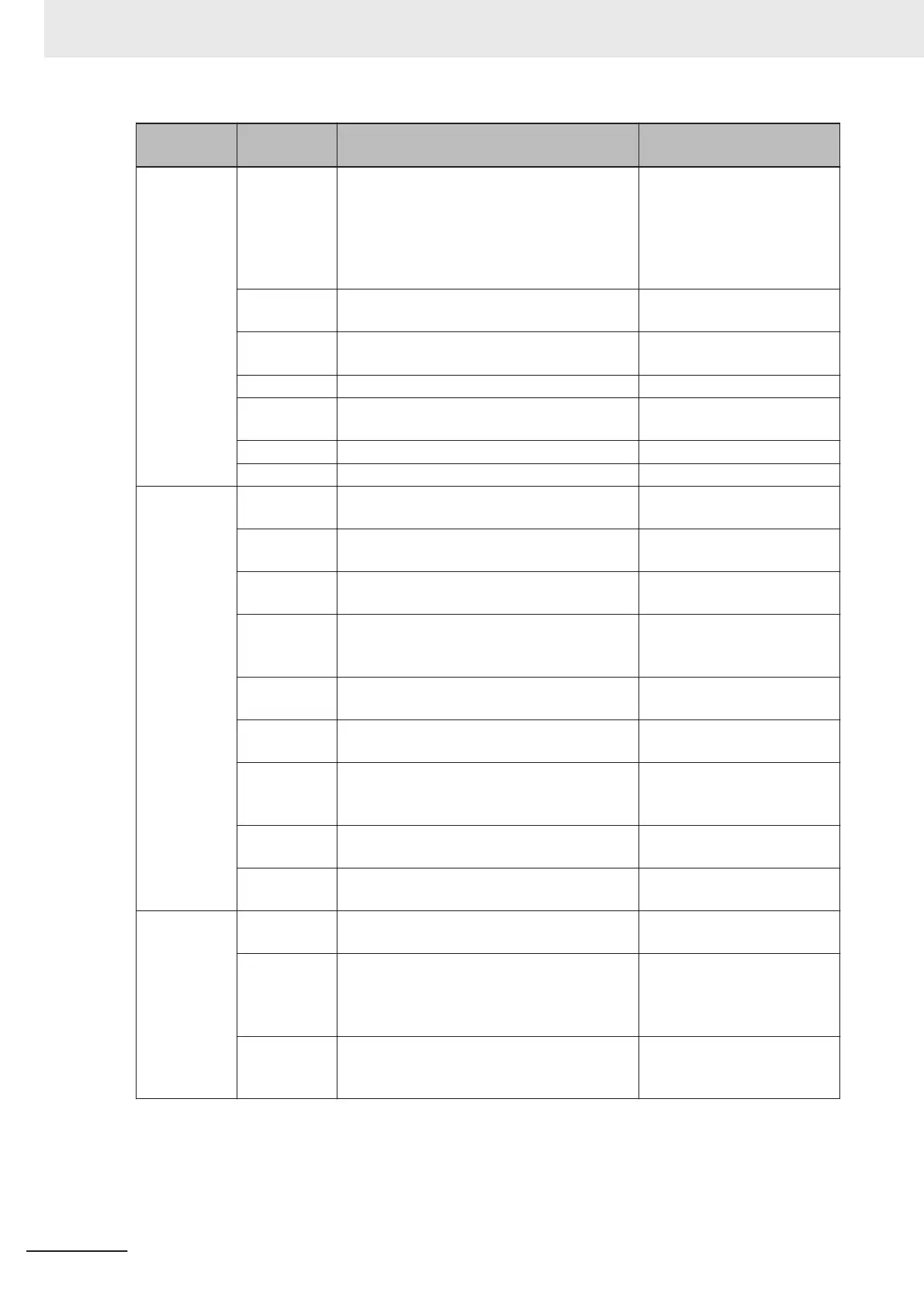
Category Command Description
Response Data Example
(For Read string ABCDE.)
Confirm Firm-
ware version
<#> Queries all the firmware version information. <#b/
35-9000033-122.3021><#a/
35-9000097-1.2.3.3008><#w/
30-9000079-1.2.3.3006><#p/
N/A><#d/35-xxxxxx-
x.x.x.xxxx>
<#a> Queries the version information of application
software.
<#a/35-9000097-1.2.3.3008>
<#b> Queries the Boot Software Version informa-
tion.
<#b/35-9000033-122.3021>
<#w> Queries the WebLink version. <#w/30-9000079-1.2.3.3006>
<!> Queries the Application software checksum
and Boot Software checksum.
<!b/38B7><!a/9555>
<!a> Queries the Application software checksum. <!a/9555>
<!b> Queries the Boot Software checksum. <!b/38B7>
Save for
Power-on,
Re-initialize
and Restart
<Z> Saves current settings to the code reader and
restarts it.
<A?/0>
<Zc> Saves the current setting as the Customer de-
fault setting on the code reader and restarts.
<A?/0>
<Zrc> Restores the code reader settings to the cus-
tomer default and restarts the code reader
.
<A?/0>
<Zrd> Resets the code reader to its factory default
settings (excluding communication settings
and user-defined names) and restarts.
<A?/0>
<Zrdall> Resets the code reader to its factory default
settings and restarts.
<A?/0>1>
<A> Restarts the code reader with its current set-
tings.
<A?/0>
<Ard> Resets the code reader to its factory default
settings (excluding communication settings
and user-defined names) and restarts.
<A?/0>
<Arp> Restores the code reader settings to the previ-
ously saved state and restarts.
<A?/0>
<Arc> Restores the code reader settings to the cus-
tomer default and restarts.
<A?/0>
Master Data-
base
<G> Sets the database number to be registered in
the Master database to 1.
None
<Gn>
n: Master Da-
tabase Index
Number
Sets the database number to be registered in
the Master database to n.
<NEWM/01>
(The data for the next Good
Read is registered in Master
database 1.)
<NEWM> Queries the database number to register.
<NEWM/00> is returned if there is no data-
base yet specified to be registered.
None
3 Controlling Operation and Data Output with Ethernet
3 - 44
V430-F Series Autofocus Multicode Reader User Manual for Communication Settings



 To Next Page
 Loading...


