97
GB
1505093, Edition 2012-05, Version 5
9 Adjustments
9.3 Adjusting the brake force
The extension arms 3, the NRH spring arm 5 and the LCH spring arm 6 are equipped
with optional brakes. The brakes hold the pendant system and the end device (e.g. flat
screen, OR lamp, etc.) in the set position.
Adjust the brake force in such a way that the end device (e.g. flat screen, OR lamp, etc.)
remains in the set position and can still be adjusted easily.
Follow the safety instructions
• Follow the general safety instructions in
“Chapter 9.1” on page 95
.
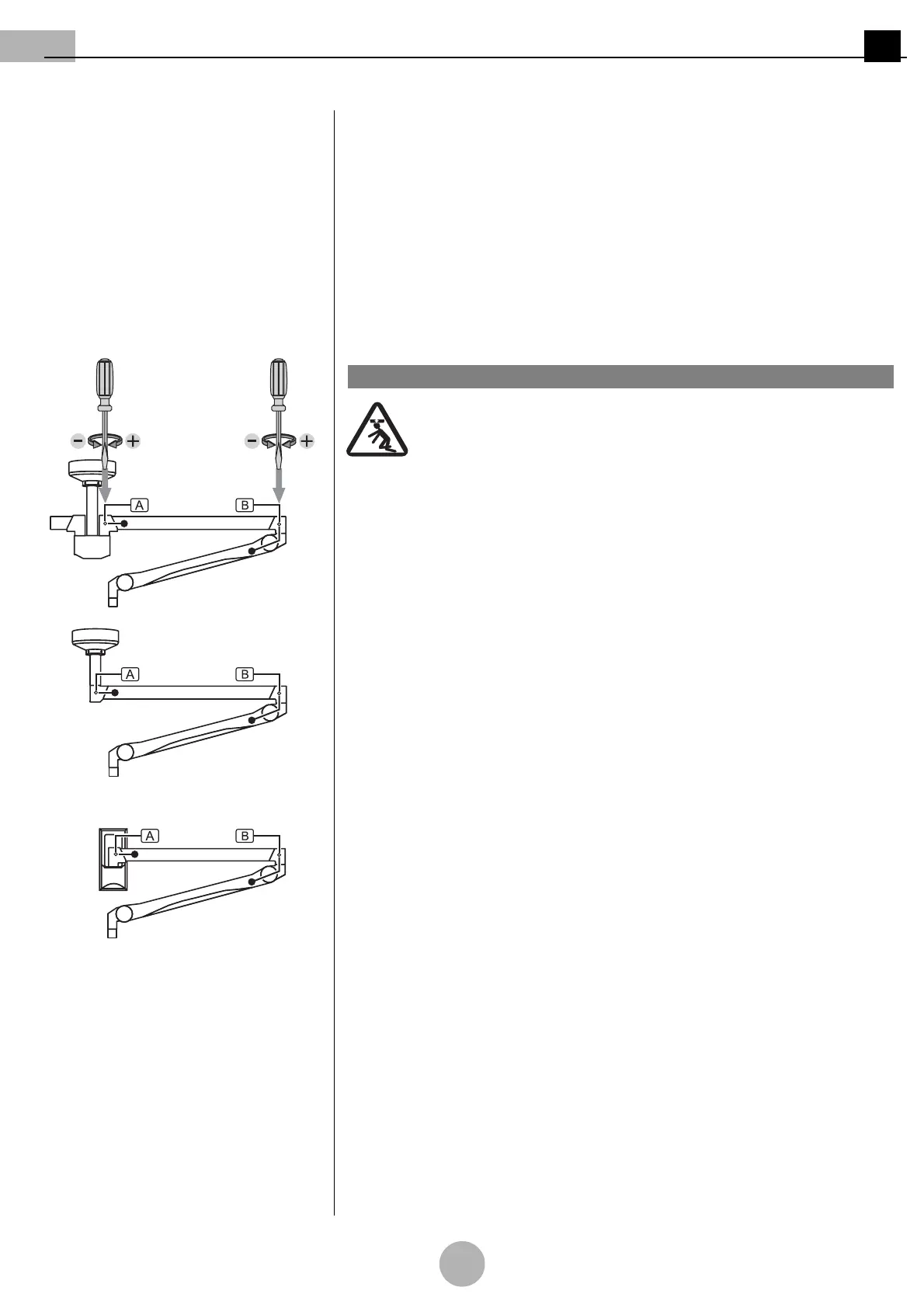
Figure 24: Adjusting the brake force on the
pendant system
9.3.1 Adjusting the brake force on the pendant system
(See "Figure 24")
Pendant system crashing
The brake screws , are designed as slotted screws:
• No other screws must be loosened.
Tool to be used
Use a suitable slotted screwdriver.
To increase the brake force
• Insert the slotted screwdriver into the brake screws , and alternately turn with
the same number of revolutions in the clockwise (+) direction as illustrated in the Fig-
ure.
To reduce the brake force
• Insert the slotted screwdriver into the brake screws , and alternately turn with
the same number of revolutions in the anti-clockwise (–) direction.
Perform a function test.
1WARNING



 To Next Page