Instruments and controls 111
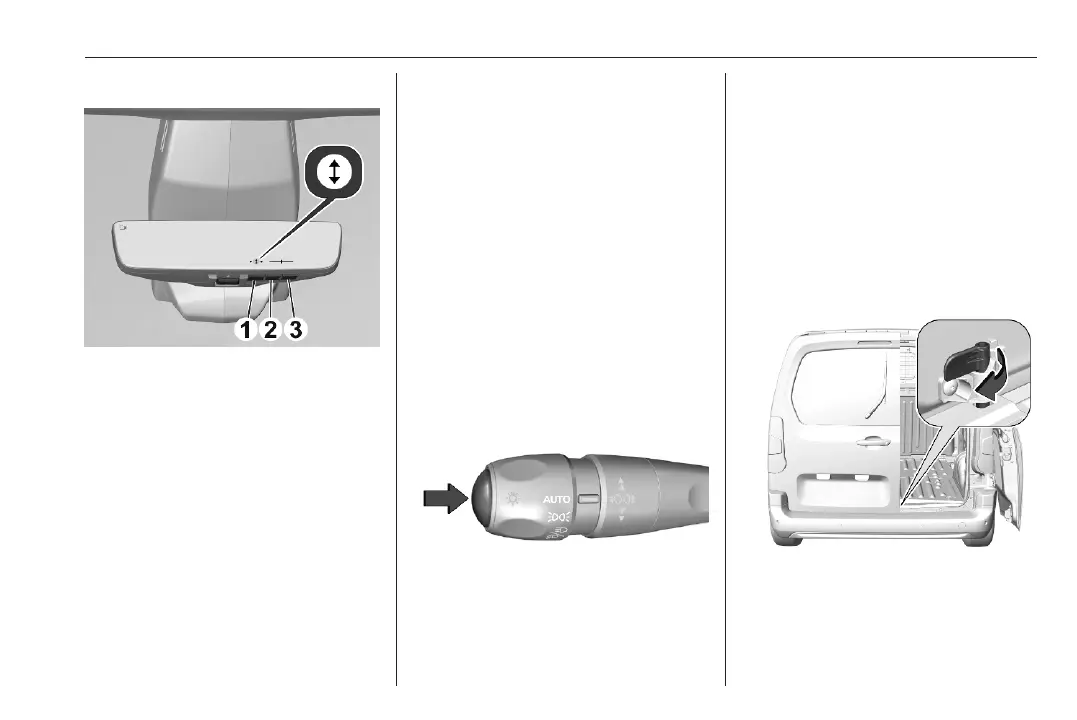
Setting the angle
Press (1) to open the settings T.
Press two times more to open the
angle menu.
Press (2) to set the angle downwards.
Press (3) to set the angle upwards.
Angle levels from one to nine, preset
level is five.
The selected level is highlighted in the
slider menu on the display.
To close the settings, press (1) until
they are closed.
Auto dimming
The brightness of the display is
adapted to the environment by
automatic dimming.
Memorisation of settings value
The user setting and the on/off mode
is memorised after the ignition is
switched off.
Selecting a view
If the setting menu is not activated:
● by pressing button (3)
● by pressing the button on the
lever.
Fault
In the event of a fault, the display will
be grey with the camera symbol
shown crossed out.
On the rear view display an illustration
shows how to switch off the rear view
display.
The display will also be grey and X
appears in the display, if a door is
opened.
In exceptional case of transporting
long objects in the load compartment
with the need to have the right-hand
rear door open, assure that the left
door is closed and mechanically
locked.



 To Next Page