234 Driving and operating
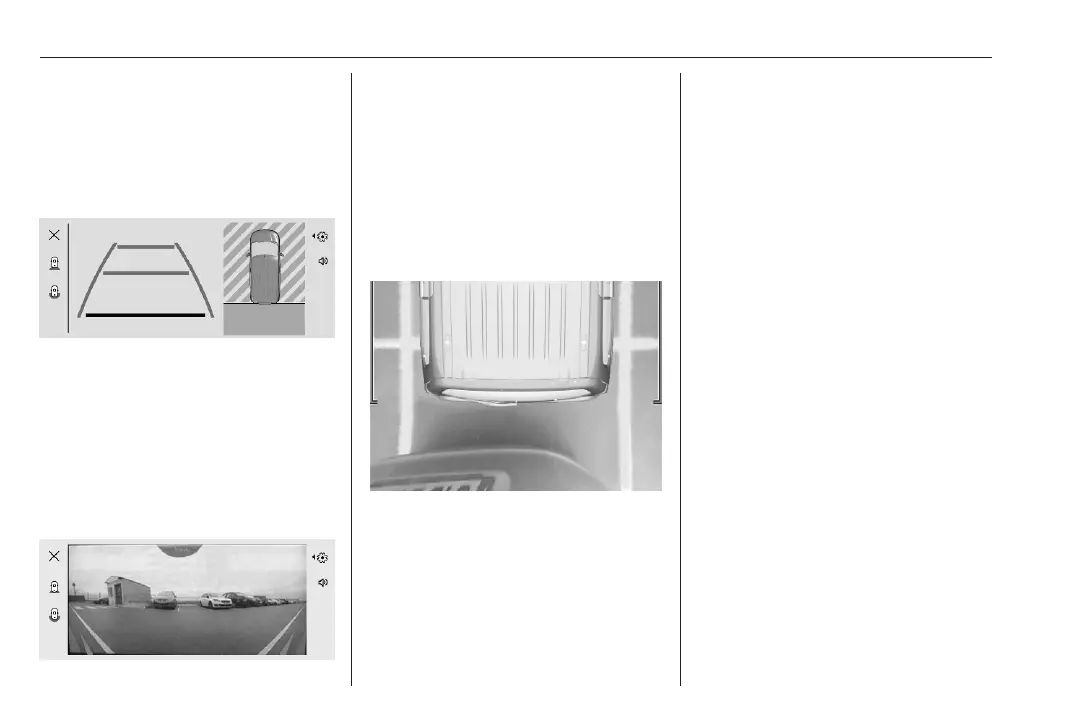
vehicle with mirrors unfolded. The
direction of the lines changes with the
position of the steering wheel.
This view is available in auto mode or
in the view selection menu.
Guidelines
The first horizontal line represents a
distance of about 30 cm beyond the
edge of vehicle's rear bumper. The
upper horizontal lines represent
distances of about 1 m and 2 m
beyond the edge of your vehicle's rear
bumper.
180° view
The 180° view facilitates reversing
out of a parking bay, making it
possible to see the approach of
vehicles, pedestrians and cyclists.
This view is not recommended for
carrying out a complete manoeuvre.
This view is available from the view
selection menu only.
Zoom view
The camera records the vehicle's
surroundings during the manoeuvre
in order to reconstruct a view from
above the vehicle in its near
surroundings. Thus, the vehicle can
be manoeuvred around obstacles
nearby.
This view is displayed automatically
as soon as the vehicle approaches an
obstacle during a manoeuvre.
Auto mode
If the vehicle is equipped with
ultrasonic parking sensors, the
automatic view changes from rear
view to a view from above, as an
obstacle is approached during a
manoeuvre.
If the vehicle is not equipped with
ultrasonic parking sensors, the view
needs to be changed manually in the
Info Display.
Deactivation
Panoramic view system is
deactivated when:
● a certain forward speed is
exceeded or, depending on
version, if reverse gear is not
engaged for seven seconds.
● by pressing the icon q in the left
upper corner of the touch screen.



 To Next Page