130 Infotainment system
1 )
Short press: switch the
system on / off or mute the
sound.
Long press: switch to
standby mode.
Rotate: adjust the volume.
2 ?
Displays the home screen.
3 :
Displays the menu for the
driver assistant systems. ..... 114
4 ;
Displays the menu for the
climate settings. .................. 165
5 b
Displays the audio menu.
6 =
Displays the phone menu.
Displays the phone
projection screen when
phone projection is active.
7 Y
Displays the navigation menu.
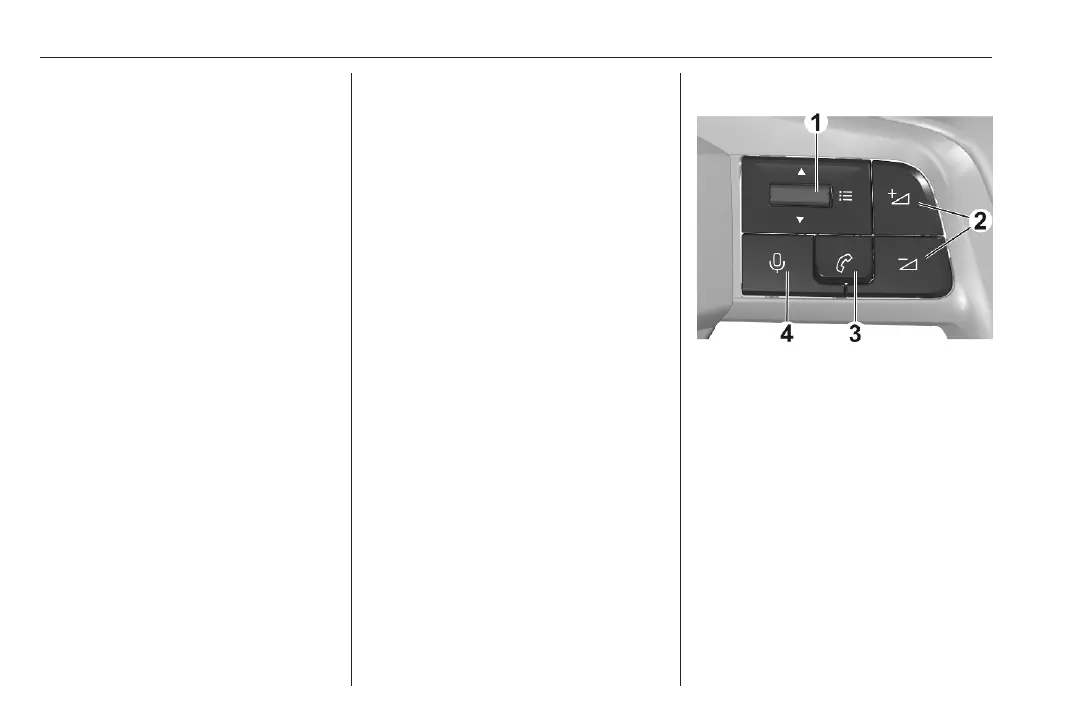
Steering wheel controls
1 : Toggle up or down: select the
previous / next radio station or
track or browse through the list of
recent calls.
Short press: display a menu or
validate a selection.
2 : Short press: adjust the volume or
unmute the sound.
Long press on Z: mute the
sound.



 To Next Page