140 Infotainment system
1 )
Short press: switch the
system on / off or mute the
sound.
Long press: switch to
standby mode.
Rotate: adjust the volume.
2 ?
Displays the home screen.
3 :
Displays the menu for the
driver assistant systems. ..... 114
4 ;
Displays the menu for the
climate settings. .................. 165
5 b
Displays the audio menu.
6 =
Displays the phone menu.
Displays the phone
projection screen when
phone projection is active.
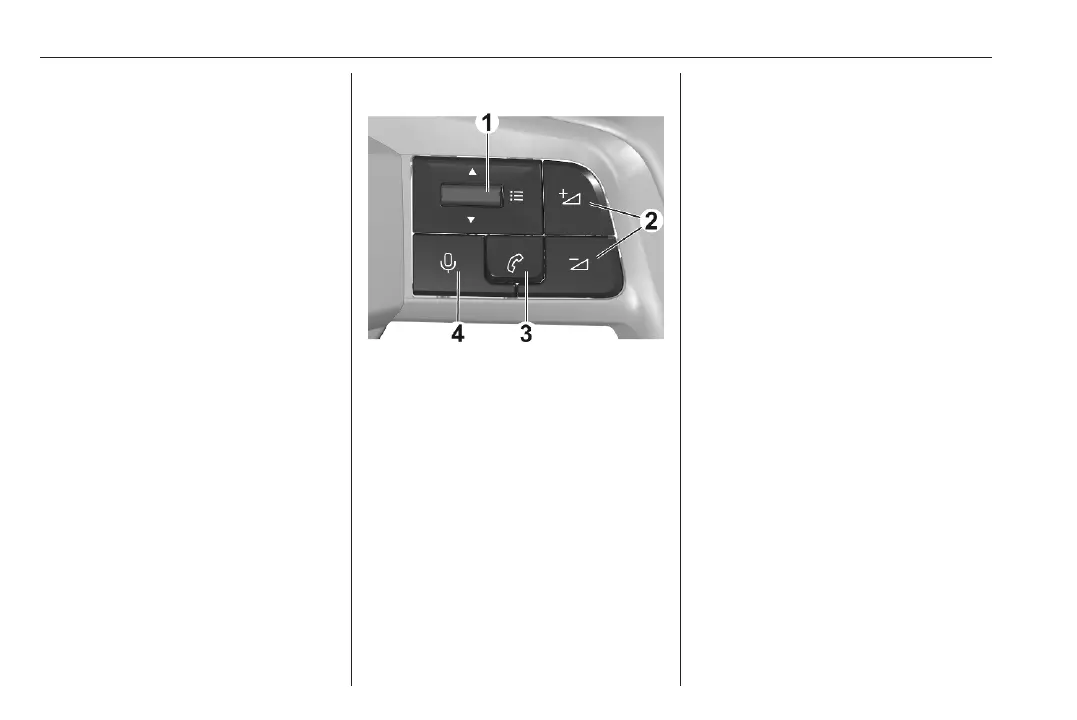
Steering wheel controls
1 : Toggle up or down: select the
previous / next radio station or
track or browse through the list of
recent calls.
Short press: display a menu or
validate a selection.
2 : Short press: adjust the volume or
unmute the sound.
Long press on Z: mute the
sound.
3 : Short press: accept an incoming
call, hang up, display the list of
recent calls or display the phone
projection screen.
Long press: refuse an incoming
call.
4 : Short press: activate the voice
assistant of the Infotainment
system.
Long press: activate the voice
assistant of the connected mobile
phone.
Personalisation
The Driver Information Centre and
the Info Display can be personalised.
To display the personalisation menu,
open the settings application z and
touch the menu for customisation.
Screen colour
The background colour of the Driver
Information Centre and the Info
Display can be chosen. The chosen
background colour will immediately
be shown in both the Driver
Information Centre and the Info
Display.



 To Next Page