124 The Information Company
This s
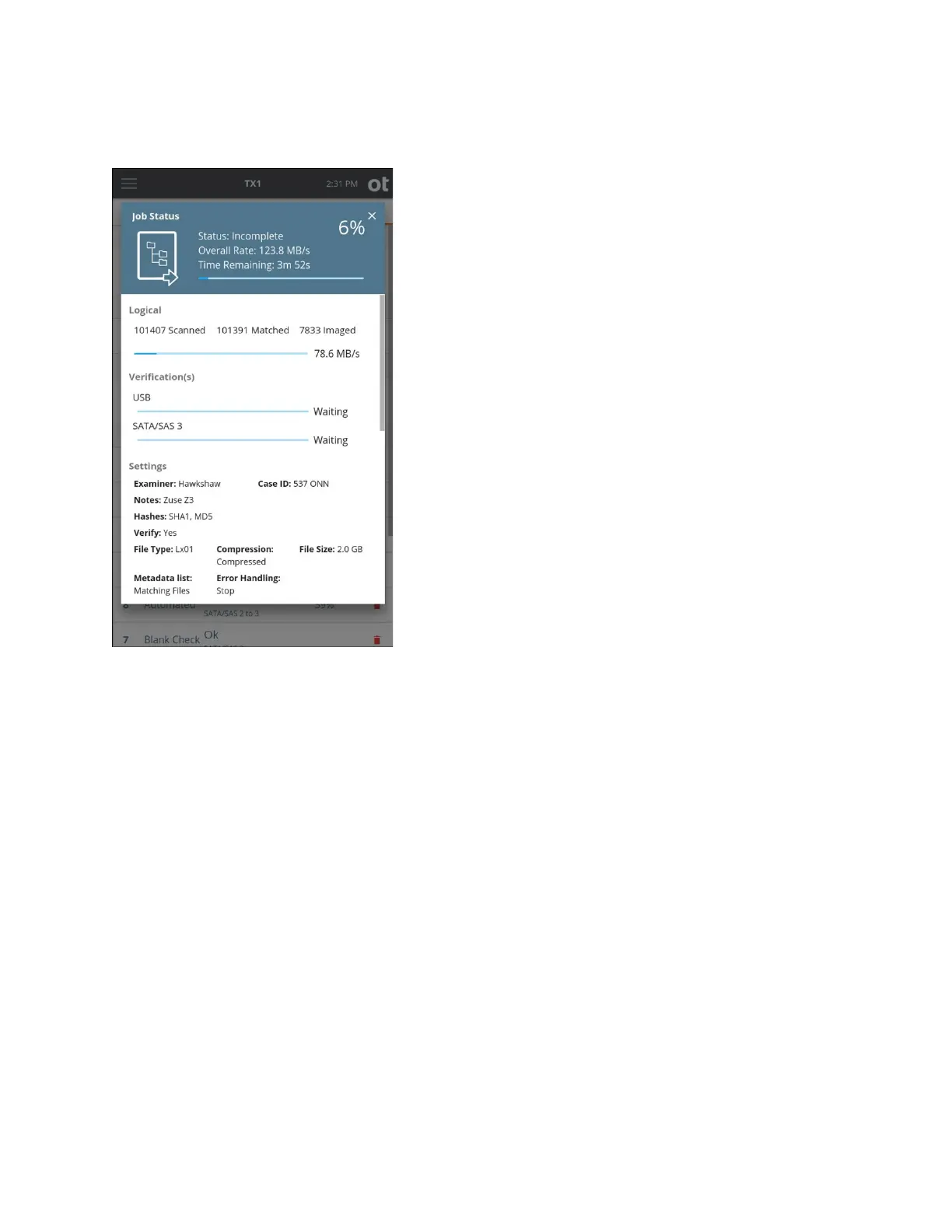
tatus screen is similar to other TX1 job types, with the following notable differences:
• While the operation is scanning for more files to acquire, the progress bar is
displayed as an indeterminate bar (throbbing/pulsing bar with no data rate displayed).
TX1 does not know how many bytes it needs to acquire until the scan is complete.
• Three new status fields show the live status of the scanned files:
• Scanned shows the number of files the job has checked so far to see if it should
include them.
• Matched shows the number of files that will be acquired by this job out of the
number of files scanned.
• Imaged shows the number of files that have been fully acquired out of the
number of files matched.
• The Settings section includes the settings specific to logical imaging that have been
configured for the active job.
• The Included Files section shows a text summary of the rules used by the active job
to determine which files should be acquired.
Note: Filesystem read errors encountered during logical imaging jobs may result in
unpredictable acquisition behavior. When they occur, such errors are indicated by a red
warning message at the top of the Logical section of the status screen. You will also see
Copyright © 2022 Open Text. All rights reserved. Trademarks owned by Open Text.



 To Next Page