162 The Information Company
4.10.3 Filtering logs
TX1 can store up to 100 forensic logs. To make it easier to view, export, and delete
specific logs of interest, a Filter Logs feature has been provided. To filter the log list,
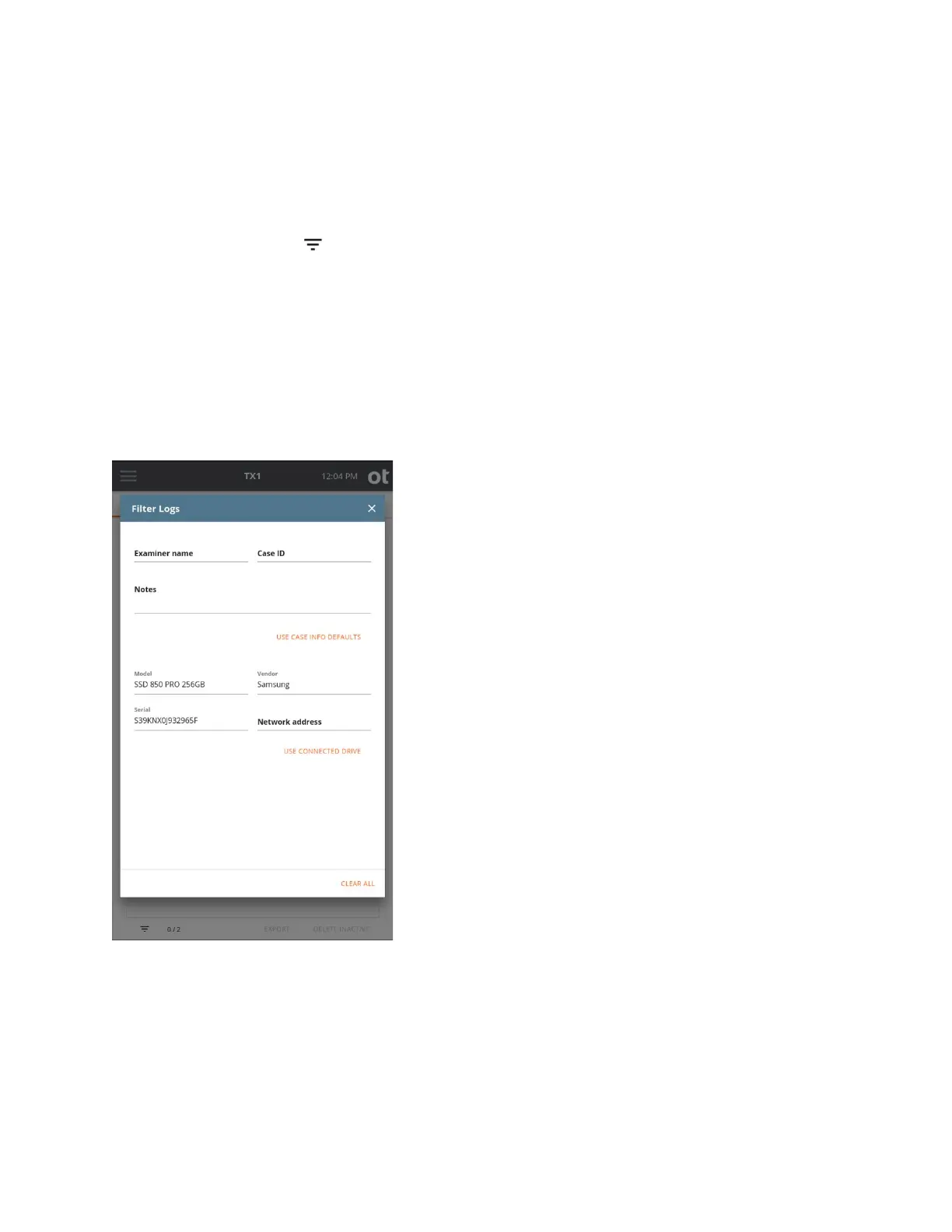
simply tap the log filter icon at the bottom left side of the log list screen. The available
filter parameters are shown in the screenshot below, and they include case information
(Examiner name, Case ID, and Notes) and drive information (Model, Vendor, Serial
number, and CIFS/iSCSI share information). Each of the filter fields can be populated
manually by typing the desired value in the field(s) of interest. Alternatively, the fields can
be auto-populated from case information default values or from information from an
attached drive or network share. To auto-populate these fields, simply tap the orange
Use Case Info Defaults and/or Use Connected Drive buttons. Note that you can also
auto-populate these fields using the buttons and then manually override specific fields to
match your desired filter parameters. The screenshot example below used the Use
Connected Drive option to fill in the filtering information for the desired drive.
Not
e: When using the Network address field to filter the log list, CIFS share paths may
be used (full or partial) as may an iSCSI IQN or target IP address. Also, when shares are
mounted using nicknames, the underlying IP address information is not stored in the logs
and thus cannot be used for filtering.
Copyright © 2022 Open Text. All rights reserved. Trademarks owned by Open Text.



 To Next Page