OpenText Tableau Forensic TX1 Imager
The Information Company 13
The Automated Acquisition area will indicate if that mode is enabled. When enabled,
the count of any duplication jobs run during that automated session will be displayed. See
“Using automated acquisition” on page 74 for more details on this valuable, time-saving
feature.
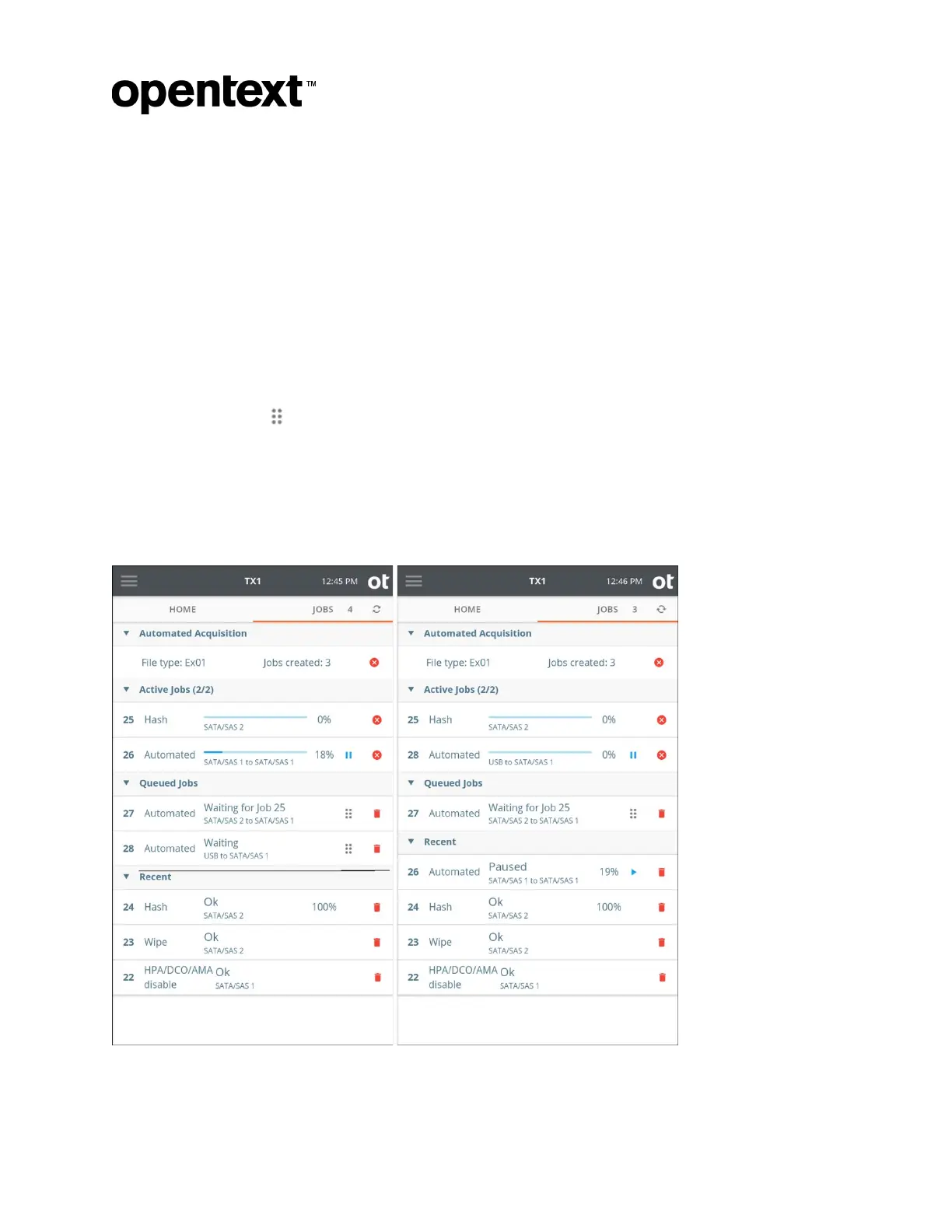
Any active jobs will be shown in the Active Jobs area. After two active jobs are running,
additional job requests are placed into the queue. Queued Jobs start as soon as one of
the two active jobs is complete, or when the source or destination resource the job is
waiting for becomes available. Likewise, as jobs are completed, they are moved to the
Recent area, so that a user can see what has already completed.
Jobs are queued in the order they were entered. You can reorder queued jobs by
dragging individual jobs to place them in the order you prefer. On the TX1 screen, press
and hold the drag icon of the job you want to select, then drag the job to the desired
position in the queue and release.
A fifth area, Media Utilities, displays media utility operations and only appears when a
media utility operation is active. Media utility operations will move to the Recent area
when they are complete. Media utilities cannot be queued like forensic jobs.
Here are two examples of the Jobs tab in action:
Copyright © 2022 Open Text. All rights reserved. Trademarks owned by Open Text.



 To Next Page