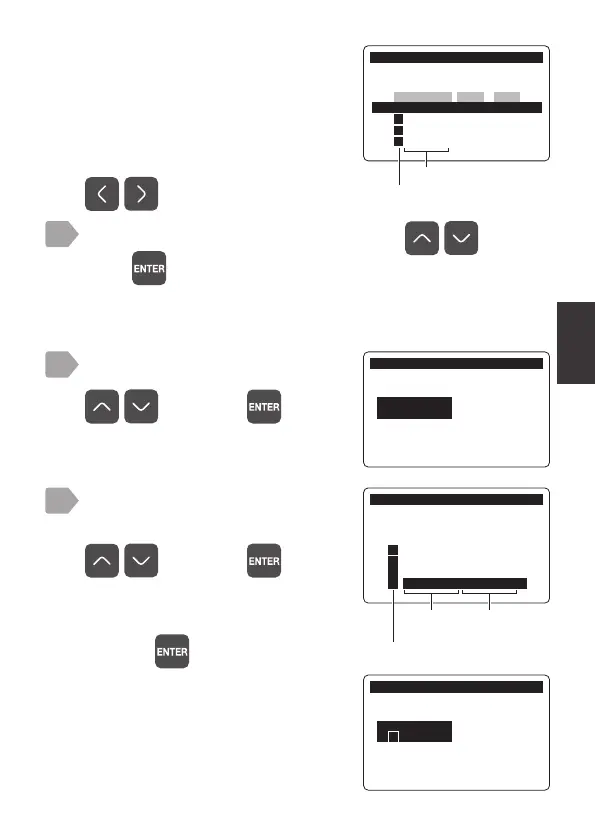
Relay Setting
19
Select [Output Item] using
, and press .
The current setting value is displayed.
Select [Sens. Cap] of a channel
to set sensor cap output using
, and press .
The set sensor channel and [Sens.
Cap] are displayed in [Output Item].
If output is unnecessary, select [OFF]
and press
.
4
5
5HOD\6HWWLQJ
&+
2XWSXW,WHP
2))
5HOD\6HWWLQJ
&+
2XWSXW,WHP6HOHFW
2))
㸱'2'26
㸱7HPS'26
㸱0DLQW'26
㸱6HQV&DS'26
!
Output
item
Sensor
model
5HOD\6HWWLQJ
&+
2XWSXW,WHPࠉࠉࠉ
㸱6HQV&DS
Select a relay output channel to set using , and
press
.
The setting item selection menu is displayed and the current setting
of the selected channel is displayed.
3
The channel selection display is
displayed.
For each relay output channel, the
current sensor channel, output item,
trigger setting, and active level are
displayed.
To switch between pages, press
.
5HOD\6HWWLQJ
&KDQQHO6HOHFW
2XWSXW,WHP7ULJ/HYHO
&+ 2))
&+㸱'2+LJKPJ/
&+㸱'2/RZPJ/
&+㸱6HQV&DS
!
Output item



 To Next Page