Adjustment
34
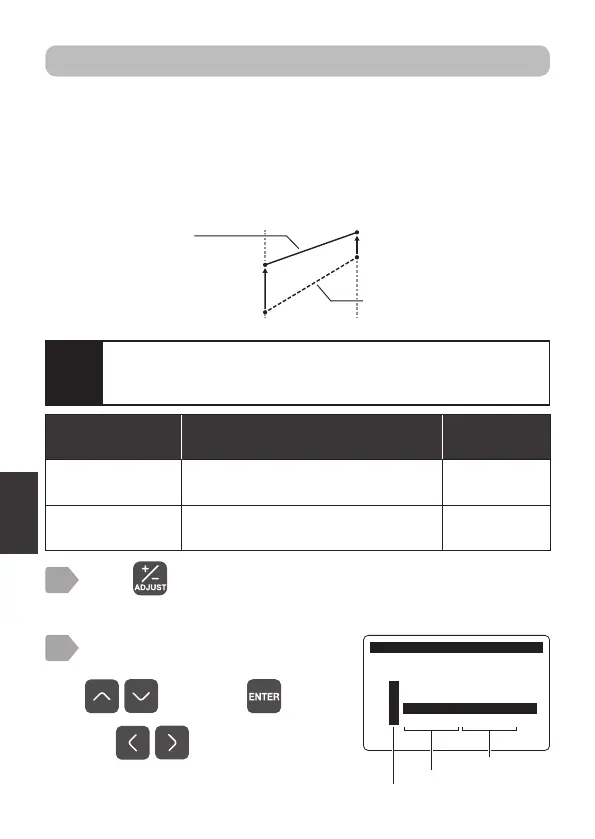
2-point adjustment
Display current values of the 2 points as any adjustment values,
respectively.
Performing 2-point adjustment changes the offset and span based on the
adjusted values.
For 4-20 mA output (“7 4-20 mA Setting” P.15) and alarm output (“Alarm
output setting” P.17), the adjusted values are applied.
Press .
The measurement item selection display is displayed.
1
Measurement item
[Display]
Measurement item setting range
(display value/adjusted value)
Factory default
setting
Dissolved oxygen
concentration [DO]
[Point 1]: 0.00 to (2nd point value -2.00)
[Point 2]: (1st point value +2.00) to 50.00
[Point 1]
: 0.00
[Point 2]
: 50.00
Temperature
[Temp.]
[Point 1]: 0.0 to (2nd point value -10.0)
[Point 2]: (1st point value +10.0) to 50.0
[Point 1]
: 0.0
[Point 2]
: 50.0
Adjusted value
Current display
value
Adjusted
value
Display value
after 2-point
adjustment
Current display
value
2
Select an item to perform
the 2-point adjustment using
, and press .
$GMXVW
0HDVXUHPHQW,WHP6HOHFW
㸯S+ࠉ6(S+'
㸰7XUE7&'
㸱'2'26
㸱7HPS'26
Measurement item
Sensor model
Use to switch pages.
The adjustment menu is displayed.
Caution
If offset, span, or 2-point adjustment has already been performed,
be sure to initialize the adjustment before performing the 2-point
adjustment.



 To Next Page