Calibration
22
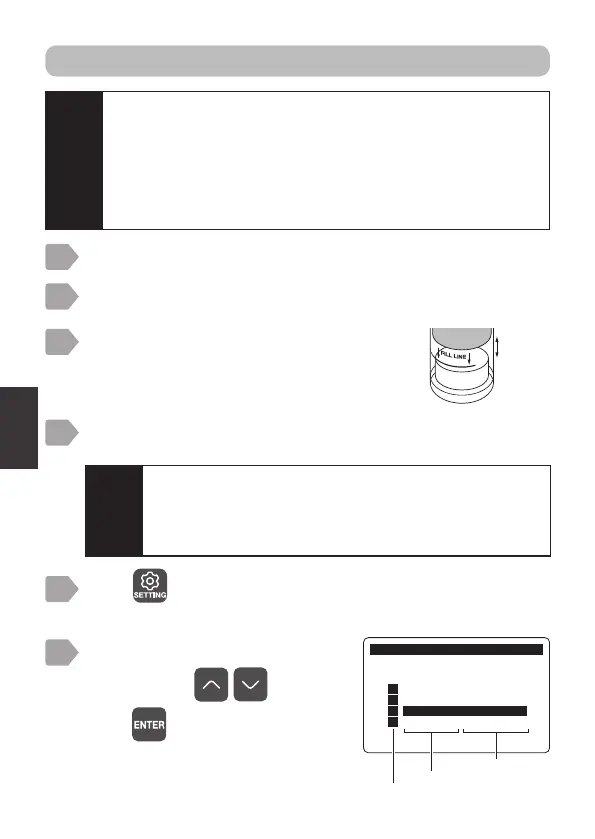
The calibration menu is displayed.
&DOLEUDWLRQ
6HQVRU6HOHFW
㸯S+6(S+'
㸰7XUE7&'
㸱'2'26
㸲
Measurement item
Sensor model
Sensor channel
Select a channel connected to
DOS-20 using
, and
press
.
Leave this to stand for between 5 to 10 minutes before
starting calibration.
6
4
Press .
The sensor selection display is displayed.
5
Soak approximately 10 mL of deionized water into the
calibration container sponge.
Prepare calibration (“Preparation” P.21).
Insert the sensor into the calibration
container so that the measurement area is
approximately 2 cm above the
water-swollen sponge.
2
1
3
Approx
2 cm
1-point calibration: 100% saturation calibration
Caution
・
Return to adjustment value for salinity to 0 PSU when
performing salinity adjustment.(“Salinity adjustment” P.37)
An error will be displayed if salinity adjustment is carried out
without doing this, and correct calibration will not be possible.
・
It is necessary to perform altitude adjustment in order to achieve
accurate calibration when using the sensor in highlands. The
default setting for this is 0 m. Refer to “Altitude adjustment”
P.39 for details on amending the setting.
Caution
Do not leave the sensor attached to the calibration
container for more than 30 minutes.
Condensation on the measurement part may affect the
measurement value. Wipe off water, if any, from the
measurement block before calibration.



 To Next Page