Calibration
23
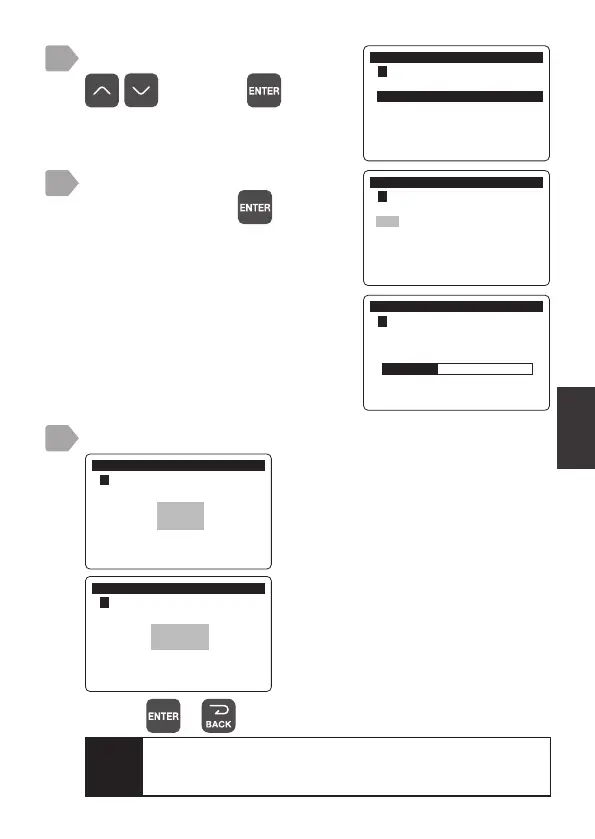
Select [1-Point Cal.] using
, and press .
Check that the measurement value
is stable, and press
.
The calibration starts.
When the calibration is complete, check the result.
When the calibration is complete, a
progress bar is displayed and then the
calibration result is displayed.
&DOLEUDWLRQ
㸱'2'26
3RLQW&DO'2
3RLQW&DO'2
2SWLRQDO'HQVLW\'2
,QLWLDOL]H&DOLEUDWLRQ9DOXH
&DOLEUDWLRQ
㸱'2'26
3RLQW&DOLEUDWLRQ
ࠉࠉࠉࠉࠉࠉࠉࠉࠉࠉࠉPJ/
7
8
9
&DOLEUDWLRQ
㸱'2'26
3RLQW&DOLEUDWLRQ
good:
The calibration is properly completed.
E4200 to E4299:
Calibration failed.
Try the steps again from 1.
&DOLEUDWLRQ
㸱'2'26
3RLQW&DOLEUDWLRQ
good
&DOLEUDWLRQ
㸱'2'26
3RLQW&DOLEUDWLRQ
E4200
Caution
For the relationship between temperature and saturated
dissolved oxygen, refer to “Saturated Dissolved Oxygen
Content at Each Temperature” P.55.
Pressing or switches to the measurement value display.



 To Next Page