Adjustment
36
Adjustment initialization
3
4
$GMXVW
㸱'2'26
2IIVHW$GMXVWPHQWPJ/
6SDQ$GMXVPHQW
3RLQW$GMXVWPHQW
,QLWLDOL]H$GMXVWPHQW9DOXH
6DOLQLW\$GMXVWPHQW368
$OWLWXGH$GMXVWPHQWP
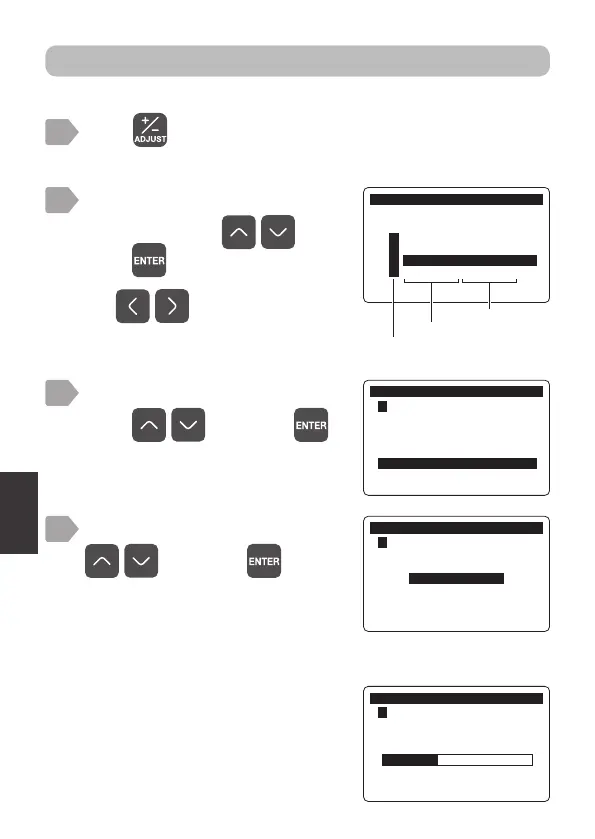
Reset the adjustment value to the factory default value.
Press .
The measurement item selection display is displayed.
1
2
Select an item to initialize
adjustment using
, and
press
.
$GMXVW
0HDVXUHPHQW,WHP6HOHFW
㸯S+ࠉ6(S+'
㸰7XUE7&'
㸱'2'26
㸱7HPS'26
Measurement item
Sensor model
Use to switch pages.
The adjustment menu is displayed.
The initialize adjustment value menu is
displayed.
・
Selecting [Yes] executes initialization
and displays a progress bar.
・
Selecting [No] cancels initialization
and returns to the initialize
adjustment value menu.
$GMXVW
㸱'2'26
,QLWLDOL]H$GMXVWPHQW9DOXH
Select [Initialize Adjustment Value]
using , and press .
Select [NO] or [YES] using
, and press .
During initialization a progress bar is
displayed.
After completion, the adjustment value
is initialized and the display returns to
the measurement value display.
$GMXVW
㸱'2'26
,QLWLDOL]H$GMXVWPHQW9DOXH
12
<(6



 To Next Page