Cleaning
47
3
Select [Manual Cleaning] using
, and press .
The cleaning device is activated
and the display returns to the
measurement value display.
The sensor under cleaning shows
"CLEAN" on the measurement
value display.
In addition, "C" is displayed in the
sensor selection display.
&OHDQLQJ
㸱'2'26
0$18$/&/($1,1*
&OHDQLQJ,QWHUYDO5/<PLQ
&OHDQLQJ$FWLYDWLRQࠉVHF
3RVWFOHDQLQJ6WDQGE\ࠉVHF
&OHDQLQJ
6HQVRU6HOHFW
㸯S+ࠉࠉࠉ6(S+'
㸰7XUE7&'
&㸱'2'26
㸲
ࠉࠉࠉ$//
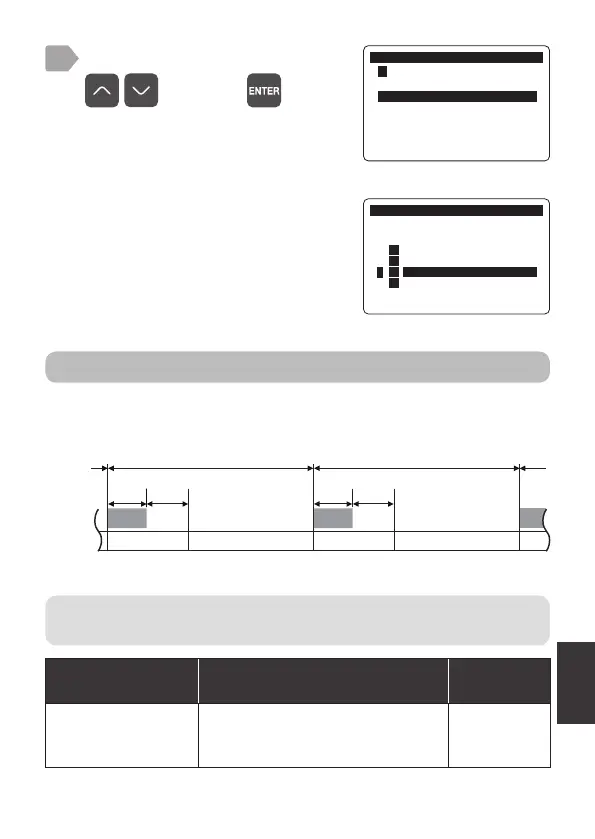
Cleaning interval (relay)
Set the time interval between cleaning actions.
The settings are to activate the cleaning device using a relay output
(“Cleaning output setting” P.20).
g
e
t
e
Cleaning
Normal measurement
Measurement
value hold
Normal measurement
Measurement
value hold
Cleaning interval (relay) Cleaning interval (relay)
Cleaning
activation
Post-
cleaning
standby
Cleaning
activation
Post-
cleaning
standby
Cleaning
Select an item from the following.
Item
[Display]
Setting range
Factory
default setting
Cleaning Interval
(Relay)
[Cleaning Interval-RLY]
OFF (No cleaning)
10 to 1440 minutes (by 10 minutes)
30 minutes
For operation, refer to the "Universal Transmitter SC-U1 Operation
Manual", "9 Cleaning" and "
◆
Cleaning Interval (Relay)".



 To Next Page