Calibration
28
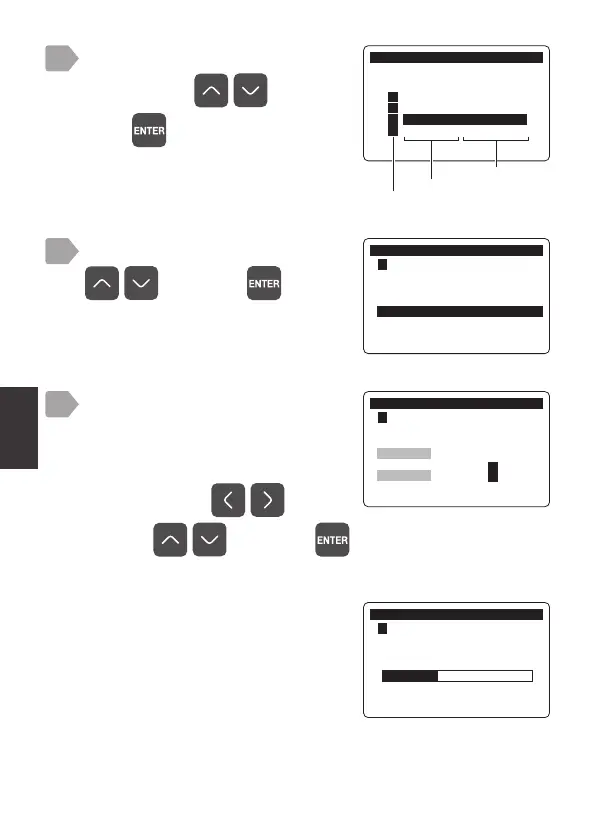
Select [Optional Density] using
, and press .
&DOLEUDWLRQ
㸱'2'26
3RLQW&DO'2
3RLQW&DO'2
2SWLRQDO'HQVLW\'2
,QLWLDOL]H&DOLEUDWLRQ9DOXH
7
&DOLEUDWLRQ
6HQVRU6HOHFW
㸯S+6(S+'
㸰7XUE7&'
㸱'2'26
㸲
Measurement item
Sensor model
Sensor channel
6
When the calibration is complete, a
progress bar is displayed and then
the calibration result is displayed.
&DOLEUDWLRQ
㸱'2'26
2SWLRQDO'HQVLW\&DOLEUDWLRQ
Current measurement value is
displayed on the upper area.
Enter the density (calibration
value) to adjust to in the lower area.
Select a digit by and
value by
, and press .
8
The calibration starts.
&DOLEUDWLRQ
㸱'2'26
2SWLRQDO'HQVLW\&DOLEUDWLRQ
0HDV9DOXHPJ/
&DO9DOXHPJ/
The calibration menu is displayed.
Select a channel connected to
DOS-20 using
, and
press
.



 To Next Page