Adjustment
31
2
3
4
$GMXVW
0HDVXUHPHQW,WHP6HOHFW
㸯S+ࠉ6(S+'
㸰7XUE7&'
㸱'2'26
㸱7HPS'26
Measurement item
Sensor model
$GMXVW
㸱'2'26
2IIVHW$GMXVWPHQWPJ/
6SDQ$GMXVPHQW
3RLQW$GMXVWPHQW
,QLWLDOL]H$GMXVWPHQW9DOXH
6DOLQLW\$GMXVWPHQW368
$OWLWXGH$GMXVWPHQWP
$GMXVW
㸱'2'26
2IIVHW$GMXVWPHQW
ࠉࠉࠉࠉࠉࠉࠉࠉࠉࠉࠉPJ/
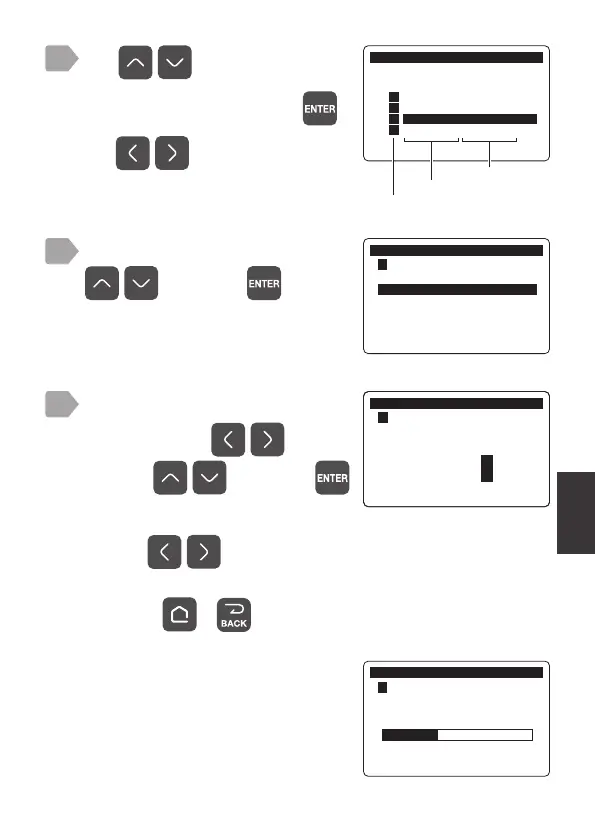
During adjustment a progress bar is
displayed.
When completed, the display returns
to the measurement value display.
$GMXVW
㸱'2'26
2IIVHW$GMXVWPHQW
When a value outside the set range is entered, a short beep sounds.
Pressing
simultaneously while entering a value resets the
value to the factory default setting.
By pressing or , the value returns to the one before changing it.
Use to switch pages.
The adjustment menu is displayed.
Use to select the item for
offset adjustment and press
.
Select [Offset Adjustment] using
, and press .
Enter the offset value.
Select a digit by
and
value by
, and press .



 To Next Page