Chapter 2 - Introduction
'normal indoor' lighting conditions.
2.5 Contraindications
There are no known contraindications for this device.
2.6 System configuration
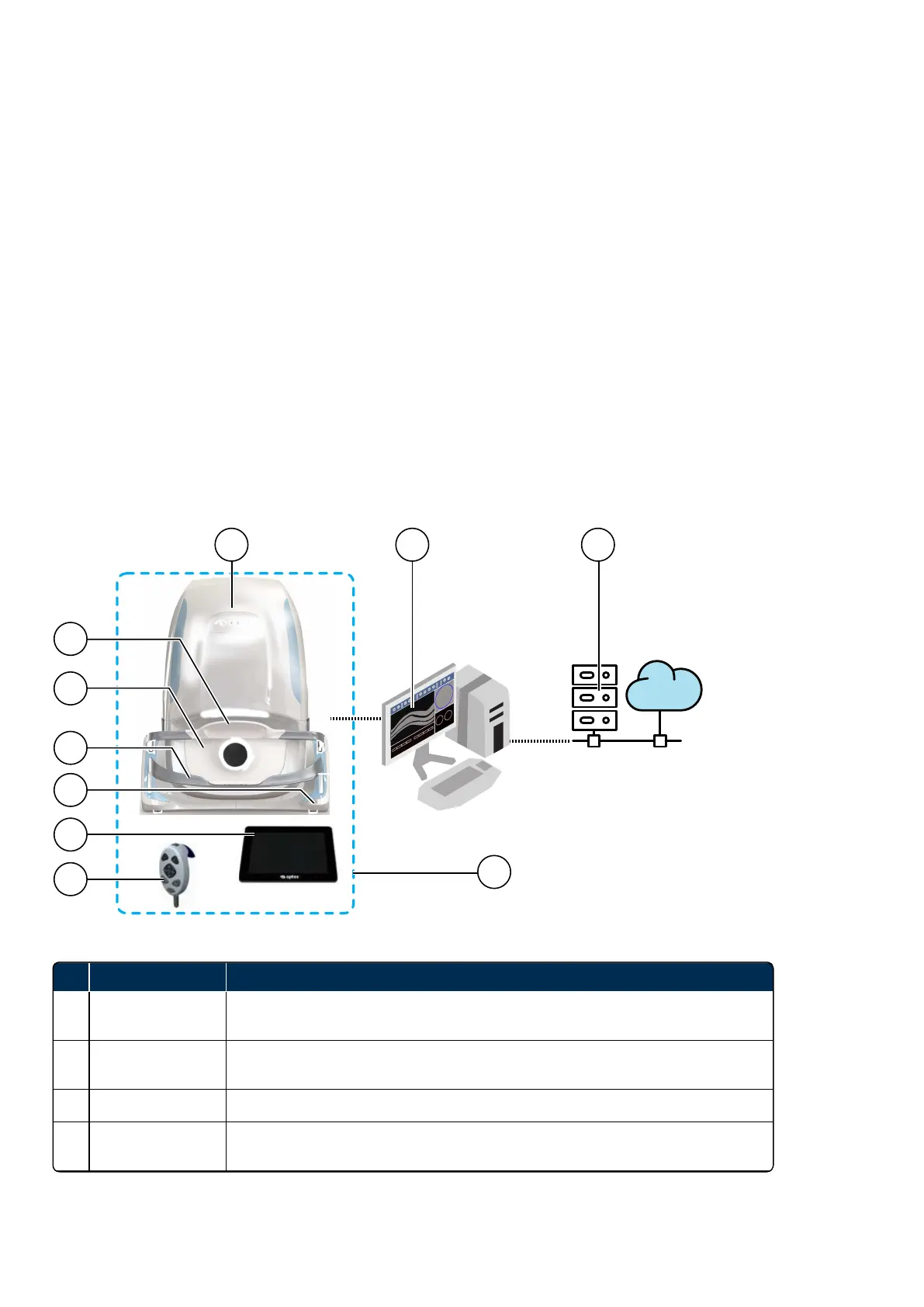
The system configuration must include a scan head and an image server. Images are captured on the scan
head and are processed on the image server and stored as DICOM image files for review on compatible
viewers.
The scan head is connected to the touch screen, hand control and image server.
The standard image server configuration runs the OptosAdvance software which allows you to review and
analyze patient images. Administrators can also manage images located on local or network resources.
Any browser-based review clients connected to your network can be used to review and analyze patient
images.
2.6.1 System parts
FIGURE 1: P200TxE device connected to network
No. Name of Part Description
1 Scan head
The scan head comprises the light sources (lasers and swept source) and
electronics used to capture patient images.
2 Head rest
The head rest supports the patient's head when the patient is being imaged, see
Using the chin rest and head rest on page33.
3 Face pad The face pad helps support the patient when the patient is being imaged.
4 Chin rest
The chin rest supports the patient's head when the patient is being imaged, see
Using the chin rest and head rest on page33.
Page 22 of 72 Part Number: G110230/1ENG
English Copyright 2019, Optos plc. All rights reserved.



 To Next Page