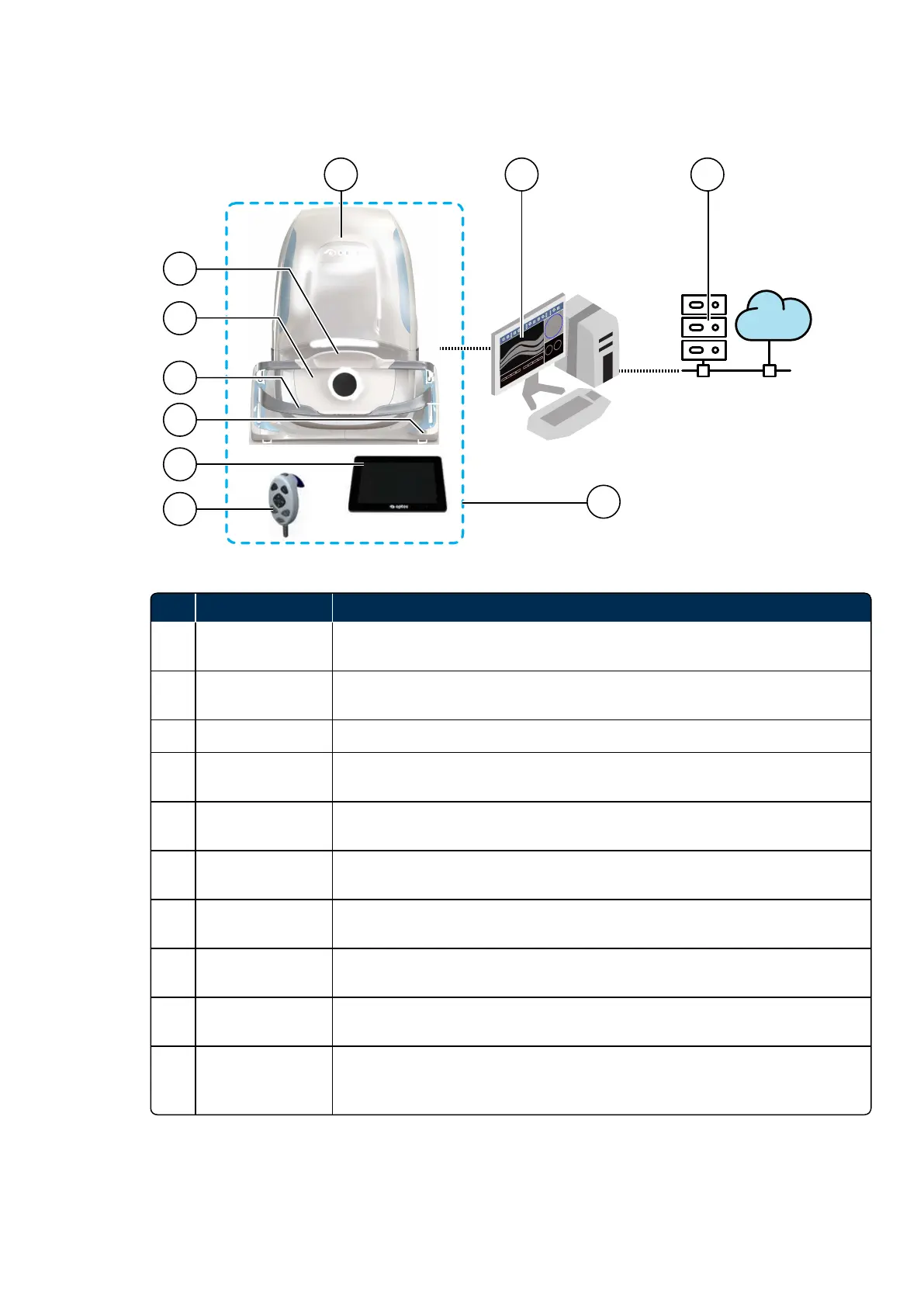
No. Name of Part Description
1 Scan head
The scan head comprises the light sources (lasers and swept source) and
electronics used to capture patient images.
2 Head rest
The head rest supports the patient's head when the patient is being imaged
(see Using the chin rest and head rest on page34).
3 Face pad The face pad helps support the patient when the patient is being imaged.
4 Chin rest
The chin rest supports the patient's head when the patient is being imaged
(see Using the chin rest and head rest on page34).
5 Status indicator
The color changes to show the status of the device (see Status indicator on
page57).
6 Touch screen
The touch screen monitor is used to interact with the system. It displays
alignment feedback and captured images.
7 Hand control
The hand control comprises buttons used to adjust the patient alignment and
capture images.
8 Image server
Runs the OptosAdvance software and lets you manage the networked
images. The image server will also let you review and analyze patient images.
9 Customer network
Switches, Firewalls, Internet access, Review clients, Virtual image server (if
required).
10
Patient
environment
The image server, switch and any browser-based review clients or monitors
must be positioned outside the patient environment; more than 1.5 meters (5
ft) from the scan head.



 To Next Page