Chapter 2 - Introduction
Note
The device also includes a user guide, power cable and ethernet cable not shown on this diagram.
A table may also be supplied.
2.7.2 Network specification and characteristics
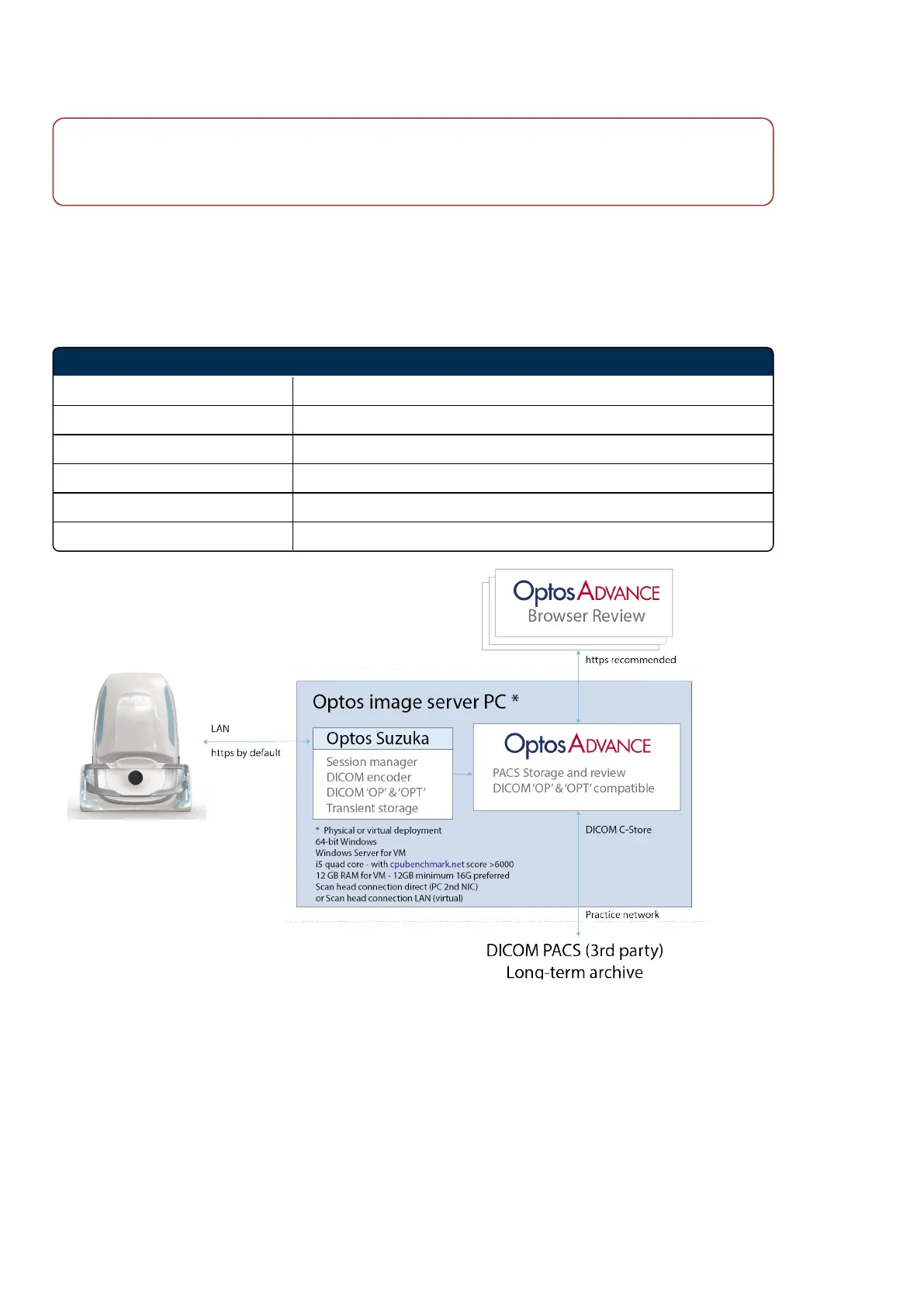
The following network specification is recommended when connecting the image server to a Wide Area
Network (WAN).
TABLE 1: Network specification
Network specification details
Installation Scan head and image server PC
Connection type LAN TCP/IP ipV4
Connection speed 1 Gbps recommended
Connection security All scan head to server transport HTTPS by default
Connection ports (defaults) Default 80, or 443 where a transport certificate is applied
Unused ports Locked on scan head and image server PC
FIGURE 2: Network data flow
2.7.3 Image modalities
Optos multi-modal ultra-widefield retinal imaging enables the capture of posterior images, with a field of
view of up to 200 degrees in a single capture, and in an imaging time of less than 0.4 seconds.
Page 24 of 84 Part Number: G110230-003-ENG
English Copyright 2019-2021, Optos plc. All rights reserved.



 To Next Page