OPTIMOD-FM INSTALLATION
2-5
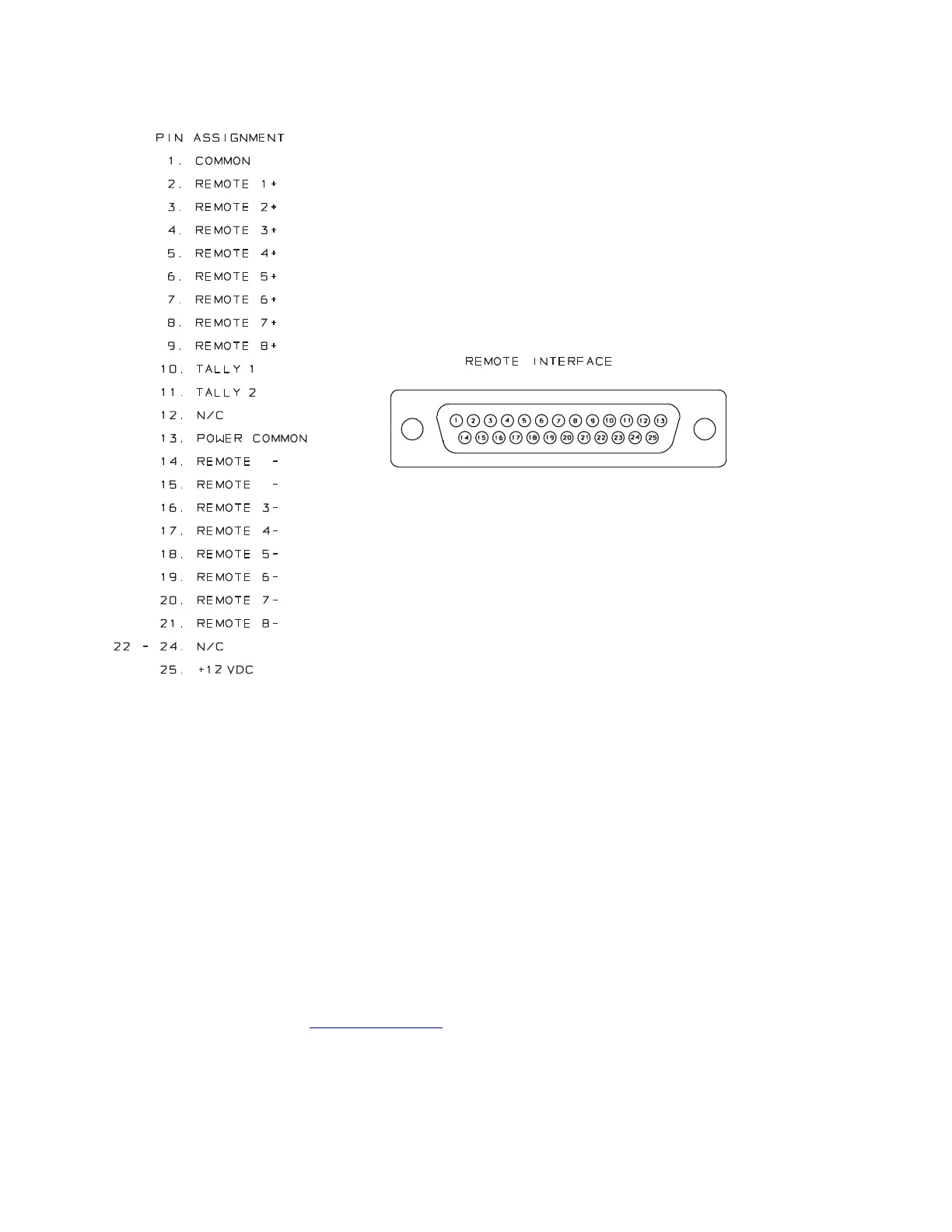
Fig. 2-2: Wiring the 25-pin Remote Interface Connector
7. Connect to a computer
You can connect to a computer running Orban’s PC Remote application via the 8400’s
Serial 1 connector or via an Ethernet network. Ethernet networking requires you to plug
an (optional) Ethernet PC card into the 8400’s rear PC card slot with 8400 power off.
(See Networking on page 2-52.)
Because procedures and instructions for connecting to a PC are subject to
development
and change, we have placed these instructions in a file called
8400_Vxxx_installation.pdf (where xxx represents the version number of the
software). You can access this file from the Orban/Optimod 8400 folder in your com-
puter’s Start Menu after you have run Orban’s PC Remote installer software or version
1.0 or greater of Orban’s 8400 software update software. You can use Adobe’s .pdf
reader application to open and read this file. If you do not have the .pdf reader, it is avail-
able for free download from www.adobe.com
.
See “Installing 8400 PC Remote Control Software” on page 2-56 for more detail.



 To Next Page