Troubleshooting PACD011001C2
360 Troubleshooting Urban Multi “MX1R, ME1R Series” Using R-407C
3.17 Outdoor Unit: Malfunction of Moving Part of Electronic Expansion Valve (Y1E)
Remote Controller
Display
E9
E9E9
E9
Supposed Causes
„
Defect of moving part of electronic expansion valve
„
Defect of outdoor unit PC board (A1P)
„
Defect of connecting cable
Troubleshooting
∗
1 Coil check method for the moving part of the electronic expansion valve
Disconnect the electronic expansion valve from the PC board and check the continuity between the
connector pins.
(Normal)
•
: Continuity Approx. 300
Ω
{
: Continuity Approx. 150
Ω
×: No continuity
Note:
MX1R Series...X12A
ME1R Series...X14A, X15A
(VF043)
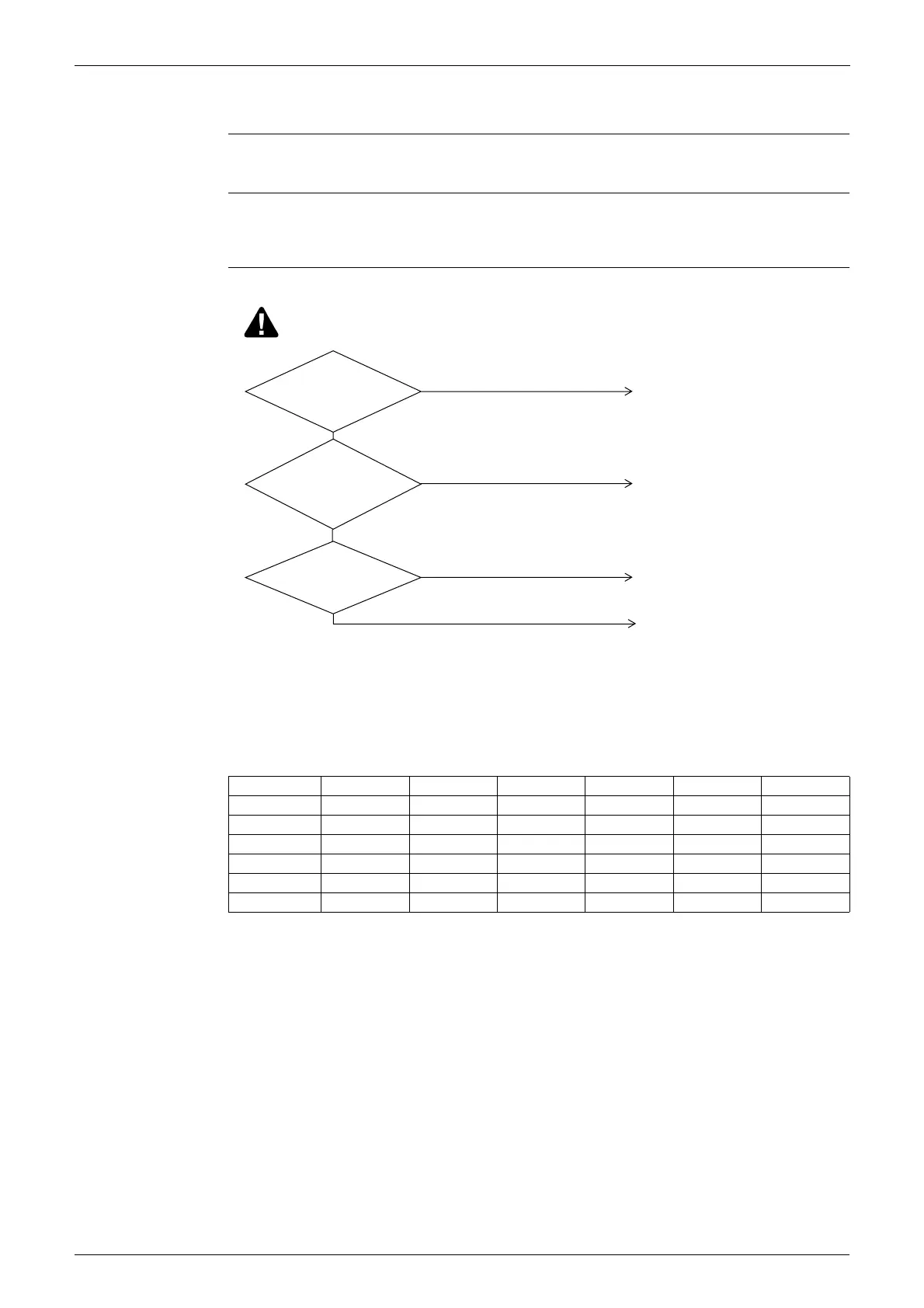
Electronic
expansion valve is
connected to X12A or X14A,
X15A of outdoor unit PC
board (A1P).
Normal
when coil check (∗1)
of the moving part of the
electronic expansion
valve is checked.
The connecting cable
is short-circuited or
disconnected.
Replace the connecting cable.
Replace outdoor unit PC board A1P.
NO
NO
NO
Replace the moving part of the
electronic expansion valve.
After connecting, turn the power off and
then back on again.
YES
YES
YES
Caution
Be sure to turn off power switch before connect or disconnect connector,
or parts damage may be occurred.
Pin No. 1. White 2. Yellow 3. Orange 4. Blue 5. Red 6. Brown
1. White ×
•
×
{
×
2. Yellow ×
•
×
{
3. Orange ×
{
×
4. Blue ×
{
5. Red ×
6. Brown





 To Next Page