Test Operation PACD011001C2
318 Test Operation Urban Multi “MX1R, ME1R Series” Using R-407C
1.16 Centralised Control Group No. Setting
CZ-01RT Type
„
If carrying out centralized control by central remote controller or unified ON/OFF controller, group No.
must be set for each group individually by remote controller.
„
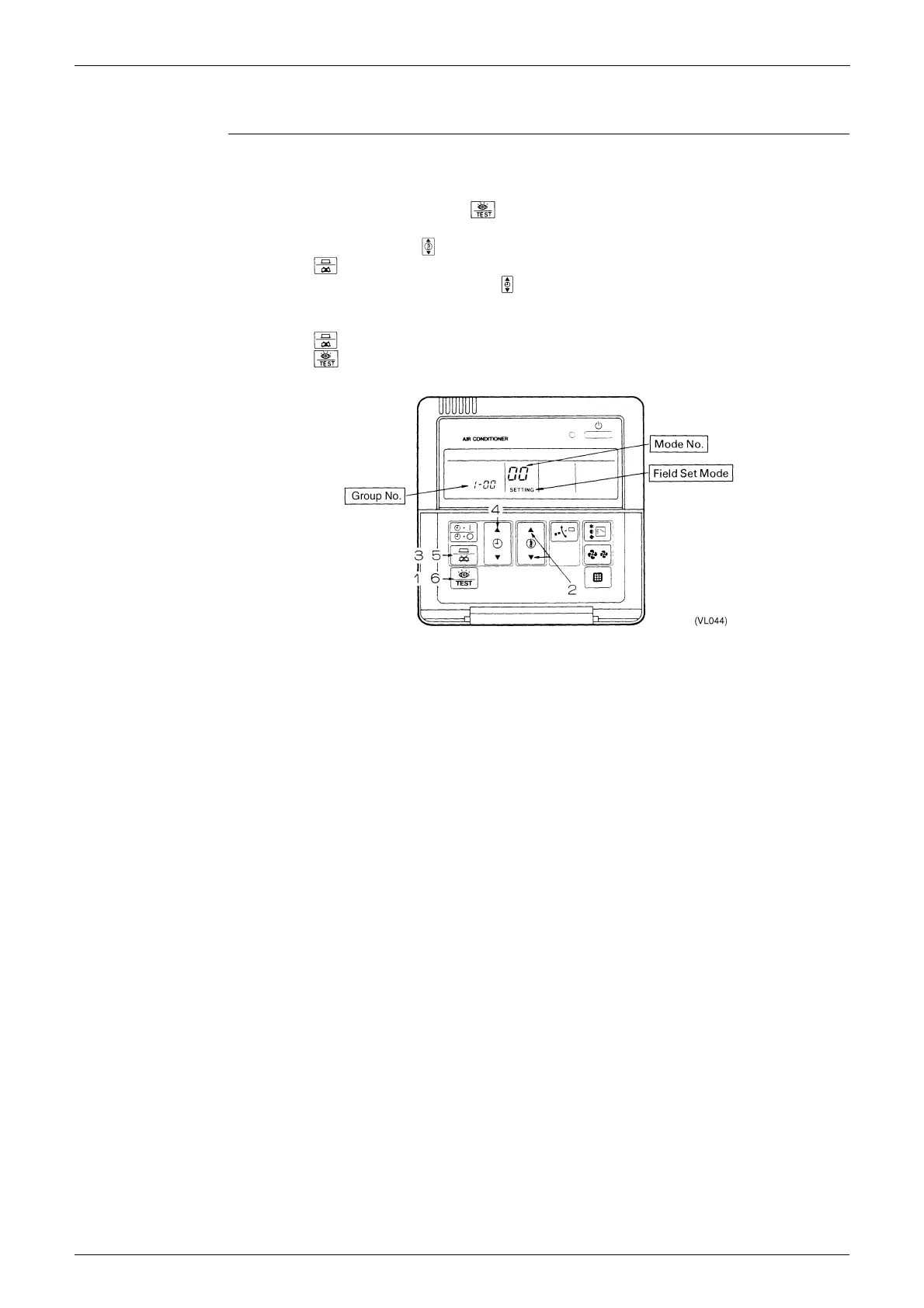
Group No. setting by remote controller for centralized control
1. When in the normal mode, push the button for 4 seconds or more, and operation then enters
the “field setting mode.”
2. Set mode No. “00” with the button.
∗
3. Push the button to inspect the group No. display.
4. Set the group No. for each group with the button (The group No. increases in the manner of 1-00,
1-01, ...,1-15, 2-00,...4-15. However, the unified ON/OFF controller displays only the group No. within
the range selected by the switch for setting each address.)
5. Push the button to define the selected group No.
6. Push the button to return to the normal mode.
„
Even if not using a remote controller, connect the remote controller when setting the group No., set the
group No. for centralized control, and disconnect after making the setting.
„
Set the group No. after turning on the power supply for the central remote controller, unified ON/OFF
controller, and indoor unit.





 To Next Page