Test Operation PACD011001C2
64 Test Operation Urban Multi “MX1, ME1 Series” Using R-22
1 Service monitor <HAP>
(Green)
Normal ................ Flicker
Malfunction ......... On or off
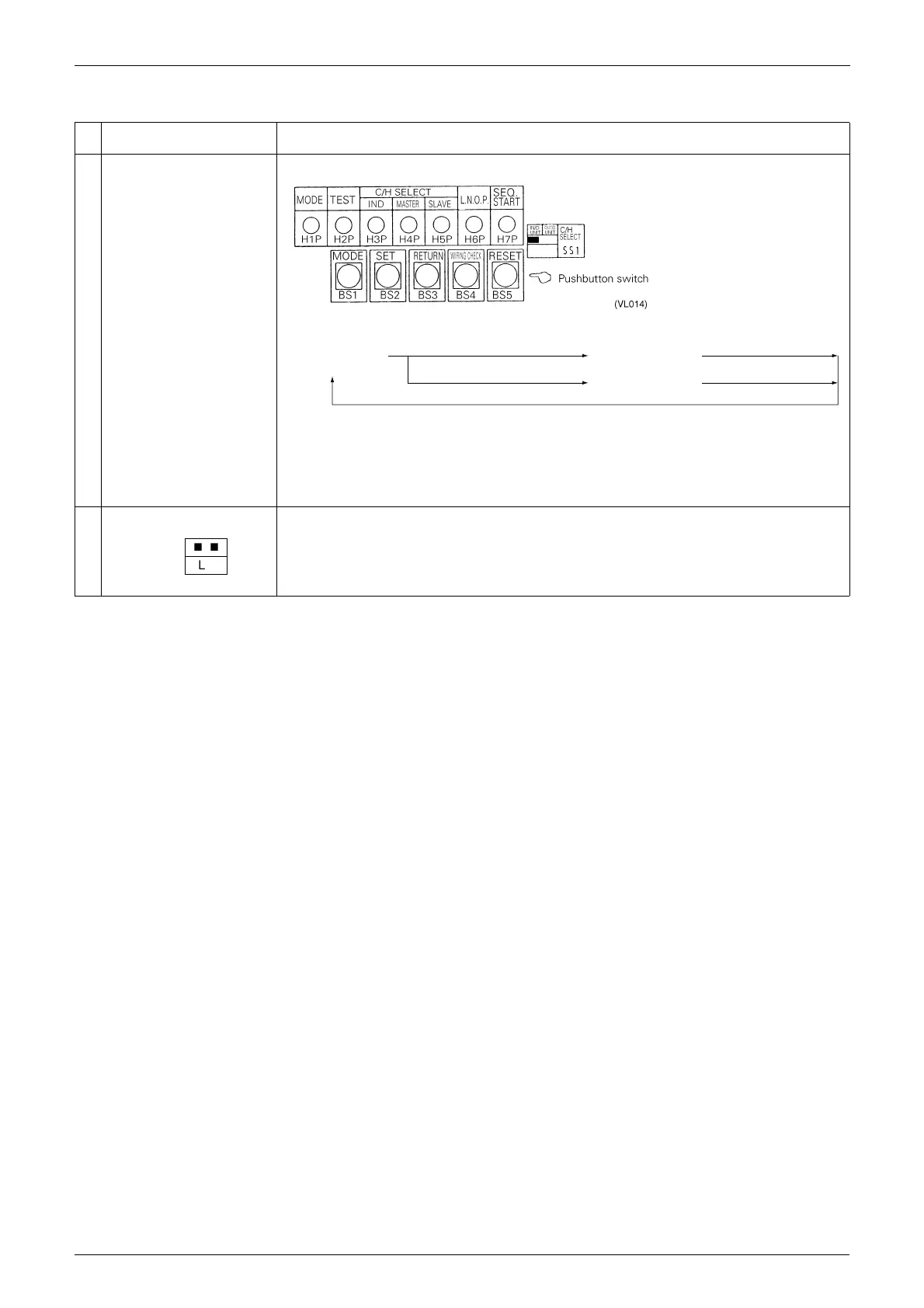
2 Function setting switch or LED
LED display
8
: On
9
: Flicker
7
: Off
Mode button ......... Mode change
•
Set return button .......... Changes or enters address or data.
•
Wiring check button .... Push and hold for 5 sec. to start wiring check.
•
Reset button ................. Push and hold for 5 sec. if the indoor unit’s PC board has been replaced, or
there has been a change in the combination of indoor and outdoor units, such as indoor unit extension,
etc.
3 Jumper pin Forced defrost operation by short circuit.
Setting mode 1
(H1P off)
Push 1 time.
Monitor mode
(H1P flickers)
Push 1 time.
Push and hold for 5 sec.
Setting mode 2
(H1P on)
Push 1 time.
(VF014)
n
n
BLUE
M
D
S
X26A
(VL015)





 To Next Page