222
2-15-6 Backup
In the menu of “OTHER”, the marking data stored in the laser marker can be saved as a backup le or a text le.
Backup
Executes the exporting the backup data of the laser marker to USB media.
The backup consists of the following data.
• Setting les, Common les (The current value of the counter function is not included in backup data.)
• Logo les
• Font les
• Environment settings (“Date and time” and “Console” settings are not included in backup data.)
1.
Insert the USB media into the USB port of the controller.
2.
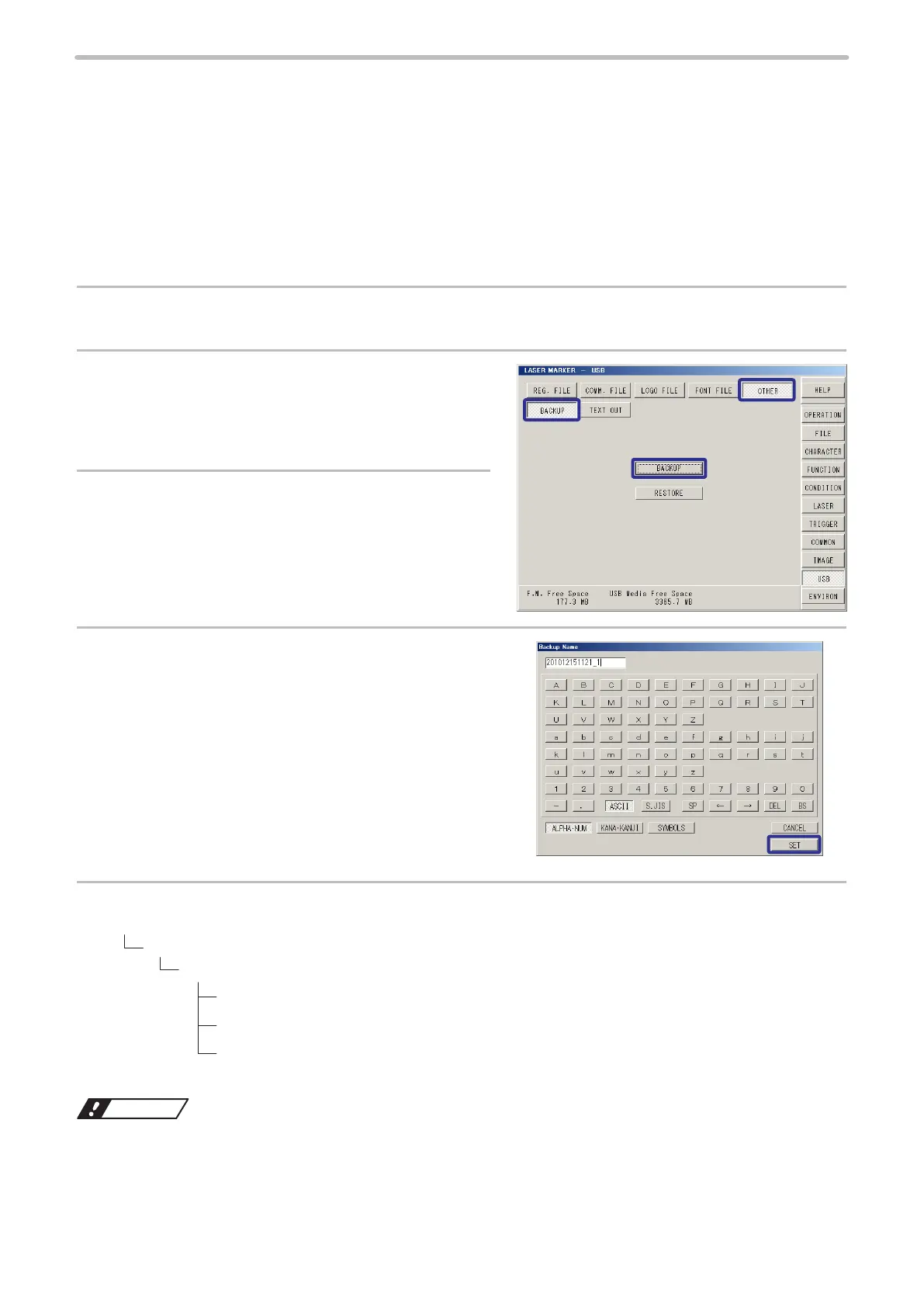
Press [OTHER] and select [BACKUP].
3.
Press [BACKUP].
4.
Input the le name and press [SET].
This le name is displayed when selecting the backup data for
restoring.
5.
The backup data is saved in the USB media with the following folder structure.
USB media
“SUNX_BACKUP” folder
Folder (can be renamed)
“BACKUP” folder
BACKUP.LOG
BKUP. INI
Notice
• Do not change the folder structure of the backup data. Changing or deleting data in the backup might be a cause of
the reading error.



 To Next Page