89
2-5 Maintenance & Service
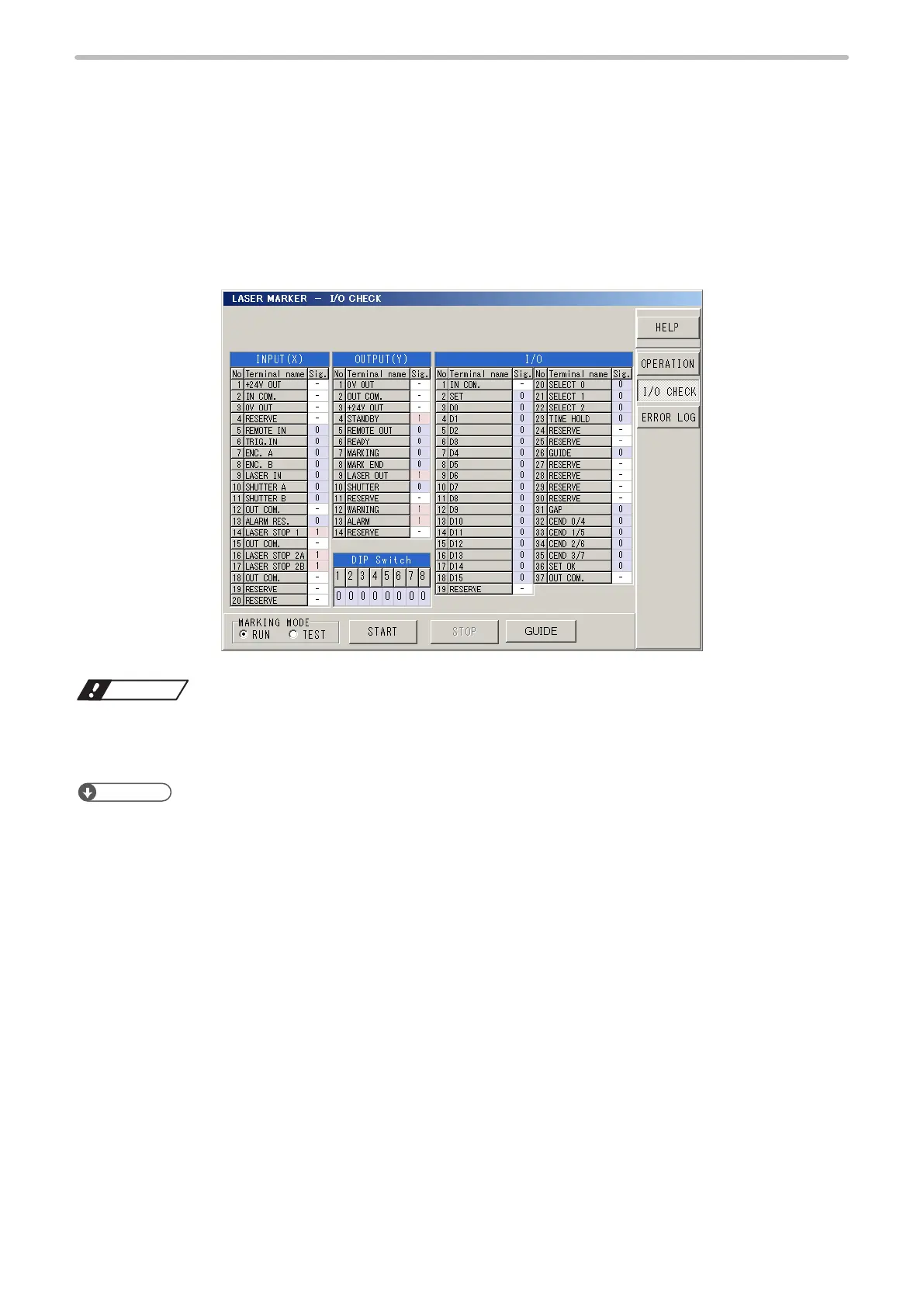
In the “SERVICE” screen, the following status of the laser marker are displayed.
• On/off status of I/O terminals
• Error log of the laser marker
2-5-1 I/O Check Monitor
The ON / OFF status of the I/O signals and DIP switch can be conrmed on this screen.
When the signal is ON status: “1” is displayed.
When the signal is OFF status: “0” is displayed.
Notice
• INPUT(X) No. 7 [ENC. A], No. 8 [ENC. B] are not usable for LP-SxxxW type. Do not connect externally.
• The signals represented by “RESERVE” are prepared for “system reserved”. Do not connect anything. (The status is
displayed with “-”.)
Reference
• The I/O monitor updates the I/O state every 20 ms. Note that the I/O monitor in remote status updates every 200 ms.
• For the name of each signal, refer to “Safety / Setup / Maintenance Guide”.
• When the setting value of the one-shot output time is short, it might not update on I/O check monitor. To check the
update status of the one-shot output on the I/O check monitor, set larger value to the one-shot output time.
Refer to “2-16-3 Communication, I/O Setting (Environment 3)” (P.232).



 To Next Page