99
2-7-4 Save to Different No.
Save currently displayed content to the different le No.
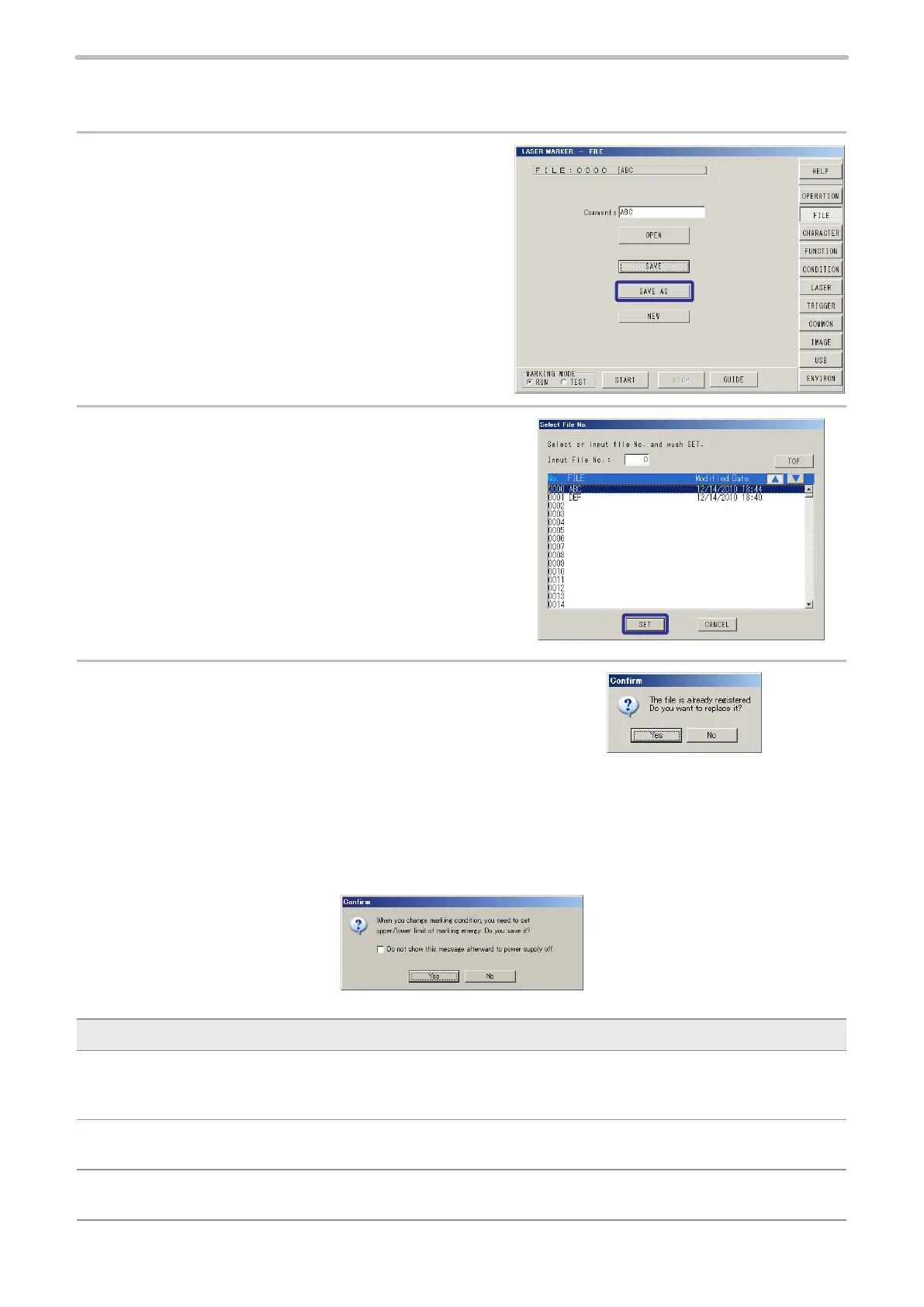
1.
When pressing [SAVE AS], the selecting window
for saving the le to different le No. is appeared.
2.
Specify the le No. to be saved using
qp
keys or
inputting le No., and press [SET].
3.
When the le is already saved to a different le No., the
conrm window is appeared.
Yes: Execute overwriting.
No: Overwriting is not executed. Screen returns to step 1.
When “Measuring marking energy” is enabled: (LP-M series and LP-Sxxx type only)
When “Measuring marking energy” is enabled (see “2-11-2 Marking Energy Measurement” (P.187)), the following message
appears after completion of step 3.
Description
Do not show this message afterward to power supply off.:
If you check on the box, the message that is displayed every overwriting does not appear until the power is turned off
and on again.
Yes:
Overwriting is executed.
No:
Overwriting is not executed. Screen returns to step 1.



 To Next Page