85
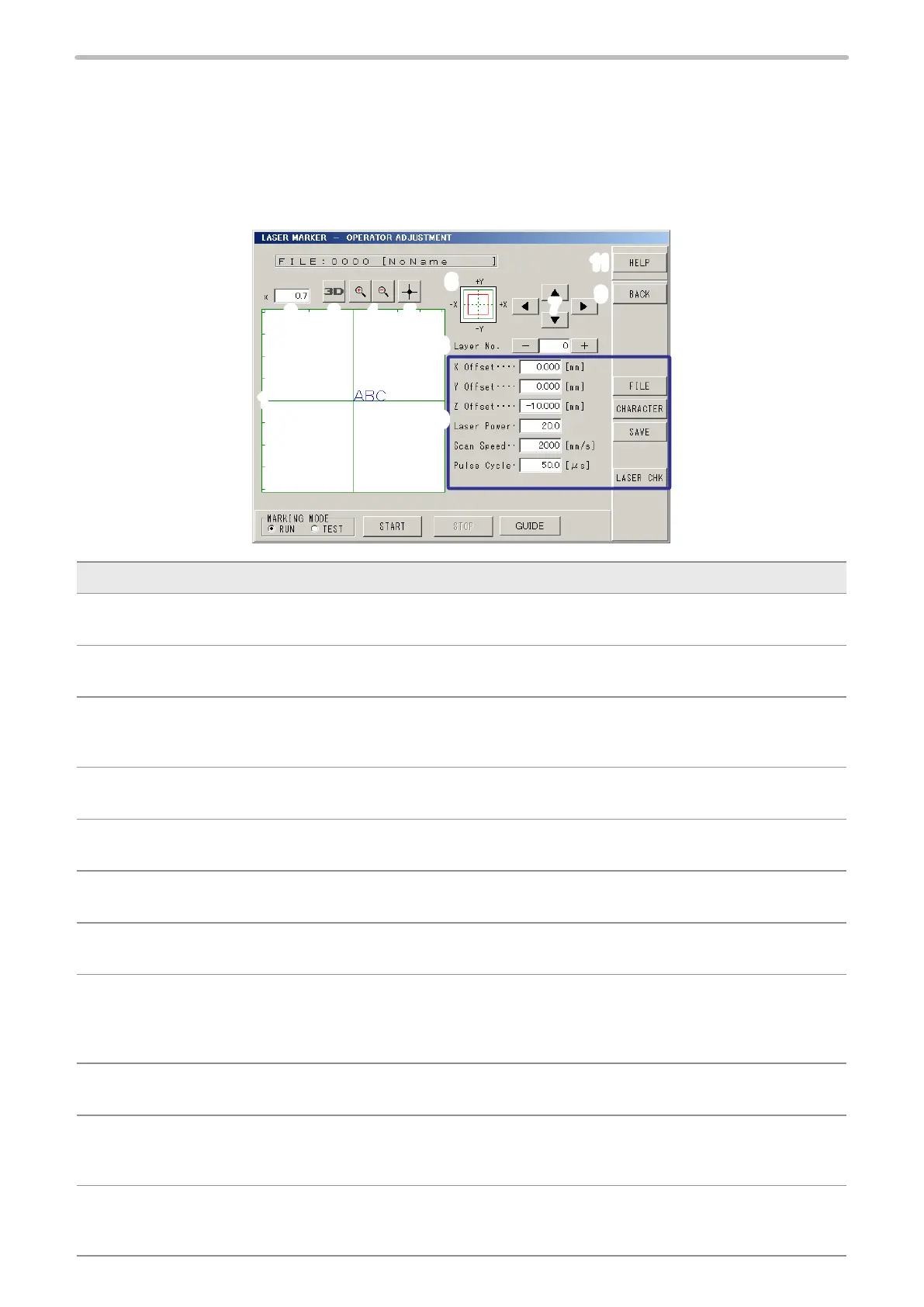
2-4 Operator Adjustment Screen
The operator adjustment screen is the screen that the operator can change or set only the permitted items.
Set the selecting item of the marking condition to be adjusted by operator following to the procedure described in “2-16-1
Display Setting (Environment 1)” (P.225).
2-4-1 Operator Adjusting Screen
1
11
8
3
2
4
6
5
7
9
10
Description
1 Image Display:
Image-displays the marking content set previously.
2 Magnication:
Sets the magnication ratio of the image display.
3 3D Display (LP-M / LP-Z series only) :
This button appears when the 3D marking mode is selected. By pressing this button, both the 3D gure and
marking content are displayed with 3D view screen. Refer to “2-14-3 3D View Screen” (P.213).
4 Image Display Zoom-in/Zoom-out :
Zooms in/out image display. The image can be zoomed in and out by 18 steps.
5 Center of Image Display:
Set the origin center to image display position.
6 Image Display Position:
Indicates where the current image is in the marking eld.
7 Shift Display Position:
Shifts image display position up and down, left and right. Pressing arrow shifts the image display position.
8 Layer No.:
The layer No. is displayed when the 3D marking mode is selected (only for LP-M and LP-Z series) and the marking
mode “Mark on Flying Object” is selected for the trigger setting.
Press [+] [-] for switching layer No., and then the image corresponding to layer No. is displayed.
9 BACK:
Returns to operation screen.
10 Changeable Items:
The items that are permitted in “2-16-1 Display Setting (Environment 1)” (P.225) are displayed.
For the setting items, refer to “2-4-2 Operator Adjustable Items” (P.86).
11 Help:
Applicable pages of the operation manual is displayed according to the screen. [Help] button is located in the
“Operator Adjustment Screen”, “Maintenance & Service Screen”, and “Setting Screen”.



 To Next Page