17
6.3. Entering into Doctor Mode
Here is the procedure to enter into doctor mode :
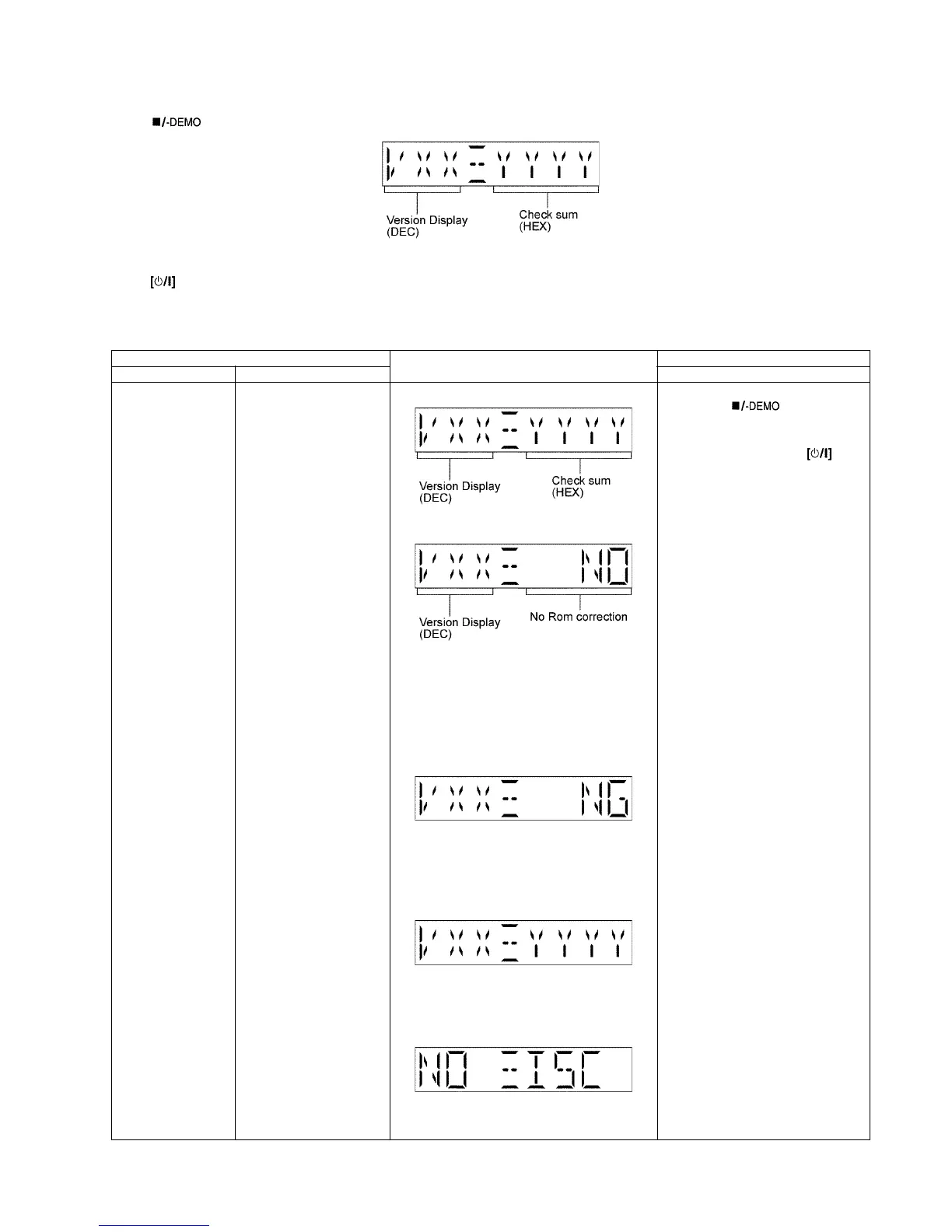
Press [ ] button on main unit follow by [4] and [7] on remote control. The FL shall display :-
To exit the Doctor mode
Press button on main unit or remote control.
6.3.1. Doctor Mode Table 1
Item FL Display Key Operation
Mode Name Description Front Key
Doctor Mode To enter into Doctor Mode
for checking of various
items and displaying
EEPROM and firmware ver-
sion.
Note: The micro-processor
version as shown is an
example. It will be revise
when there is an updates.
FL Display sequence Dis-
play 1 → 2
(Display 1)
Checksum : (Condition 1)
(a) If there is NO EEPROM header string
OR
(b) If there is no EEPROM ( no data is
received by micro-processor) [NO] is dis-
played.
Checksum : (Condition 2)
If the version of the EEPROM does not
match or not working properly [NG] is dis-
play.
Checksum : (Condition 3)
If the EEPROM version matches, checksum
[YYYY] is displayed.
(Display 2)
The Checksum of EEPROM and firmware
version will be display for 2 sec.
In CD mode:
1. Press [ ] button on main
unit follow by [4] and [7] on
remote control.
To exit Doctor Mode, press but-
ton on main unit or remote control.









 To Next Page