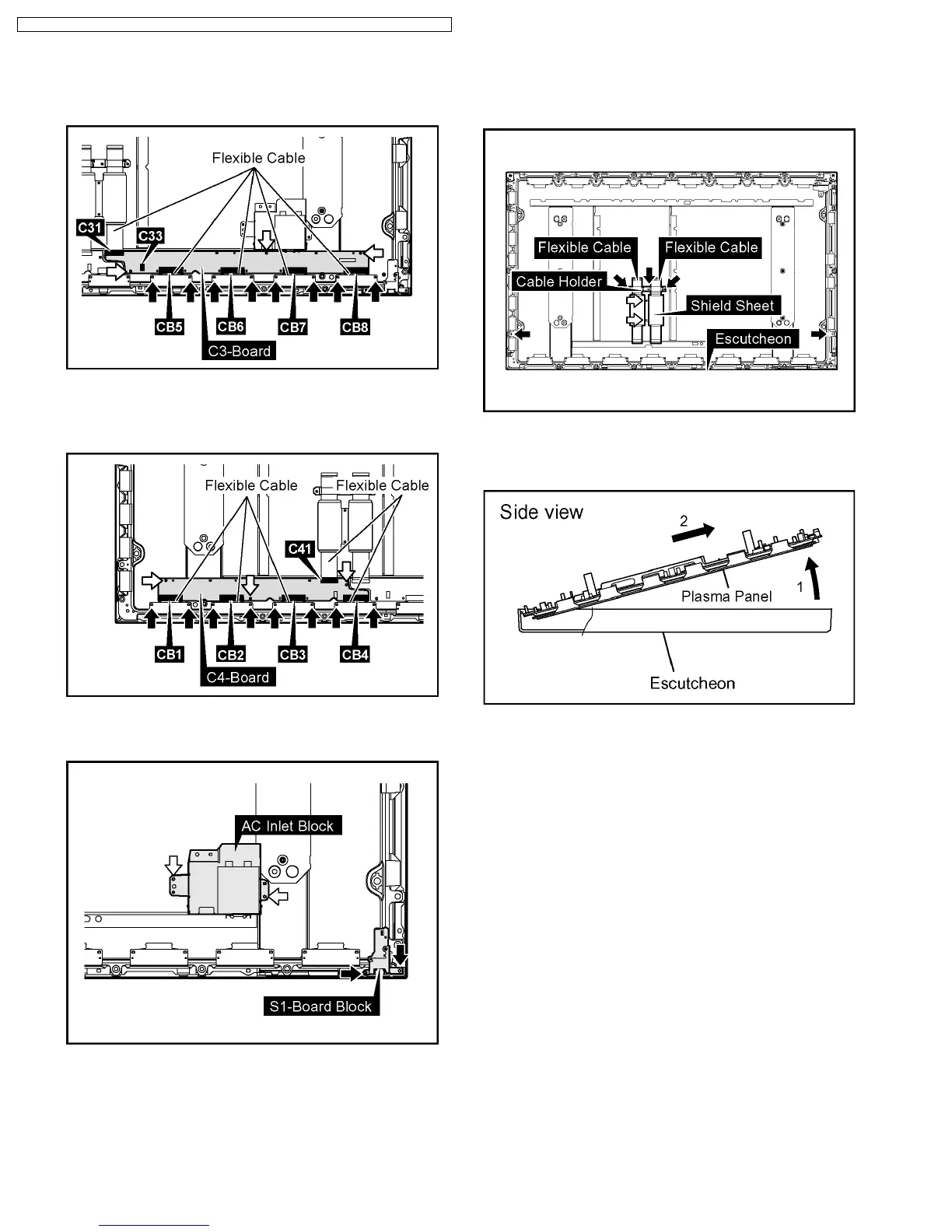
34. Disconnect the coupler(C33).
35. Remove the 8 screws and then remove the Flexible Cable
from the couplers(CB5, CB6, CB7, CB8, C31).
36. Remove the 3 screws and then remove the C3-Board.
37. Remove the 8 screws and then remove the Flexible Cable
from the couplers(CB1, CB2, CB3, CB4, C41).
38. Remove the 3 screws and then remove the C4-Board.
39. Remove the 2 screws and then remove the S1-Board Block.
40. Remove the 2 screws and then remove the AC Inlet Block.
41. Remove the 2 screws and then remove the Shield Sheet.
42. Pull out the Flexible Cable.
43. Remove the 3 screws and then remove the Cable Holder.
44. Remove the 2 screws of the Escutcheon.
45. Lift up the bottom of the Plasma Panel in the direction of the
arrow1 and pull the Plasma Panel in the direction of the
arrow2 and then remove the Plasma Panel.
32
TH-37PHD8GK / TH-37PHD8GS / TH-37PHD8UK / TH-42PHD8GK / TH-42PHD8GS / TH-42PHD8UK













 To Next Page