29
PHONE EXPERIENCE
Learning to Use the Pantech Easy
Experience
Learn how to use the functions and menus in Pantech Easy
Experience.
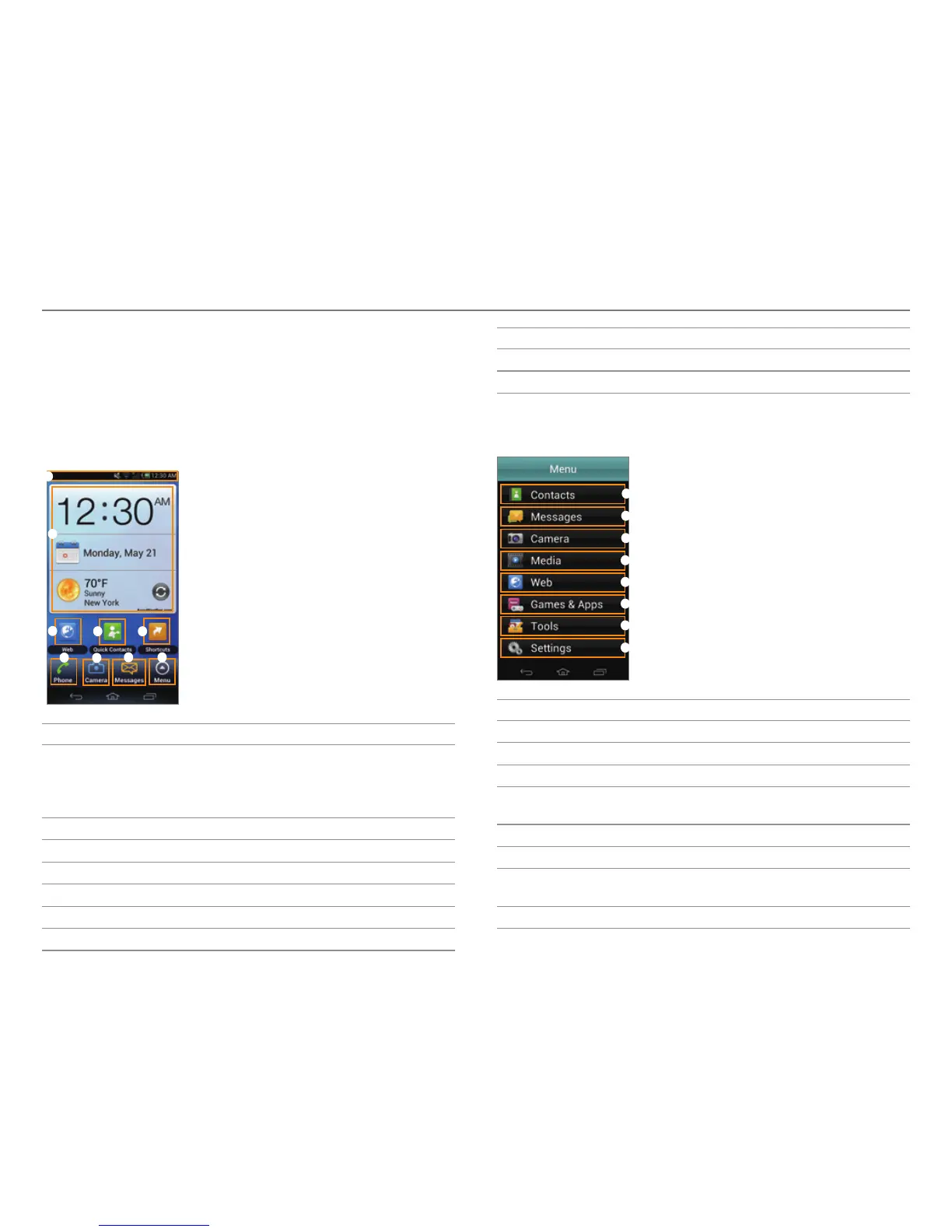
Layout of the Home Screen
3
2
1
4 5
6
7
8 9
No. Description
1
Drag the area at the top of the screen downward to
access Quick settings or view ba
ttery usage, current
time and date, your phone number, signal strength, or
ongoing events.
2
View the current time, date, and temperature.
3
Access the web.
4
Open Quick Contacts.
5
Open shortcuts for applications.
6
Make calls.
7
Take pictures and record videos.
No. Description
8
Send and receive messages.
9
Open menus.
Menu Items in Pantech Easy Experience
1
2
3
4
5
6
7
8
No. Description
1
View contacts.
2
Send and receive messages.
3
Take pictures and record videos.
4
Start Document Viewer, Gallery, Music Player, or Video
Play
er.
5
Access the web.
6
Play games or start applications.
7
Start Alarm/Clock, Calendar, Converter, Notepad,
Pill Reminder
, Tip Calculator, or Voice Recorder.
8
Access the settings. For details, refer to page 89



 To Next Page